Alacritty theming + possible bug

Hello!
I am running the Niri + Noctalia desktop environment.
So I spent the last couple of hours trying to figure out why noctalias color scheme templates were not affecting my Alacritty terminal colors.

I found 2 issues:

  • The CachyOS default Alacritty config file sets the colors and those override the noctalia theme colors.
    • After removing all the color settings including draw_bold_text_with_bright_colors = true the colors changed properly.
  • If draw_bold_text_with_bright_colors = true remains enabled the colors.bright and colors.dim are pulled from the CachyOS default color palette. Noctalia does not seem to generate the .bright or .dim variants of the colors automatically.

I am wondering if this is a bug on my end or the intended behavior of the software.
Also figured I’d kinda document this for future reference.

Thanks in advance!

From what I can see, if cachyos-alacritty-config is installed ahead of time, the [general] section is near the end and that’s where Noctalia should load their own toml. And that should override anything declared before then.

What does your ~/.config/alacritty/alacritty.toml` look like? If something went wrong when activating the color scheme for Alacritty, I’d imagine that there’s actually something conflicting between the two.

The ideal solution would be never installing cachyos-alacritty-config at all, but that decision would have to be made when you install the OS. The package hasn’t been touched for a couple years now.

Looking at the netinstall.yaml shows that nothing actually installs it by default anymore. If I’m reading this correctly, that is. Nor is it listed as a dependency for anything.

So for the purpose of future reference it seems to have already been taken care of.

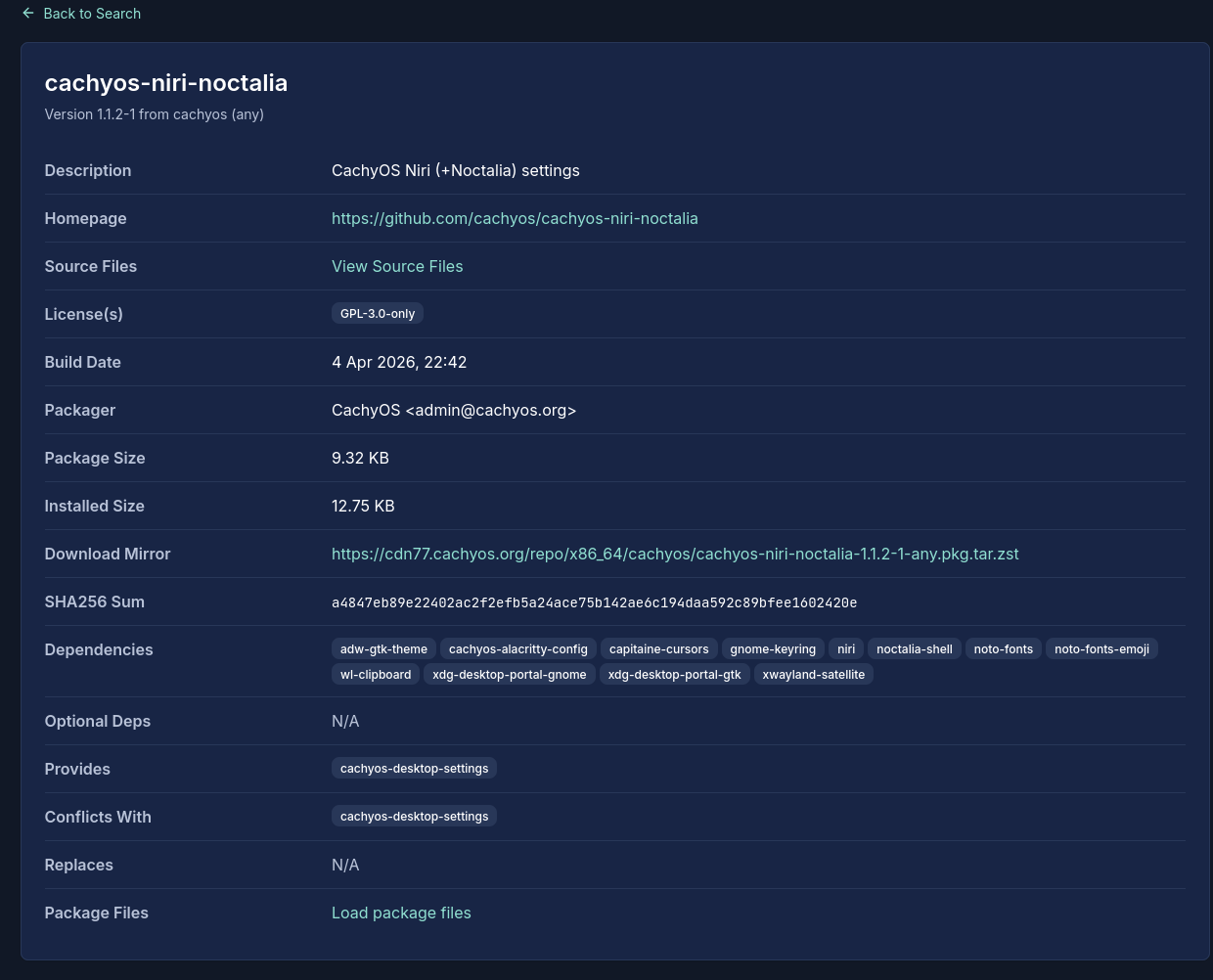
I don’t remember installing cachyos-alacritty-config so I checked in the CachyOS package repo and indeed its a dependency for cachyos-niri-noctalia:

Its probably intended behavior because the noctalia shell adds the import line to the alacritty.toml file when you enable the color scheme template.
Its just strange to me why it didn’t override the colors.

anyway here is my alacritty.toml file:

[env]
TERM = "xterm-256color"
WINIT_X11_SCALE_FACTOR = "1"

[window]
dynamic_padding = true
decorations = "full"
title = "Alacritty@CachyOS"
opacity = 0.8
decorations_theme_variant = "Dark"

[window.dimensions]
columns = 100
lines = 30

[window.class]
instance = "Alacritty"
general = "Alacritty"

[scrolling]
history = 10000
multiplier = 3

# [colors]
# draw_bold_text_with_bright_colors = true

# [colors.primary]
# background = "0x2E3440"
# foreground = "0xD8DEE9"
# 
# [colors.normal]
# black = "0x3B4252"
# red = "0xBF616A"
# green = "0xA3BE8C"
# yellow = "0xEBCB8B"
# blue = "0x81A1C1"
# magenta = "0xB48EAD"
# cyan = "0x88C0D0"
# white = "0xE5E9F0"
# 
# [colors.bright]
# black = "0x4C566A"
# red = "0xBF616A"
# green = "0xA3BE8C"
# yellow = "0xEBCB8B"
# blue = "0x81A1C1"
# magenta = "0xB48EAD"
# cyan = "0x8FBCBB"
# white = "0xECEFF4"

[font]
size = 12

[font.normal]
family = "monospace"
style = "Regular"

[font.bold]
family = "monospace"
style = "Bold"

[font.italic]
family = "monospace"
style = "Italic"

[font.bold_italic]
family = "monospace"
style = "Bold Italic"

[selection]
semantic_escape_chars = ",│`|:\"' ()[]{}<>\t"
save_to_clipboard = true

[cursor]
style = "Underline"
vi_mode_style = "None"
unfocused_hollow = true
thickness = 0.15

[mouse]
hide_when_typing = true

[[mouse.bindings]]
mouse = "Middle"
action = "PasteSelection"

[keyboard]
[[keyboard.bindings]]
key = "Paste"
action = "Paste"

[[keyboard.bindings]]
key = "Copy"
action = "Copy"

[[keyboard.bindings]]
key = "L"
mods = "Control"
action = "ClearLogNotice"

[[keyboard.bindings]]
key = "L"
mods = "Control"
mode = "~Vi"
chars = "\f"

[[keyboard.bindings]]
key = "PageUp"
mods = "Shift"
mode = "~Alt"
action = "ScrollPageUp"

[[keyboard.bindings]]
key = "PageDown"
mods = "Shift"
mode = "~Alt"
action = "ScrollPageDown"

[[keyboard.bindings]]
key = "Home"
mods = "Shift"
mode = "~Alt"
action = "ScrollToTop"

[[keyboard.bindings]]
key = "End"
mods = "Shift"
mode = "~Alt"
action = "ScrollToBottom"

[[keyboard.bindings]]
key = "V"
mods = "Control|Shift"
action = "Paste"

[[keyboard.bindings]]
key = "C"
mods = "Control|Shift"
action = "Copy"

[[keyboard.bindings]]
key = "F"
mods = "Control|Shift"
action = "SearchForward"

[[keyboard.bindings]]
key = "B"
mods = "Control|Shift"
action = "SearchBackward"

[[keyboard.bindings]]
key = "C"
mods = "Control|Shift"
mode = "Vi"
action = "ClearSelection"

[[keyboard.bindings]]
key = "Key0"
mods = "Control"
action = "ResetFontSize"

[general]
import = ["~/.config/alacritty/themes/noctalia.toml"]
live_config_reload = true
working_directory = "None"

And here is my current noctalia.toml file:

[colors.primary]
background = '#10182e'
foreground = '#f2f2f3'
 
[colors.cursor]
text = '#f2f2f3'
cursor = '#afb1b6' 
 
[colors.vi_mode_cursor]
text = '#10182e'
cursor = '#6788e4' 
 
[colors.search.matches]
foreground = '#151f3d' 
background = '#b166cc' 
 
[colors.search.focused_match]
foreground = '#151f3d' 
background = '#6788e4' 
 
[colors.footer_bar]
foreground = '#151f3d' 
background = '#e3e5e8' 
 
[colors.hints.start]
foreground = '#151f3d' 
background = '#7c5cd6' 
 
[colors.hints.end]
foreground = '#151f3d' 
background = '#7c5cd6' 
 
[colors.selection]
text = '#10182e'
background = '#6788e4'
 
 
[colors.normal]
black = '#181818' 
red = '#fd4663' 
green = '#6788e4' 
yellow = '#334e99' 
blue = '#6788e4' 
magenta = '#b166cc' 
cyan = '#7c5cd6' 
white = '#BAC2DE' 
 
 
[colors.bright]
black = '#585B70' 
red = '#F38BA8' 
green = '#A6E3A1' 
yellow = '#F9E2AF' 
blue = '#89B4FA' 
magenta = '#F5C2E7' 
cyan = '#94E2D5' 
white = '#A6ADC8' 
 
 
[colors.dim]
black = '#45475A' 
red = '#F38BA8' 
green = '#A6E3A1' 
yellow = '#F9E2AF' 
blue = '#89B4FA' 
magenta = '#F5C2E7' 
cyan = '#94E2D5' 
white = '#BAC2DE' 

Interesting, I clearly missed that.

I manually install Noctalia into my Hyprland installation, so I bypass cachyos-alacritty-config being installed.

My initial and very simple alacritty.toml:

 [window]
opacity = 0.9
blur = true

[font]
normal = {family = "Noto Sans Mono", style = "Regular"}
size = 11
offset = {y = -2}

When you toggle on the Noctalia color scheme integration, it adds its own theme file and this section to the beginning of the file:

[general]
import = [
    "~/.config/alacritty/themes/noctalia.toml"
]

So I’d continue to believe that CachyOS’s Alacritty config file is unnecessary, at least for a Niri installation where Alacritty’s color theme is configured by Noctalia.

@Lysec Can you shed some light on this? It’s entirely possible I’m missing something as to why cachyos-niri-noctalia depends on the config.

I investigated this a bit, noctalia itself sets the .bright and .dim colors as constants in their alacritty template file when generating colors schemes from wallpapers:

This combined with the default config file from cachyOS using the draw_bold_text_with_bright_colors property to make the theming look like it doesn’t work properly even when the colors were properly removed.

I played around with the config and found that if I move the alacritty.toml colors to a separate file and import it alongside noctalia.toml then the file imported last applies. Which is the expected behavior:

# This order loads the 'cachyos_colors' file
import = ["~/.config/alacritty/themes/noctalia.toml", "~/.config/alacritty/themes/cachyos_colors.toml"]
# This order loads the 'noctalia' file
import = ["~/.config/alacritty/themes/cachyos_colors.toml", "~/.config/alacritty/themes/noctalia.toml"]

So I’m gonna assume that the “import” is applied first then the rest of the config file follows which would explain this behavior.

Anyway, given that this is a minor issue I fixed it by creating a noctalia user template for alacritty to use instead of the default and modified the bright colors from constants to this:
[colors.bright]
black = '#585B70' 
red = '{{colors.error.default.hex | saturate 20 | lighten 10}}' 
green = '{{colors.primary.default.hex | saturate 20 | lighten 10}}' 
yellow = '{{colors.inverse_primary.default.hex | saturate 20 | lighten 10}}' 
blue = '{{colors.primary.default.hex | saturate 20 | lighten 10}}' 
magenta = '{{colors.tertiary.default.hex | saturate 20 | lighten 10}}' 
cyan = '{{colors.secondary.default.hex | saturate 20 | lighten 10}}' 
white = '#A6ADC8' 

I just copied the normal colors variables and added some saturation and brightened it a touch. This does the job well enough for me.

I did notice that blue and green are the same color in the template and i just find that a little amusing lul.