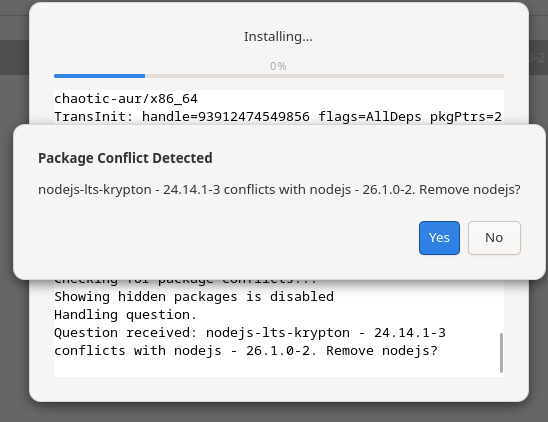
Good morning: I have a question. It says I can update the Heroic Launcher, but for some reason it’s an AUR package. I only remember installing the Cachy gaming metapack. The problem is that I’m getting a package conflict message, and I don’t know whether to accept the update and delete the package or not. I’m hoping you can help.
What package is actually installed?
pacman -Qs heroic
There are multiple heroic packages and only one is in the repos.
You also have chaotic-aur enabled which means the AUR is largely going to be treated as just as official as cachy/arch repositories - so a replacement with something foreign might happen all the easier.
PS.
Normally we must accept replacement prompts. During a regular upgrade they should almost always be confirmed. But as we do not know if the system status is good I am hesitant to simply give this answer without first reporting the packages involved.
This is what came out
local/heroic-games-launcher 2.21.0-2
Native GOG, Epic Games and Amazon games launcher for Linux
That would be a foreign example.
In the repositories is only heroic-games-launcher-bin.
You may replace your current package with it if you wish;
sudo pacman -Syu heroic-games-launcher-bin
Which will also perform the sync/refresh/upgrade at the same time.
PS.
If you did not consciously choose this foreign package in the first place it may have been the result of your use of the chaotic-aur. Any foreign packages provided by chaotic will appear as if they are officially supported repository packages. Meaning they might replace true official packages without much warning - some aur package may be seen as an ‘upgrade’ and hence replace the real official package, etc.
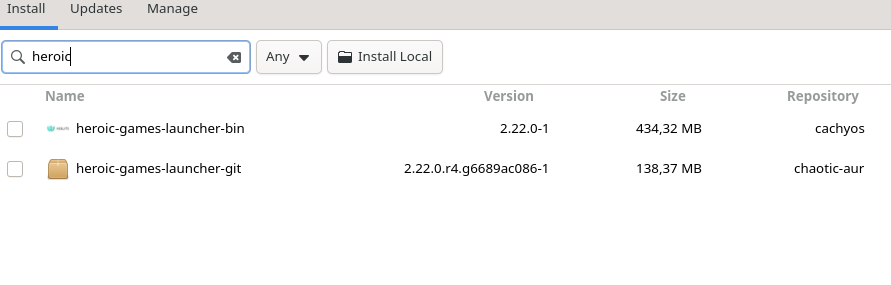
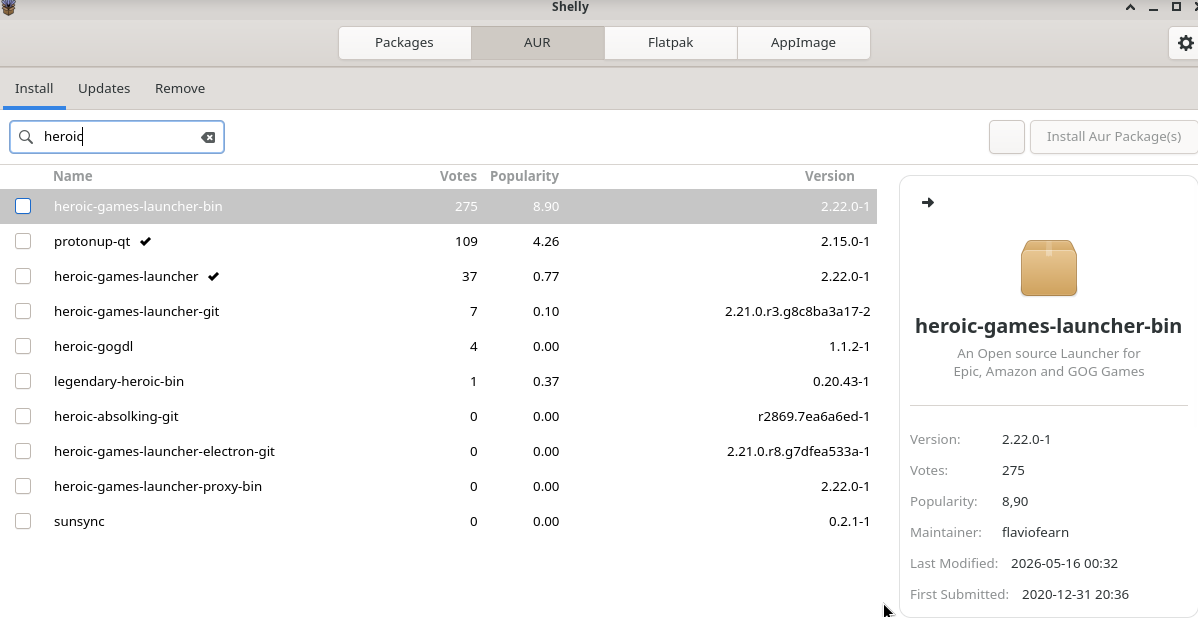
And I have mentioned that you have enabled the Chaotic AUR which turns huge portions of the AUR into just another official repository as far as the package manager is concerned.
You certainly did enable that.
The cachy ‘packageinstaller’ ?
Again as mentioned above. There is one package available in the repositories.
You do not have that installed.
You do have some other foreign one installed.
That is heroic-games-launcher is installed but is not from the repositories.
heroic-games-launcher-bin is in the repos but is not installed.
I also suggested how to reverse this situation.
I suggested the replacement above if desired.
What might actually stop you from having this same kind of problem in the future would be disabling the chaotic-aur.
Thanks for the quick reply, that solves it. The issue is that Chaotic has packages I use, like Microsoft Edge, which isn’t natively supported by Cachy, so I’ll keep this in mind for future instances of package conflicts.
The Arch User Repository has software you need.
Chaotic simply pre-compiles some of those packages and then gets configured as if it is an official repo.
You could very well be installing edge from the AUR without Chaotic.
And with -bin packages you would not even need to compile it yourself either;
paru -S microsoft-edge-stable-bin
But of course it is up to you.

Optional dependencies are by their definition optional.
And chaotic is supposed to just be compiling the AUR package .. so it should not actually have any difference in deps at all.
PS
Kinda silly for chaotic to be serving -bin packages at all as those are binaries - already compiled. 
Okay, if I disable the Chaotic-aur repo, will what was already installed with it update automatically? Or do I have to reinstall?
Nothing will happen to the installed packages at all.
They will be updated from the AUR if/when using an aur-helper so long as they continue to exist in the AUR.
Some aur-helpers use a sort of index so you might want to do something like ‘reinstall foreign packages’… but this is mostly only really useful for -git type packages.
If desired you could do it like, ex;
paru -S $(pacman -Qmq)
( Note - Of course these ‘Qm’ packages wont actually be printed as foreign until chaotic is disabled. )
Thanks for the clarification. I’m going to disable Chaotic, reinstall Edge, and I’ll let you know if there are any conflicts. I liked Chaotic because it has some packages that aren’t in the AUR, but now that I see it can occasionally break the system, I need to reconsider. Regards.
I have the package in the same situation, but I don’t have chaotic-aur enabled, nor have I installed any package from the AUR at any time.
The heroic-games-launcher package was installed via the cachyos-gaming-applications metapackage from the CachyOS repository.
❯ pacman -Si cachyos-gaming-applications
Repositorio :cachyos
Nombre :cachyos-gaming-applications
Versión :1.0.0-2
Descripción :Common Applications used for Gaming
Arquitectura :any
URL :Nada
Licencias :Nada
Grupos :Nada
Provee :Nada
Depende de :cachyos-gaming-meta gamescope goverlay heroic-games-launcher lib32-mangohud
lutris mangohud steam wqy-zenhei
Dependencias opcionales :Nada
En conflicto con :Nada
Remplaza a :Nada
Tamaño de la descarga :5,95 KiB
Tamaño de la instalación :0,00 KiB
Encargado :CachyOS <``admin@cachyos.org``>
Fecha de creación :mar 28 oct 2025 08:08:19
Validado por : Suma SHA-256 Firma
❯ pacman -Si heroic-games-launcher-bin
Repositorio :cachyos
Nombre :heroic-games-launcher-bin
Versión :2.22.0-1
Descripción :An Open source Launcher for Epic, Amazon and GOG Games
Arquitectura :x86_64
URL :``https://heroicgameslauncher.com/``
Licencias :GPL-3.0-only
Grupos :Nada
Provee :heroic-games-launcher
Depende de :which gtk3
Dependencias opcionales :Nada
En conflicto con :heroic-games-launcher
Remplaza a :Nada
Tamaño de la descarga :129,40 MiB
Tamaño de la instalación :434,32 MiB
Encargado :CachyOS <``admin@cachyos.org``>
Fecha de creación :sáb 16 may 2026 20:46:43
Validado por : Suma SHA-256 Firma
Today, cachy-update notified me that there was an update for heroic-games-launcher, but it tried to update it from the AUR and showed the same conflict with nodejs. I resolved it by forcing arch-update / cachy-update not to use the AUR. I created the file ~/.config/arch-update/arch-update.conf with the content NoAUR.
Good morning: Thank you for your input. As I said, it seemed strange to me that the AUR version was being installed and not the Chaotic-aur or Cachy versions. Evidently, there is a problem with the meta package and it’s redirecting you to that one. I’ve noticed, for example, that it installed the ProtonQt AUR version.
Another user with the same situation @cscs
Same issue here.
The cachyos-gaming-applications meta package requires heroic-games-launcher which heroic-games-launcher-bin provides.
Cachy-update had an update about a week ago but I think it was just an added translation.
Yes, that’s right, but somehow the AUR version that breaks the nodejs package is installed without consent.
I’m just compiling what has already been noted in the thread.
This is an issue with the cachyos-gaming-applications meta package.
It lists heroic-games-launcher as a dependency, which used to be correct, but that specific package has since been removed from the cachyos repository.
However, heroic-games-launcher-bin does exist in the repository and can take its place. This is what the “Provides” field in the pacman -Si heroic-games-launcher-bin output means. Because these two packages conflict with each other, installing the -bin package will replace the other and your system should be good to go.
sudo pacman -Syu heroic-games-launcher-bin
This is something that I recall being brought up back in April:
There are two different points of emphasis here:
- The
cachyos-gaming-applicationsmeta package has the wrong dependency listed. This becomes an issue if you try to installor update this native repo meta package with an AUR helper since it will offer to fulfill the dependency with an AUR package. As a side note, this is a reason I dislike the usage of AUR helpers to performpacmanfunctions even if they have the capability to do so.heroic-games-launchercannot be installed bypacmanbecause it is an AUR package. - This is a great case against the continued use of meta packages once you understand the basics of operating your
pacmanbased system. While I like the fact that a complete newcomer is able to get off the ground without much initial fuss due to them, the fact is that meta packages add a point of failure into your system due to being nothing more than adding a branch to your dependency tree. In this case, what makes the system easier to use for a beginner makes it harder to maintain later on.
This shows us what is in the rpoes .. not what you have installed (use Qi for that).
heroic-games-launcher only exists in the AUR .. it could not be coming from somewhere else.
heroic-games-launcher-bin is in the repos and can fulfill the same depends .. so using a normal package manager should gave you the bin variant whether during install of heroic-games-launcher or if upgrading.
If you use an AUR-helper on the other hand the AUR is enabled and you very well could be getting and upgrading heroic-games-launcher from the AUR.
This has been covered elsewhere for people who do not use the AUR.
Same for NoFlatpak.
As these are also points of failure for the update notifier thing, ex;
In case any user simply needs a one-liner to ensure they have the repo package then here is such;
sudo pacman -Syu heroic-games-launcher-bin