Yes, select Y to uninstall older version.
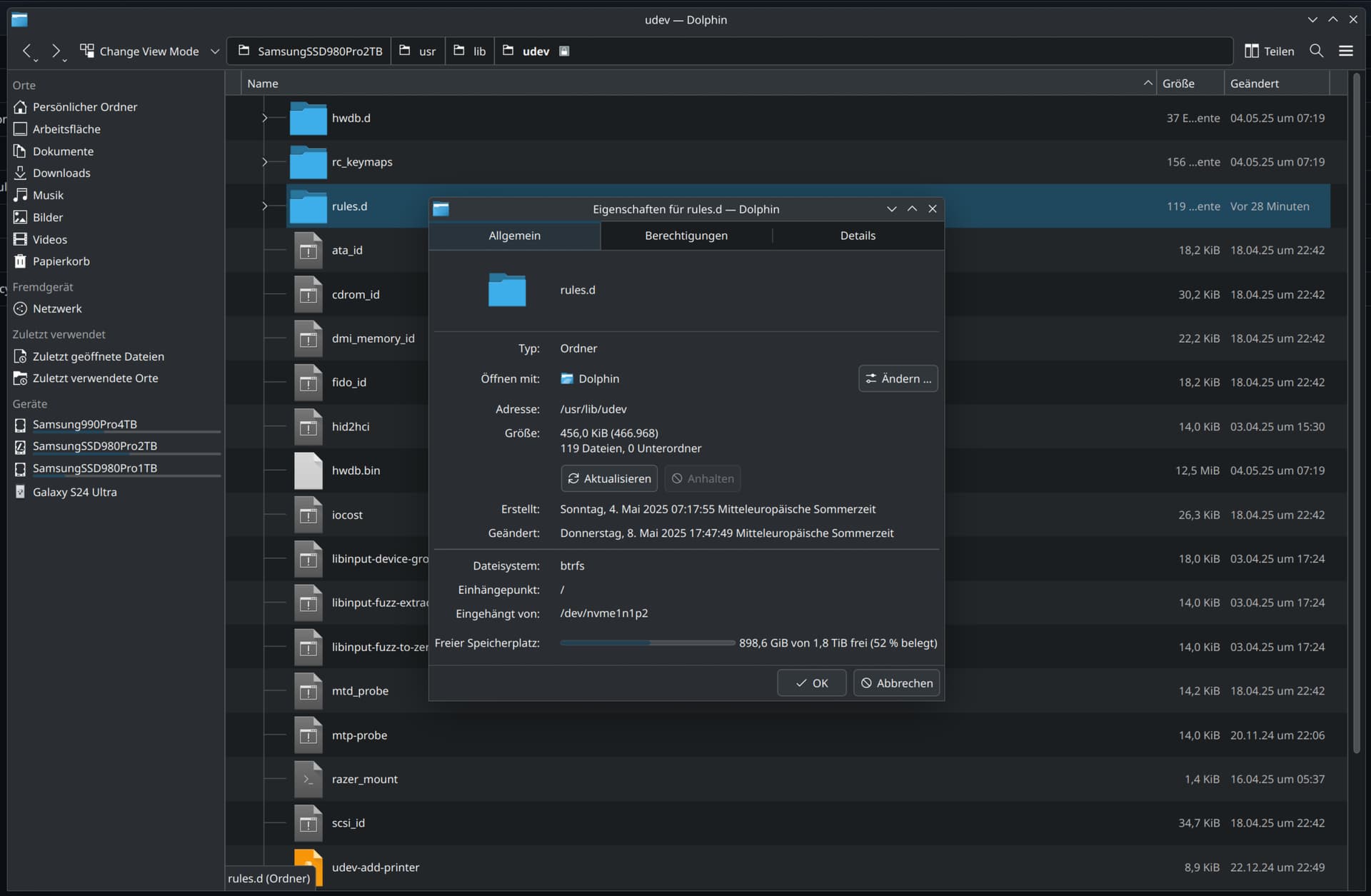
Use Dolphin and right click on the file and select properties.
Yes, select Y to uninstall older version.
Use Dolphin and right click on the file and select properties.
Ok, I installed that version. But nothing changed. No Razer controller found. And Same i2c errors.
I guess this is the answer which I am searching for.
https://gitlab.com/CalcProgrammer1/OpenRGB/-/blob/master/Documentation/SMBusAccess.md
Linux
- Install the
i2c-toolspackage.- Load the i2c-dev module:
sudo modprobe i2c-dev- Load the i2c driver for your chipset:
Intel
sudo modprobe i2c-i801sudo modprobe i2c-nct6775- Secondary controller for motherboard LEDs (requires kernel patch)AMD
sudo modprobe i2c-piix4If you want the i2c modules to load automatically at boot, run the following:
sudo touch /etc/modules-load.d/i2c.confsudo sh -c 'echo "i2c-dev" >> /etc/modules-load.d/i2c.conf'- Run the following based on which i2c drivers you loaded in the previous section:
sudo sh -c 'echo "i2c-i801" >> /etc/modules-load.d/i2c.conf'sudo sh -c 'echo "i2c-piix4" >> /etc/modules-load.d/i2c.conf'You will have to enable user access to the i2c devices if you don’t run OpenRGB as root.
- List all SMBus controllers:
sudo i2cdetect -l- Note the number(s) for piix4 or i801 controllers.
- Give user access to those controllers. If you have not installed OpenRGB from a distribution package then most likely you need to install the udev rules manually.
Those last points:
- List all SMBus controllers:
sudo i2cdetect -l- Note the number(s) for piix4 or i801 controllers.
- Give user access to those controllers. If you have not installed OpenRGB from a distribution package then most likely you need to install the udev rules manually.
sudo i2cdetect -l
[sudo] Passwort für sascha:
i2c-0   i2c             Synopsys DesignWare I2C adapter         I2C adapter
i2c-1   i2c             Synopsys DesignWare I2C adapter         I2C adapter
i2c-2   i2c             AMDGPU SMU 0                            I2C adapter
i2c-3   i2c             AMDGPU SMU 1                            I2C adapter
i2c-4   i2c             AMDGPU DM i2c hw bus 0                  I2C adapter
i2c-5   i2c             AMDGPU DM i2c hw bus 1                  I2C adapter
i2c-6   i2c             AMDGPU DM i2c hw bus 2                  I2C adapter
i2c-7   i2c             AMDGPU DM i2c hw bus 3                  I2C adapter
i2c-8   i2c             AMDGPU DM i2c OEM bus                   I2C adapter
i2c-9   i2c             AMDGPU DM aux hw bus 0                  I2C adapter
i2c-10  i2c             AMDGPU DM aux hw bus 1                  I2C adapter
i2c-11  i2c             AMDGPU DM i2c hw bus 0                  I2C adapter
i2c-12  i2c             AMDGPU DM i2c hw bus 1                  I2C adapter
i2c-13  i2c             AMDGPU DM i2c hw bus 2                  I2C adapter
i2c-14  i2c             AMDGPU DM i2c hw bus 3                  I2C adapter
i2c-15  i2c             AMDGPU DM aux hw bus 1                  I2C adapter
i2c-16  i2c             AMDGPU DM aux hw bus 2                  I2C adapter
i2c-17  i2c             AMDGPU DM aux hw bus 3                  I2C adapter
i2c-18  smbus           SMBus PIIX4 adapter port 0 at 0b00      SMBus adapter
i2c-19  smbus           SMBus PIIX4 adapter port 2 at 0b00      SMBus adapter
i2c-20  smbus           SMBus PIIX4 adapter port 1 at 0b20      SMBus adapter
- Give user access to those controllers. If you have not installed OpenRGB from a distribution package then most likely you need to install the udev rules manually.
But how do I do that? How can I give user access? I do not undersatnd this.
PS: Is this the filesize which you asked for?
The AI says to do this to give read and write access to the user:
Set appropriate permissions for the
/dev/i2c-*devices:
sudo chmod g+rw /dev/i2c-1(again, replace/dev/i2c-1as needed)- This grants read and write permissions to users within the
i2cgroup
sudo i2cdetect -l
i2c-0   i2c             Synopsys DesignWare I2C adapter         I2C adapter
i2c-1   i2c             Synopsys DesignWare I2C adapter         I2C adapter
i2c-2   i2c             AMDGPU SMU 0                            I2C adapter
i2c-3   i2c             AMDGPU SMU 1                            I2C adapter
i2c-4   i2c             AMDGPU DM i2c hw bus 0                  I2C adapter
i2c-5   i2c             AMDGPU DM i2c hw bus 1                  I2C adapter
i2c-6   i2c             AMDGPU DM i2c hw bus 2                  I2C adapter
i2c-7   i2c             AMDGPU DM i2c hw bus 3                  I2C adapter
i2c-8   i2c             AMDGPU DM i2c OEM bus                   I2C adapter
i2c-9   i2c             AMDGPU DM aux hw bus 0                  I2C adapter
i2c-10  i2c             AMDGPU DM aux hw bus 1                  I2C adapter
i2c-11  i2c             AMDGPU DM i2c hw bus 0                  I2C adapter
i2c-12  i2c             AMDGPU DM i2c hw bus 1                  I2C adapter
i2c-13  i2c             AMDGPU DM i2c hw bus 2                  I2C adapter
i2c-14  i2c             AMDGPU DM i2c hw bus 3                  I2C adapter
i2c-15  i2c             AMDGPU DM aux hw bus 1                  I2C adapter
i2c-16  i2c             AMDGPU DM aux hw bus 2                  I2C adapter
i2c-17  i2c             AMDGPU DM aux hw bus 3                  I2C adapter
i2c-18  smbus           SMBus PIIX4 adapter port 0 at 0b00      SMBus adapter
i2c-19  smbus           SMBus PIIX4 adapter port 2 at 0b00      SMBus adapter
i2c-20  smbus           SMBus PIIX4 adapter port 1 at 0b20      SMBus adapter
sudo chmod g+rw /dev/i2c-18
[sudo] Passwort für sascha:

~ 10s
❯ sudo chmod g+rw /dev/i2c-19

~
❯ sudo chmod g+rw /dev/i2c-20
    OpenRGB v0.9+ (git1307)
    Commit: c1d055386630fe3df748e05c67af2a3e1b8a5639 from 2025-05-03 04:53:23 -0700
    Launched: 20250509_090651
====================================================================================================

0     |Info:    [ProfileManager] Found file: blue.orp attempting to validate header
0     |Info:    [ProfileManager] Valid v5 profile found for blue
0     |Info:    [ProfileManager] Found file: lights-off.orp attempting to validate header
0     |Info:    [ProfileManager] Valid v5 profile found for lights-off
52    |Info:    [ResourceManager] Initializing HID interfaces: Success
52    |Info:    ------------------------------------------------------
52    |Info:    |               Start device detection               |
52    |Info:    ------------------------------------------------------
56    |Info:    ------------------------------------------------------
56    |Info:    |             Detecting I2C interfaces               |
56    |Info:    ------------------------------------------------------
56    |Info:    [ResourceManager] Registering I2C interface: /dev/i2c-3 Device 1002:744C Subsystem: 1458:240D
56    |Info:    [ResourceManager] Registering I2C interface: /dev/i2c-20 Device 1022:790B Subsystem: 1849:790B
56    |Warning: [i2c_smbus_linux] Failed to read i2c device PCI device ID
56    |Info:    [ResourceManager] Registering I2C interface: /dev/i2c-10 Device 0000:0000 Subsystem: 0000:0000
56    |Info:    [ResourceManager] Registering I2C interface: /dev/i2c-1 Device 0000:0000 Subsystem: 0000:0000
56    |Info:    [ResourceManager] Registering I2C interface: /dev/i2c-19 Device 1022:790B Subsystem: 1849:790B
56    |Warning: [i2c_smbus_linux] Failed to read i2c device PCI device ID
56    |Info:    [ResourceManager] Registering I2C interface: /dev/i2c-17 Device 0000:0000 Subsystem: 0000:0000
56    |Info:    [ResourceManager] Registering I2C interface: /dev/i2c-8 Device 1002:744C Subsystem: 1458:240D
56    |Warning: [i2c_smbus_linux] Failed to read i2c device PCI device ID
56    |Info:    [ResourceManager] Registering I2C interface: /dev/i2c-15 Device 0000:0000 Subsystem: 0000:0000
56    |Info:    [ResourceManager] Registering I2C interface: /dev/i2c-6 Device 1002:744C Subsystem: 1458:240D
56    |Info:    [ResourceManager] Registering I2C interface: /dev/i2c-13 Device 1002:13C0 Subsystem: 1849:364E
56    |Info:    [ResourceManager] Registering I2C interface: /dev/i2c-4 Device 1002:744C Subsystem: 1458:240D
56    |Info:    [ResourceManager] Registering I2C interface: /dev/i2c-11 Device 1002:13C0 Subsystem: 1849:364E
56    |Info:    [ResourceManager] Registering I2C interface: /dev/i2c-2 Device 1002:744C Subsystem: 1458:240D
56    |Info:    [ResourceManager] Registering I2C interface: /dev/i2c-0 Device 0000:0000 Subsystem: 0000:0000
56    |Info:    [ResourceManager] Registering I2C interface: /dev/i2c-18 Device 1022:790B Subsystem: 1849:790B
56    |Warning: [i2c_smbus_linux] Failed to read i2c device PCI device ID
56    |Info:    [ResourceManager] Registering I2C interface: /dev/i2c-9 Device 0000:0000 Subsystem: 0000:0000
56    |Warning: [i2c_smbus_linux] Failed to read i2c device PCI device ID
56    |Info:    [ResourceManager] Registering I2C interface: /dev/i2c-16 Device 0000:0000 Subsystem: 0000:0000
56    |Info:    [ResourceManager] Registering I2C interface: /dev/i2c-7 Device 1002:744C Subsystem: 1458:240D
56    |Info:    [ResourceManager] Registering I2C interface: /dev/i2c-14 Device 1002:13C0 Subsystem: 1849:364E
56    |Info:    [ResourceManager] Registering I2C interface: /dev/i2c-5 Device 1002:744C Subsystem: 1458:240D
56    |Info:    [ResourceManager] Registering I2C interface: /dev/i2c-MSFT8000:00 Device 0000:0000 Subsystem: 0000:0000
56    |Info:    [ResourceManager] Registering I2C interface: /dev/i2c-12 Device 1002:13C0 Subsystem: 1849:364E
56    |Info:    ------------------------------------------------------
56    |Info:    |               Detecting I2C devices                |
56    |Info:    ------------------------------------------------------
1095  |Info:    ------------------------------------------------------
1095  |Info:    |            Detecting I2C DIMM modules              |
1095  |Info:    ------------------------------------------------------
1188  |Info:    [ResourceManager] Detected occupied slot 2, bus 14, type DDR5
1193  |Info:    [ResourceManager] Detected occupied slot 4, bus 14, type DDR5
1279  |Info:    ------------------------------------------------------
1279  |Info:    |               Detecting I2C PCI devices            |
1279  |Info:    ------------------------------------------------------
1280  |Info:    ------------------------------------------------------
1280  |Info:    |               Detecting HID devices                |
1280  |Info:    ------------------------------------------------------
1411  |Info:    [Razer Mouse Bungee V3 Chroma] Registering RGB controller
1490  |Info:    [Razer Goliathus] Registering RGB controller
1587  |Info:    [KLM] Created new Full 104 key QWERTZ with 6 rows and 21 columns containing 106 keys
1587  |Info:    [Razer Ornata Chroma V2] Registering RGB controller
1687  |Info:    [Razer Charging Pad Chroma] Registering RGB controller
1765  |Info:    [Razer Base Station V2 Chroma] Registering RGB controller
1798  |Info:    [Razer Basilisk Ultimate (Wired)] Registering RGB controller
1824  |Info:    [ASRock X870 Riptide WiFi] Registering RGB controller
1824  |Info:    ------------------------------------------------------
1824  |Info:    |            Detecting libusb HID devices            |
1824  |Info:    ------------------------------------------------------
2454  |Info:    ------------------------------------------------------
2454  |Info:    |              Detecting other devices               |
2454  |Info:    ------------------------------------------------------
2514  |Info:    [GLEDOPTO GL-MC-001P] Registering RGB controller
2514  |Info:    [GLEDOPTO GL-MC-001P] Registering RGB controller
2514  |Info:    [Signify Netherlands B.V. 440400982841] Registering RGB controller
2514  |Info:    [Signify Netherlands B.V. 440400982841] Registering RGB controller
2514  |Info:    [Signify Netherlands B.V. 440400982841] Registering RGB controller
2514  |Info:    [Signify Netherlands B.V. 440400982841] Registering RGB controller
2514  |Info:    [Signify Netherlands B.V. 440400982841] Registering RGB controller
2514  |Info:    [GLEDOPTO GL-MC-001P] Registering RGB controller
2515  |Info:    [ResourceManager] Calling Post-detection callbacks
2515  |Info:    ------------------------------------------------------
2515  |Info:    |                Detection completed                 |
2515  |Info:    ------------------------------------------------------
2515  |Dialog:  <h2>Some internal devices may not be detected:</h2><p>One or more I2C or SMBus interfaces failed to initialize.</p><p><b>RGB DRAM modules, some motherboards' onboard RGB lighting, and RGB Graphics Cards, will not be available in OpenRGB</b> without I2C or SMBus.</p><h4>How to fix this:</h4><p>On Linux, this is usually because the i2c-dev module is not loaded.</p><p>You must load the i2c-dev module along with the correct i2c driver for your motherboard. This is usually i2c-piix4 for AMD systems and i2c-i801 for Intel systems.</p><p>See <a href='https://help.openrgb.org/'>help.openrgb.org</a> for additional troubleshooting steps if you keep seeing this message.<br></p><h3>If you are not using internal RGB on a desktop this message is not important to you.</h3>
154873|Info:    [ProfileManager] Profile loading: Succeeded for Razer Mouse Bungee V3 Chroma @ HID: /dev/hidraw7
154873|Info:    [ProfileManager] Profile loading: Succeeded for Razer Goliathus @ HID: /dev/hidraw9
154873|Info:    [ProfileManager] Profile loading: Succeeded for Razer Ornata Chroma V2 @ HID: /dev/hidraw8
154873|Info:    [ProfileManager] Profile loading: Succeeded for Razer Charging Pad Chroma @ HID: /dev/hidraw2
154873|Info:    [ProfileManager] Profile loading: Succeeded for Razer Base Station V2 Chroma @ HID: /dev/hidraw15
154873|Info:    [ProfileManager] Profile loading: Succeeded for Razer Basilisk Ultimate (Wired) @ HID: /dev/hidraw5
154873|Info:    [ProfileManager] Profile loading: Succeeded for ASRock X870 Riptide WiFi @ HID: /dev/hidraw0
154873|Info:    [ProfileManager] Profile loading: Succeeded for GLEDOPTO GL-MC-001P @ IP: 192.168.178.182
154873|Info:    [ProfileManager] Profile loading: Succeeded for GLEDOPTO GL-MC-001P @ IP: 192.168.178.182
154873|Info:    [ProfileManager] Profile loading: Succeeded for Signify Netherlands B.V. 440400982841 @ IP: 192.168.178.182
154873|Info:    [ProfileManager] Profile loading: Succeeded for Signify Netherlands B.V. 440400982841 @ IP: 192.168.178.182
154873|Info:    [ProfileManager] Profile loading: Succeeded for Signify Netherlands B.V. 440400982841 @ IP: 192.168.178.182
154873|Info:    [ProfileManager] Profile loading: Succeeded for Signify Netherlands B.V. 440400982841 @ IP: 192.168.178.182
154873|Info:    [ProfileManager] Profile loading: Succeeded for Signify Netherlands B.V. 440400982841 @ IP: 192.168.178.182
154873|Info:    [ProfileManager] Profile loading: Succeeded for GLEDOPTO GL-MC-001P @ IP: 192.168.178.182
158376|Info:    [ResourceManager] Initializing HID interfaces: Success
158376|Info:    ------------------------------------------------------
158376|Info:    |               Start device detection               |
158376|Info:    ------------------------------------------------------
158380|Info:    ------------------------------------------------------
158380|Info:    |             Detecting I2C interfaces               |
158380|Info:    ------------------------------------------------------
158380|Info:    [ResourceManager] Registering I2C interface: /dev/i2c-3 Device 1002:744C Subsystem: 1458:240D
158380|Info:    [ResourceManager] Registering I2C interface: /dev/i2c-20 Device 1022:790B Subsystem: 1849:790B
158380|Warning: [i2c_smbus_linux] Failed to read i2c device PCI device ID
158380|Info:    [ResourceManager] Registering I2C interface: /dev/i2c-10 Device 0000:0000 Subsystem: 0000:0000
158380|Info:    [ResourceManager] Registering I2C interface: /dev/i2c-1 Device 0000:0000 Subsystem: 0000:0000
158380|Info:    [ResourceManager] Registering I2C interface: /dev/i2c-19 Device 1022:790B Subsystem: 1849:790B
158380|Warning: [i2c_smbus_linux] Failed to read i2c device PCI device ID
158380|Info:    [ResourceManager] Registering I2C interface: /dev/i2c-17 Device 0000:0000 Subsystem: 0000:0000
158380|Info:    [ResourceManager] Registering I2C interface: /dev/i2c-8 Device 1002:744C Subsystem: 1458:240D
158380|Warning: [i2c_smbus_linux] Failed to read i2c device PCI device ID
158380|Info:    [ResourceManager] Registering I2C interface: /dev/i2c-15 Device 0000:0000 Subsystem: 0000:0000
158380|Info:    [ResourceManager] Registering I2C interface: /dev/i2c-6 Device 1002:744C Subsystem: 1458:240D
158380|Info:    [ResourceManager] Registering I2C interface: /dev/i2c-13 Device 1002:13C0 Subsystem: 1849:364E
158380|Info:    [ResourceManager] Registering I2C interface: /dev/i2c-4 Device 1002:744C Subsystem: 1458:240D
158380|Info:    [ResourceManager] Registering I2C interface: /dev/i2c-11 Device 1002:13C0 Subsystem: 1849:364E
158380|Info:    [ResourceManager] Registering I2C interface: /dev/i2c-2 Device 1002:744C Subsystem: 1458:240D
158380|Info:    [ResourceManager] Registering I2C interface: /dev/i2c-0 Device 0000:0000 Subsystem: 0000:0000
158380|Info:    [ResourceManager] Registering I2C interface: /dev/i2c-18 Device 1022:790B Subsystem: 1849:790B
158380|Warning: [i2c_smbus_linux] Failed to read i2c device PCI device ID
158381|Info:    [ResourceManager] Registering I2C interface: /dev/i2c-9 Device 0000:0000 Subsystem: 0000:0000
158381|Warning: [i2c_smbus_linux] Failed to read i2c device PCI device ID
158381|Info:    [ResourceManager] Registering I2C interface: /dev/i2c-16 Device 0000:0000 Subsystem: 0000:0000
158381|Info:    [ResourceManager] Registering I2C interface: /dev/i2c-7 Device 1002:744C Subsystem: 1458:240D
158381|Info:    [ResourceManager] Registering I2C interface: /dev/i2c-14 Device 1002:13C0 Subsystem: 1849:364E
158381|Info:    [ResourceManager] Registering I2C interface: /dev/i2c-5 Device 1002:744C Subsystem: 1458:240D
158381|Info:    [ResourceManager] Registering I2C interface: /dev/i2c-MSFT8000:00 Device 0000:0000 Subsystem: 0000:0000
158381|Info:    [ResourceManager] Registering I2C interface: /dev/i2c-12 Device 1002:13C0 Subsystem: 1849:364E
158381|Info:    ------------------------------------------------------
158381|Info:    |               Detecting I2C devices                |
158381|Info:    ------------------------------------------------------
159411|Info:    ------------------------------------------------------
159411|Info:    |            Detecting I2C DIMM modules              |
159411|Info:    ------------------------------------------------------
159499|Info:    [ResourceManager] Detected occupied slot 2, bus 14, type DDR5
159504|Info:    [ResourceManager] Detected occupied slot 4, bus 14, type DDR5
159588|Info:    ------------------------------------------------------
159588|Info:    |               Detecting I2C PCI devices            |
159588|Info:    ------------------------------------------------------
159589|Info:    ------------------------------------------------------
159589|Info:    |               Detecting HID devices                |
159589|Info:    ------------------------------------------------------
159723|Info:    [Razer Nommo Pro] Registering RGB controller
159802|Info:    [Razer Mouse Bungee V3 Chroma] Registering RGB controller
159881|Info:    [Razer Goliathus] Registering RGB controller
159979|Info:    [KLM] Created new Full 104 key QWERTZ with 6 rows and 21 columns containing 106 keys
159979|Info:    [Razer Ornata Chroma V2] Registering RGB controller
160079|Info:    [Razer Charging Pad Chroma] Registering RGB controller
160157|Info:    [Razer Base Station V2 Chroma] Registering RGB controller
160191|Info:    [Razer Basilisk Ultimate (Wired)] Registering RGB controller
160216|Info:    [ASRock X870 Riptide WiFi] Registering RGB controller
160216|Info:    ------------------------------------------------------
160216|Info:    |            Detecting libusb HID devices            |
160216|Info:    ------------------------------------------------------
160910|Info:    ------------------------------------------------------
160910|Info:    |              Detecting other devices               |
160910|Info:    ------------------------------------------------------
160970|Info:    [GLEDOPTO GL-MC-001P] Registering RGB controller
160970|Info:    [GLEDOPTO GL-MC-001P] Registering RGB controller
160970|Info:    [Signify Netherlands B.V. 440400982841] Registering RGB controller
160970|Info:    [Signify Netherlands B.V. 440400982841] Registering RGB controller
160970|Info:    [Signify Netherlands B.V. 440400982841] Registering RGB controller
160970|Info:    [Signify Netherlands B.V. 440400982841] Registering RGB controller
160970|Info:    [Signify Netherlands B.V. 440400982841] Registering RGB controller
160970|Info:    [GLEDOPTO GL-MC-001P] Registering RGB controller
160971|Info:    [ResourceManager] Calling Post-detection callbacks
160971|Info:    ------------------------------------------------------
160971|Info:    |                Detection completed                 |
160971|Info:    ------------------------------------------------------
160971|Dialog:  <h2>Some internal devices may not be detected:</h2><p>One or more I2C or SMBus interfaces failed to initialize.</p><p><b>RGB DRAM modules, some motherboards' onboard RGB lighting, and RGB Graphics Cards, will not be available in OpenRGB</b> without I2C or SMBus.</p><h4>How to fix this:</h4><p>On Linux, this is usually because the i2c-dev module is not loaded.</p><p>You must load the i2c-dev module along with the correct i2c driver for your motherboard. This is usually i2c-piix4 for AMD systems and i2c-i801 for Intel systems.</p><p>See <a href='https://help.openrgb.org/'>help.openrgb.org</a> for additional troubleshooting steps if you keep seeing this message.<br></p><h3>If you are not using internal RGB on a desktop this message is not important to you.</h3>
163671|Info:    [ProfileManager] Profile loading: Succeeded for Razer Nommo Pro @ HID: /dev/hidraw17
163671|Info:    [ProfileManager] Profile loading: Succeeded for Razer Mouse Bungee V3 Chroma @ HID: /dev/hidraw7
163671|Info:    [ProfileManager] Profile loading: Succeeded for Razer Goliathus @ HID: /dev/hidraw9
163671|Info:    [ProfileManager] Profile loading: Succeeded for Razer Ornata Chroma V2 @ HID: /dev/hidraw8
163671|Info:    [ProfileManager] Profile loading: Succeeded for Razer Charging Pad Chroma @ HID: /dev/hidraw2
163671|Info:    [ProfileManager] Profile loading: Succeeded for Razer Base Station V2 Chroma @ HID: /dev/hidraw15
163671|Info:    [ProfileManager] Profile loading: Succeeded for Razer Basilisk Ultimate (Wired) @ HID: /dev/hidraw5
163671|Info:    [ProfileManager] Profile loading: Succeeded for ASRock X870 Riptide WiFi @ HID: /dev/hidraw0
163671|Info:    [ProfileManager] Profile loading: Succeeded for GLEDOPTO GL-MC-001P @ IP: 192.168.178.182
163671|Info:    [ProfileManager] Profile loading: Succeeded for GLEDOPTO GL-MC-001P @ IP: 192.168.178.182
163671|Info:    [ProfileManager] Profile loading: Succeeded for Signify Netherlands B.V. 440400982841 @ IP: 192.168.178.182
163671|Info:    [ProfileManager] Profile loading: Succeeded for Signify Netherlands B.V. 440400982841 @ IP: 192.168.178.182
163671|Info:    [ProfileManager] Profile loading: Succeeded for Signify Netherlands B.V. 440400982841 @ IP: 192.168.178.182
163671|Info:    [ProfileManager] Profile loading: Succeeded for Signify Netherlands B.V. 440400982841 @ IP: 192.168.178.182
163671|Info:    [ProfileManager] Profile loading: Succeeded for Signify Netherlands B.V. 440400982841 @ IP: 192.168.178.182
163671|Info:    [ProfileManager] Profile loading: Succeeded for GLEDOPTO GL-MC-001P @ IP: 192.168.178.182
165102|Info:    [ProfileManager] Profile loading: Succeeded for Razer Nommo Pro @ HID: /dev/hidraw17
165102|Info:    [ProfileManager] Profile loading: Succeeded for Razer Mouse Bungee V3 Chroma @ HID: /dev/hidraw7
165102|Info:    [ProfileManager] Profile loading: Succeeded for Razer Goliathus @ HID: /dev/hidraw9
165102|Info:    [ProfileManager] Profile loading: Succeeded for Razer Ornata Chroma V2 @ HID: /dev/hidraw8
165102|Info:    [ProfileManager] Profile loading: Succeeded for Razer Charging Pad Chroma @ HID: /dev/hidraw2
165102|Info:    [ProfileManager] Profile loading: Succeeded for Razer Base Station V2 Chroma @ HID: /dev/hidraw15
165102|Info:    [ProfileManager] Profile loading: Succeeded for Razer Basilisk Ultimate (Wired) @ HID: /dev/hidraw5
165102|Info:    [ProfileManager] Profile loading: Succeeded for ASRock X870 Riptide WiFi @ HID: /dev/hidraw0
165102|Info:    [ProfileManager] Profile loading: Succeeded for GLEDOPTO GL-MC-001P @ IP: 192.168.178.182
165102|Info:    [ProfileManager] Profile loading: Succeeded for GLEDOPTO GL-MC-001P @ IP: 192.168.178.182
165102|Info:    [ProfileManager] Profile loading: Succeeded for Signify Netherlands B.V. 440400982841 @ IP: 192.168.178.182
165102|Info:    [ProfileManager] Profile loading: Succeeded for Signify Netherlands B.V. 440400982841 @ IP: 192.168.178.182
165102|Info:    [ProfileManager] Profile loading: Succeeded for Signify Netherlands B.V. 440400982841 @ IP: 192.168.178.182
165102|Info:    [ProfileManager] Profile loading: Succeeded for Signify Netherlands B.V. 440400982841 @ IP: 192.168.178.182
165102|Info:    [ProfileManager] Profile loading: Succeeded for Signify Netherlands B.V. 440400982841 @ IP: 192.168.178.182
165102|Info:    [ProfileManager] Profile loading: Succeeded for GLEDOPTO GL-MC-001P @ IP: 192.168.178.182
173359|Info:    [ResourceManager] Initializing HID interfaces: Success
173359|Info:    ------------------------------------------------------
173359|Info:    |               Start device detection               |
173359|Info:    ------------------------------------------------------
173364|Info:    ------------------------------------------------------
173364|Info:    |             Detecting I2C interfaces               |
173364|Info:    ------------------------------------------------------
173364|Info:    [ResourceManager] Registering I2C interface: /dev/i2c-3 Device 1002:744C Subsystem: 1458:240D
173364|Info:    [ResourceManager] Registering I2C interface: /dev/i2c-20 Device 1022:790B Subsystem: 1849:790B
173364|Warning: [i2c_smbus_linux] Failed to read i2c device PCI device ID
173364|Info:    [ResourceManager] Registering I2C interface: /dev/i2c-10 Device 0000:0000 Subsystem: 0000:0000
173364|Info:    [ResourceManager] Registering I2C interface: /dev/i2c-1 Device 0000:0000 Subsystem: 0000:0000
173364|Info:    [ResourceManager] Registering I2C interface: /dev/i2c-19 Device 1022:790B Subsystem: 1849:790B
173364|Warning: [i2c_smbus_linux] Failed to read i2c device PCI device ID
173364|Info:    [ResourceManager] Registering I2C interface: /dev/i2c-17 Device 0000:0000 Subsystem: 0000:0000
173364|Info:    [ResourceManager] Registering I2C interface: /dev/i2c-8 Device 1002:744C Subsystem: 1458:240D
173364|Warning: [i2c_smbus_linux] Failed to read i2c device PCI device ID
173364|Info:    [ResourceManager] Registering I2C interface: /dev/i2c-15 Device 0000:0000 Subsystem: 0000:0000
173364|Info:    [ResourceManager] Registering I2C interface: /dev/i2c-6 Device 1002:744C Subsystem: 1458:240D
173364|Info:    [ResourceManager] Registering I2C interface: /dev/i2c-13 Device 1002:13C0 Subsystem: 1849:364E
173364|Info:    [ResourceManager] Registering I2C interface: /dev/i2c-4 Device 1002:744C Subsystem: 1458:240D
173364|Info:    [ResourceManager] Registering I2C interface: /dev/i2c-11 Device 1002:13C0 Subsystem: 1849:364E
173364|Info:    [ResourceManager] Registering I2C interface: /dev/i2c-2 Device 1002:744C Subsystem: 1458:240D
173364|Info:    [ResourceManager] Registering I2C interface: /dev/i2c-0 Device 0000:0000 Subsystem: 0000:0000
173364|Info:    [ResourceManager] Registering I2C interface: /dev/i2c-18 Device 1022:790B Subsystem: 1849:790B
173364|Warning: [i2c_smbus_linux] Failed to read i2c device PCI device ID
173364|Info:    [ResourceManager] Registering I2C interface: /dev/i2c-9 Device 0000:0000 Subsystem: 0000:0000
173364|Warning: [i2c_smbus_linux] Failed to read i2c device PCI device ID
173364|Info:    [ResourceManager] Registering I2C interface: /dev/i2c-16 Device 0000:0000 Subsystem: 0000:0000
173364|Info:    [ResourceManager] Registering I2C interface: /dev/i2c-7 Device 1002:744C Subsystem: 1458:240D
173364|Info:    [ResourceManager] Registering I2C interface: /dev/i2c-14 Device 1002:13C0 Subsystem: 1849:364E
173364|Info:    [ResourceManager] Registering I2C interface: /dev/i2c-5 Device 1002:744C Subsystem: 1458:240D
173364|Info:    [ResourceManager] Registering I2C interface: /dev/i2c-MSFT8000:00 Device 0000:0000 Subsystem: 0000:0000
173364|Info:    [ResourceManager] Registering I2C interface: /dev/i2c-12 Device 1002:13C0 Subsystem: 1849:364E
173364|Info:    ------------------------------------------------------
173364|Info:    |               Detecting I2C devices                |
173364|Info:    ------------------------------------------------------
174402|Info:    ------------------------------------------------------
174402|Info:    |            Detecting I2C DIMM modules              |
174402|Info:    ------------------------------------------------------
174493|Info:    [ResourceManager] Detected occupied slot 2, bus 14, type DDR5
174497|Info:    [ResourceManager] Detected occupied slot 4, bus 14, type DDR5
174587|Info:    ------------------------------------------------------
174587|Info:    |               Detecting I2C PCI devices            |
174587|Info:    ------------------------------------------------------
174588|Info:    ------------------------------------------------------
174588|Info:    |               Detecting HID devices                |
174588|Info:    ------------------------------------------------------
174720|Info:    [Razer Nommo Pro] Registering RGB controller
174799|Info:    [Razer Mouse Bungee V3 Chroma] Registering RGB controller
174878|Info:    [Razer Goliathus] Registering RGB controller
174975|Info:    [KLM] Created new Full 104 key QWERTZ with 6 rows and 21 columns containing 106 keys
174975|Info:    [Razer Ornata Chroma V2] Registering RGB controller
175075|Info:    [Razer Charging Pad Chroma] Registering RGB controller
175153|Info:    [Razer Base Station V2 Chroma] Registering RGB controller
175187|Info:    [Razer Basilisk Ultimate (Wired)] Registering RGB controller
175212|Info:    [ASRock X870 Riptide WiFi] Registering RGB controller
175212|Info:    ------------------------------------------------------
175212|Info:    |            Detecting libusb HID devices            |
175212|Info:    ------------------------------------------------------
175906|Info:    ------------------------------------------------------
175906|Info:    |              Detecting other devices               |
175906|Info:    ------------------------------------------------------
175960|Info:    [GLEDOPTO GL-MC-001P] Registering RGB controller
175960|Info:    [GLEDOPTO GL-MC-001P] Registering RGB controller
175960|Info:    [Signify Netherlands B.V. 440400982841] Registering RGB controller
175960|Info:    [Signify Netherlands B.V. 440400982841] Registering RGB controller
175960|Info:    [Signify Netherlands B.V. 440400982841] Registering RGB controller
175960|Info:    [Signify Netherlands B.V. 440400982841] Registering RGB controller
175960|Info:    [Signify Netherlands B.V. 440400982841] Registering RGB controller
175960|Info:    [GLEDOPTO GL-MC-001P] Registering RGB controller
175961|Info:    [ResourceManager] Calling Post-detection callbacks
175961|Info:    ------------------------------------------------------
175961|Info:    |                Detection completed                 |
175961|Info:    ------------------------------------------------------
175961|Dialog:  <h2>Some internal devices may not be detected:</h2><p>One or more I2C or SMBus interfaces failed to initialize.</p><p><b>RGB DRAM modules, some motherboards' onboard RGB lighting, and RGB Graphics Cards, will not be available in OpenRGB</b> without I2C or SMBus.</p><h4>How to fix this:</h4><p>On Linux, this is usually because the i2c-dev module is not loaded.</p><p>You must load the i2c-dev module along with the correct i2c driver for your motherboard. This is usually i2c-piix4 for AMD systems and i2c-i801 for Intel systems.</p><p>See <a href='https://help.openrgb.org/'>help.openrgb.org</a> for additional troubleshooting steps if you keep seeing this message.<br></p><h3>If you are not using internal RGB on a desktop this message is not important to you.</h3>
Did not work. 
//edit:
You will have to enable user access to the i2c devices if you don’t run OpenRGB as root.
What about that? How can I do that? I just could give that one a try.
//edit2:
    OpenRGB v0.9+ (git1307)
    Commit: c1d055386630fe3df748e05c67af2a3e1b8a5639 from 2025-05-03 04:53:23 -0700
    Launched: 20250509_092141
====================================================================================================

0     |Info:    [ProfileManager] Found file: blue.orp attempting to validate header
0     |Info:    [ProfileManager] Valid v5 profile found for blue
0     |Info:    [ProfileManager] Found file: lights-off.orp attempting to validate header
0     |Info:    [ProfileManager] Valid v5 profile found for lights-off
51    |Info:    [ResourceManager] Initializing HID interfaces: Success
51    |Info:    ------------------------------------------------------
51    |Info:    |               Start device detection               |
51    |Info:    ------------------------------------------------------
56    |Info:    ------------------------------------------------------
56    |Info:    |             Detecting I2C interfaces               |
56    |Info:    ------------------------------------------------------
56    |Info:    [ResourceManager] Registering I2C interface: /dev/i2c-3 Device 1002:744C Subsystem: 1458:240D
56    |Info:    [ResourceManager] Registering I2C interface: /dev/i2c-20 Device 1022:790B Subsystem: 1849:790B
56    |Warning: [i2c_smbus_linux] Failed to read i2c device PCI device ID
56    |Info:    [ResourceManager] Registering I2C interface: /dev/i2c-10 Device 0000:0000 Subsystem: 0000:0000
56    |Info:    [ResourceManager] Registering I2C interface: /dev/i2c-1 Device 0000:0000 Subsystem: 0000:0000
56    |Info:    [ResourceManager] Registering I2C interface: /dev/i2c-19 Device 1022:790B Subsystem: 1849:790B
56    |Warning: [i2c_smbus_linux] Failed to read i2c device PCI device ID
56    |Info:    [ResourceManager] Registering I2C interface: /dev/i2c-17 Device 0000:0000 Subsystem: 0000:0000
56    |Info:    [ResourceManager] Registering I2C interface: /dev/i2c-8 Device 1002:744C Subsystem: 1458:240D
56    |Warning: [i2c_smbus_linux] Failed to read i2c device PCI device ID
56    |Info:    [ResourceManager] Registering I2C interface: /dev/i2c-15 Device 0000:0000 Subsystem: 0000:0000
56    |Info:    [ResourceManager] Registering I2C interface: /dev/i2c-6 Device 1002:744C Subsystem: 1458:240D
56    |Info:    [ResourceManager] Registering I2C interface: /dev/i2c-13 Device 1002:13C0 Subsystem: 1849:364E
56    |Info:    [ResourceManager] Registering I2C interface: /dev/i2c-4 Device 1002:744C Subsystem: 1458:240D
56    |Info:    [ResourceManager] Registering I2C interface: /dev/i2c-11 Device 1002:13C0 Subsystem: 1849:364E
56    |Info:    [ResourceManager] Registering I2C interface: /dev/i2c-2 Device 1002:744C Subsystem: 1458:240D
56    |Info:    [ResourceManager] Registering I2C interface: /dev/i2c-0 Device 0000:0000 Subsystem: 0000:0000
56    |Info:    [ResourceManager] Registering I2C interface: /dev/i2c-18 Device 1022:790B Subsystem: 1849:790B
56    |Warning: [i2c_smbus_linux] Failed to read i2c device PCI device ID
56    |Info:    [ResourceManager] Registering I2C interface: /dev/i2c-9 Device 0000:0000 Subsystem: 0000:0000
56    |Warning: [i2c_smbus_linux] Failed to read i2c device PCI device ID
56    |Info:    [ResourceManager] Registering I2C interface: /dev/i2c-16 Device 0000:0000 Subsystem: 0000:0000
56    |Info:    [ResourceManager] Registering I2C interface: /dev/i2c-7 Device 1002:744C Subsystem: 1458:240D
56    |Info:    [ResourceManager] Registering I2C interface: /dev/i2c-14 Device 1002:13C0 Subsystem: 1849:364E
56    |Info:    [ResourceManager] Registering I2C interface: /dev/i2c-5 Device 1002:744C Subsystem: 1458:240D
56    |Info:    [ResourceManager] Registering I2C interface: /dev/i2c-MSFT8000:00 Device 0000:0000 Subsystem: 0000:0000
56    |Info:    [ResourceManager] Registering I2C interface: /dev/i2c-12 Device 1002:13C0 Subsystem: 1849:364E
56    |Info:    ------------------------------------------------------
56    |Info:    |               Detecting I2C devices                |
56    |Info:    ------------------------------------------------------
1088  |Info:    ------------------------------------------------------
1088  |Info:    |            Detecting I2C DIMM modules              |
1088  |Info:    ------------------------------------------------------
1182  |Info:    [ResourceManager] Detected occupied slot 2, bus 14, type DDR5
1187  |Info:    [ResourceManager] Detected occupied slot 4, bus 14, type DDR5
1272  |Info:    ------------------------------------------------------
1272  |Info:    |               Detecting I2C PCI devices            |
1272  |Info:    ------------------------------------------------------
1273  |Info:    ------------------------------------------------------
1273  |Info:    |               Detecting HID devices                |
1273  |Info:    ------------------------------------------------------
1405  |Info:    [Razer Nommo Pro] Registering RGB controller
1483  |Info:    [Razer Mouse Bungee V3 Chroma] Registering RGB controller
1562  |Info:    [Razer Goliathus] Registering RGB controller
1660  |Info:    [KLM] Created new Full 104 key QWERTZ with 6 rows and 21 columns containing 106 keys
1660  |Info:    [Razer Ornata Chroma V2] Registering RGB controller
1759  |Info:    [Razer Charging Pad Chroma] Registering RGB controller
1837  |Info:    [Razer Base Station V2 Chroma] Registering RGB controller
1871  |Info:    [Razer Basilisk Ultimate (Wired)] Registering RGB controller
1896  |Info:    [ASRock X870 Riptide WiFi] Registering RGB controller
1896  |Info:    ------------------------------------------------------
1896  |Info:    |            Detecting libusb HID devices            |
1896  |Info:    ------------------------------------------------------
2599  |Info:    ------------------------------------------------------
2599  |Info:    |              Detecting other devices               |
2599  |Info:    ------------------------------------------------------
2659  |Info:    [GLEDOPTO GL-MC-001P] Registering RGB controller
2659  |Info:    [GLEDOPTO GL-MC-001P] Registering RGB controller
2659  |Info:    [Signify Netherlands B.V. 440400982841] Registering RGB controller
2659  |Info:    [Signify Netherlands B.V. 440400982841] Registering RGB controller
2659  |Info:    [Signify Netherlands B.V. 440400982841] Registering RGB controller
2659  |Info:    [Signify Netherlands B.V. 440400982841] Registering RGB controller
2659  |Info:    [Signify Netherlands B.V. 440400982841] Registering RGB controller
2659  |Info:    [GLEDOPTO GL-MC-001P] Registering RGB controller
2659  |Info:    [ResourceManager] Calling Post-detection callbacks
2659  |Info:    ------------------------------------------------------
2659  |Info:    |                Detection completed                 |
2659  |Info:    ------------------------------------------------------
2659  |Dialog:  <h2>Some internal devices may not be detected:</h2><p>One or more I2C or SMBus interfaces failed to initialize.</p><p><b>RGB DRAM modules, some motherboards' onboard RGB lighting, and RGB Graphics Cards, will not be available in OpenRGB</b> without I2C or SMBus.</p><h4>How to fix this:</h4><p>On Linux, this is usually because the i2c-dev module is not loaded.</p><p>You must load the i2c-dev module along with the correct i2c driver for your motherboard. This is usually i2c-piix4 for AMD systems and i2c-i801 for Intel systems.</p><p>See <a href='https://help.openrgb.org/'>help.openrgb.org</a> for additional troubleshooting steps if you keep seeing this message.<br></p><h3>If you are not using internal RGB on a desktop this message is not important to you.</h3>
Same 
First, read the I2C entry for Arch Linux systems:
As I understand it, these are the steps you need to follow to enable I2C probing:
i2c-tools:sudo pacman -S i2c-tools
i2c-dev module:sudo modprobe i2c-dev
sudo modprobe i2c-piix4
i2c-dev and AMD sensors at boot:sudo touch /etc/modules-load.d/i2c.conf
sudo sh -c 'echo "i2c-dev" >> /etc/modules-load.d/i2c.conf'
sudo sh -c 'echo "i2c-piix4" >> /etc/modules-load.d/i2c.conf'
i2c group and add your current user:sudo groupadd --system i2c
sudo usermod $USER -aG i2c
Perform a full system reboot, then try launching OpenRGB from the terminal. If it still doesn’t work, try running OpenRGB with sudo from the terminal and post the logs here.
Did all the steps and rebootet my computer. Still does not work.
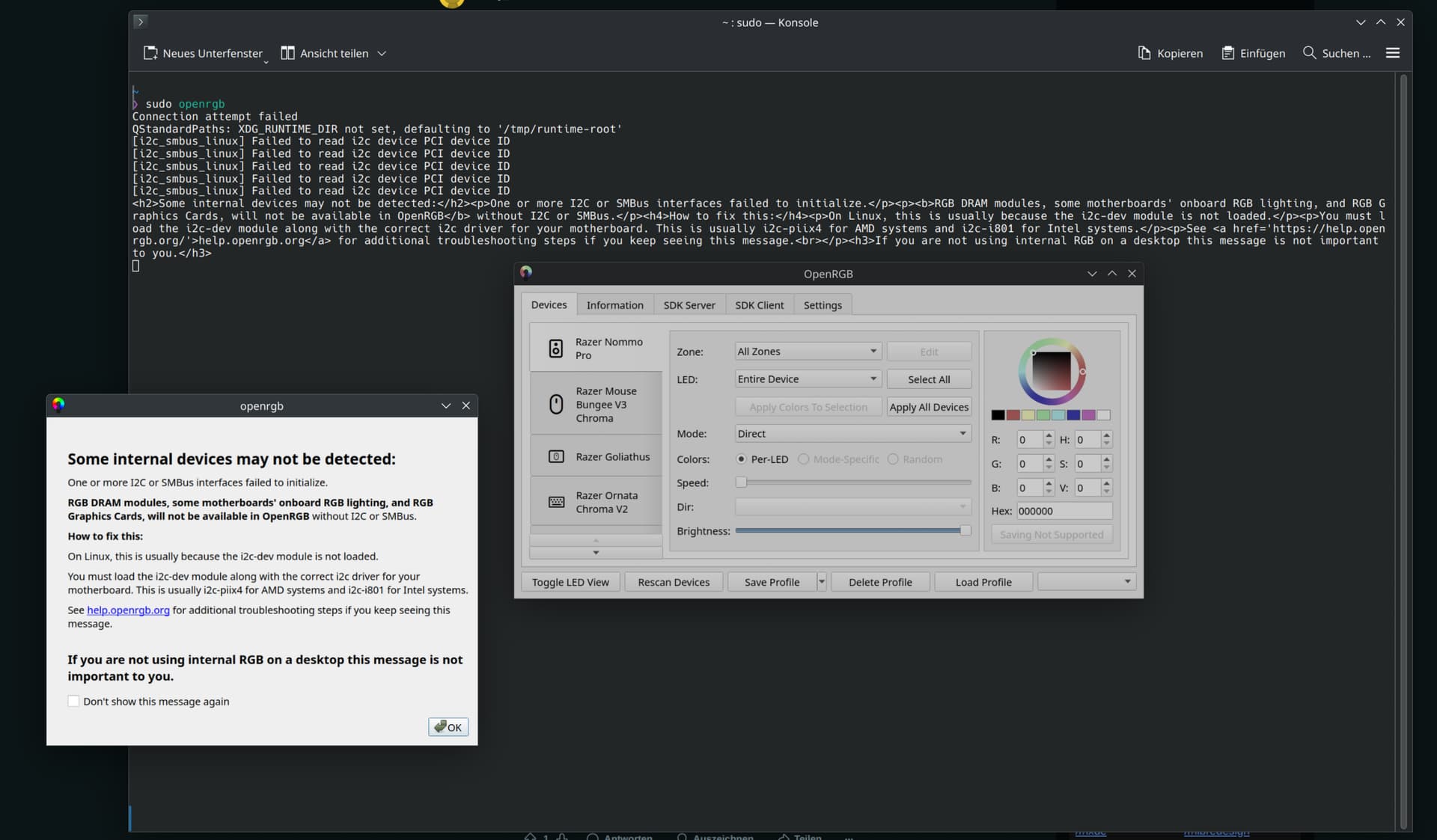
sudo openrgb
Connection attempt failed
QStandardPaths: XDG_RUNTIME_DIR not set, defaulting to '/tmp/runtime-root'
[i2c_smbus_linux] Failed to read i2c device PCI device ID
[i2c_smbus_linux] Failed to read i2c device PCI device ID
[i2c_smbus_linux] Failed to read i2c device PCI device ID
[i2c_smbus_linux] Failed to read i2c device PCI device ID
[i2c_smbus_linux] Failed to read i2c device PCI device ID
<h2>Some internal devices may not be detected:</h2><p>One or more I2C or SMBus interfaces failed to initialize.</p><p><b>RGB DRAM modules, some motherboards' onboard RGB lighting, and RGB Graphics Cards, will not be available in OpenRGB</b> without I2C or SMBus.</p><h4>How to fix this:</h4><p>On Linux, this is usually because the i2c-dev module is not loaded.</p><p>You must load the i2c-dev module along with the correct i2c driver for your motherboard. This is usually i2c-piix4 for AMD systems and i2c-i801 for Intel systems.</p><p>See <a href='https://help.openrgb.org/'>help.openrgb.org</a> for additional troubleshooting steps if you keep seeing this message.<br></p><h3>If you are not using internal RGB on a desktop this message is not important to you.</h3>
And the new log:
    OpenRGB v0.9+ (git1307)
    Commit: c1d055386630fe3df748e05c67af2a3e1b8a5639 from 2025-05-03 04:53:23 -0700
    Launched: 20250509_131836
====================================================================================================

0     |Info:    [ProfileManager] Found file: blue.orp attempting to validate header
0     |Info:    [ProfileManager] Valid v5 profile found for blue
0     |Info:    [ProfileManager] Found file: lights-off.orp attempting to validate header
0     |Info:    [ProfileManager] Valid v5 profile found for lights-off
51    |Info:    [ResourceManager] Initializing HID interfaces: Success
51    |Info:    ------------------------------------------------------
51    |Info:    |               Start device detection               |
51    |Info:    ------------------------------------------------------
56    |Info:    ------------------------------------------------------
56    |Info:    |             Detecting I2C interfaces               |
56    |Info:    ------------------------------------------------------
56    |Info:    [ResourceManager] Registering I2C interface: /dev/i2c-3 Device 1002:744C Subsystem: 1458:240D
56    |Info:    [ResourceManager] Registering I2C interface: /dev/i2c-20 Device 1022:790B Subsystem: 1849:790B
56    |Warning: [i2c_smbus_linux] Failed to read i2c device PCI device ID
56    |Info:    [ResourceManager] Registering I2C interface: /dev/i2c-10 Device 0000:0000 Subsystem: 0000:0000
56    |Info:    [ResourceManager] Registering I2C interface: /dev/i2c-1 Device 0000:0000 Subsystem: 0000:0000
56    |Info:    [ResourceManager] Registering I2C interface: /dev/i2c-19 Device 1022:790B Subsystem: 1849:790B
56    |Warning: [i2c_smbus_linux] Failed to read i2c device PCI device ID
56    |Info:    [ResourceManager] Registering I2C interface: /dev/i2c-17 Device 0000:0000 Subsystem: 0000:0000
56    |Info:    [ResourceManager] Registering I2C interface: /dev/i2c-8 Device 1002:744C Subsystem: 1458:240D
56    |Warning: [i2c_smbus_linux] Failed to read i2c device PCI device ID
56    |Info:    [ResourceManager] Registering I2C interface: /dev/i2c-15 Device 0000:0000 Subsystem: 0000:0000
56    |Info:    [ResourceManager] Registering I2C interface: /dev/i2c-6 Device 1002:744C Subsystem: 1458:240D
56    |Info:    [ResourceManager] Registering I2C interface: /dev/i2c-13 Device 1002:13C0 Subsystem: 1849:364E
56    |Info:    [ResourceManager] Registering I2C interface: /dev/i2c-4 Device 1002:744C Subsystem: 1458:240D
56    |Info:    [ResourceManager] Registering I2C interface: /dev/i2c-11 Device 1002:13C0 Subsystem: 1849:364E
56    |Info:    [ResourceManager] Registering I2C interface: /dev/i2c-2 Device 1002:744C Subsystem: 1458:240D
56    |Info:    [ResourceManager] Registering I2C interface: /dev/i2c-0 Device 0000:0000 Subsystem: 0000:0000
56    |Info:    [ResourceManager] Registering I2C interface: /dev/i2c-18 Device 1022:790B Subsystem: 1849:790B
56    |Warning: [i2c_smbus_linux] Failed to read i2c device PCI device ID
56    |Info:    [ResourceManager] Registering I2C interface: /dev/i2c-9 Device 0000:0000 Subsystem: 0000:0000
56    |Warning: [i2c_smbus_linux] Failed to read i2c device PCI device ID
56    |Info:    [ResourceManager] Registering I2C interface: /dev/i2c-16 Device 0000:0000 Subsystem: 0000:0000
56    |Info:    [ResourceManager] Registering I2C interface: /dev/i2c-7 Device 1002:744C Subsystem: 1458:240D
56    |Info:    [ResourceManager] Registering I2C interface: /dev/i2c-14 Device 1002:13C0 Subsystem: 1849:364E
56    |Info:    [ResourceManager] Registering I2C interface: /dev/i2c-5 Device 1002:744C Subsystem: 1458:240D
56    |Info:    [ResourceManager] Registering I2C interface: /dev/i2c-MSFT8000:00 Device 0000:0000 Subsystem: 0000:0000
57    |Info:    [ResourceManager] Registering I2C interface: /dev/i2c-12 Device 1002:13C0 Subsystem: 1849:364E
57    |Info:    ------------------------------------------------------
57    |Info:    |               Detecting I2C devices                |
57    |Info:    ------------------------------------------------------
1095  |Info:    ------------------------------------------------------
1095  |Info:    |            Detecting I2C DIMM modules              |
1095  |Info:    ------------------------------------------------------
1189  |Info:    [ResourceManager] Detected occupied slot 2, bus 14, type DDR5
1193  |Info:    [ResourceManager] Detected occupied slot 4, bus 14, type DDR5
1278  |Info:    ------------------------------------------------------
1278  |Info:    |               Detecting I2C PCI devices            |
1278  |Info:    ------------------------------------------------------
1279  |Info:    ------------------------------------------------------
1279  |Info:    |               Detecting HID devices                |
1279  |Info:    ------------------------------------------------------
1411  |Info:    [Razer Nommo Pro] Registering RGB controller
1490  |Info:    [Razer Mouse Bungee V3 Chroma] Registering RGB controller
1569  |Info:    [Razer Goliathus] Registering RGB controller
1666  |Info:    [KLM] Created new Full 104 key QWERTZ with 6 rows and 21 columns containing 106 keys
1666  |Info:    [Razer Ornata Chroma V2] Registering RGB controller
1766  |Info:    [Razer Charging Pad Chroma] Registering RGB controller
1844  |Info:    [Razer Base Station V2 Chroma] Registering RGB controller
1878  |Info:    [Razer Basilisk Ultimate (Wired)] Registering RGB controller
1903  |Info:    [ASRock X870 Riptide WiFi] Registering RGB controller
1903  |Info:    ------------------------------------------------------
1903  |Info:    |            Detecting libusb HID devices            |
1903  |Info:    ------------------------------------------------------
2606  |Info:    ------------------------------------------------------
2606  |Info:    |              Detecting other devices               |
2606  |Info:    ------------------------------------------------------
2663  |Info:    [GLEDOPTO GL-MC-001P] Registering RGB controller
2663  |Info:    [GLEDOPTO GL-MC-001P] Registering RGB controller
2664  |Info:    [Signify Netherlands B.V. 440400982841] Registering RGB controller
2664  |Info:    [Signify Netherlands B.V. 440400982841] Registering RGB controller
2664  |Info:    [Signify Netherlands B.V. 440400982841] Registering RGB controller
2664  |Info:    [Signify Netherlands B.V. 440400982841] Registering RGB controller
2664  |Info:    [Signify Netherlands B.V. 440400982841] Registering RGB controller
2664  |Info:    [GLEDOPTO GL-MC-001P] Registering RGB controller
2664  |Info:    [ResourceManager] Calling Post-detection callbacks
2664  |Info:    ------------------------------------------------------
2664  |Info:    |                Detection completed                 |
2664  |Info:    ------------------------------------------------------
2664  |Dialog:  <h2>Some internal devices may not be detected:</h2><p>One or more I2C or SMBus interfaces failed to initialize.</p><p><b>RGB DRAM modules, some motherboards' onboard RGB lighting, and RGB Graphics Cards, will not be available in OpenRGB</b> without I2C or SMBus.</p><h4>How to fix this:</h4><p>On Linux, this is usually because the i2c-dev module is not loaded.</p><p>You must load the i2c-dev module along with the correct i2c driver for your motherboard. This is usually i2c-piix4 for AMD systems and i2c-i801 for Intel systems.</p><p>See <a href='https://help.openrgb.org/'>help.openrgb.org</a> for additional troubleshooting steps if you keep seeing this message.<br></p><h3>If you are not using internal RGB on a desktop this message is not important to you.</h3>
3786  |Info:    [ProfileManager] Profile loading: Succeeded for Razer Nommo Pro @ HID: /dev/hidraw10
3786  |Info:    [ProfileManager] Profile loading: Succeeded for Razer Mouse Bungee V3 Chroma @ HID: /dev/hidraw5
3786  |Info:    [ProfileManager] Profile loading: Succeeded for Razer Goliathus @ HID: /dev/hidraw6
3786  |Info:    [ProfileManager] Profile loading: Succeeded for Razer Ornata Chroma V2 @ HID: /dev/hidraw13
3786  |Info:    [ProfileManager] Profile loading: Succeeded for Razer Charging Pad Chroma @ HID: /dev/hidraw2
3786  |Info:    [ProfileManager] Profile loading: Succeeded for Razer Base Station V2 Chroma @ HID: /dev/hidraw16
3786  |Info:    [ProfileManager] Profile loading: Succeeded for Razer Basilisk Ultimate (Wired) @ HID: /dev/hidraw1
3786  |Info:    [ProfileManager] Profile loading: Succeeded for ASRock X870 Riptide WiFi @ HID: /dev/hidraw0
3786  |Info:    [ProfileManager] Profile loading: Succeeded for GLEDOPTO GL-MC-001P @ IP: 192.168.178.182
3786  |Info:    [ProfileManager] Profile loading: Succeeded for GLEDOPTO GL-MC-001P @ IP: 192.168.178.182
3786  |Info:    [ProfileManager] Profile loading: Succeeded for Signify Netherlands B.V. 440400982841 @ IP: 192.168.178.182
3786  |Info:    [ProfileManager] Profile loading: Succeeded for Signify Netherlands B.V. 440400982841 @ IP: 192.168.178.182
3786  |Info:    [ProfileManager] Profile loading: Succeeded for Signify Netherlands B.V. 440400982841 @ IP: 192.168.178.182
3786  |Info:    [ProfileManager] Profile loading: Succeeded for Signify Netherlands B.V. 440400982841 @ IP: 192.168.178.182
3786  |Info:    [ProfileManager] Profile loading: Succeeded for Signify Netherlands B.V. 440400982841 @ IP: 192.168.178.182
3786  |Info:    [ProfileManager] Profile loading: Succeeded for GLEDOPTO GL-MC-001P @ IP: 192.168.178.182
Maybe my computer components are the problem? I do not know.
inxi -Fzxi
System:
Kernel: 6.14.5-3-cachyos arch: x86_64 bits: 64 compiler: clang v: 19.1.7
Desktop: KDE Plasma v: 6.3.5 Distro: CachyOS base: Arch Linux
Machine:
Type: Desktop Mobo: ASRock model: X870 Riptide WiFi
serial: <superuser required> UEFI: American Megatrends LLC. v: 3.20
date: 02/21/2025
CPU:
Info: 8-core model: AMD Ryzen 7 9800X3D bits: 64 type: MT MCP arch: N/A
rev: 0 cache: L1: 640 KiB L2: 8 MiB L3: 96 MiB
Speed (MHz): avg: 2985 min/max: 603/5272 boost: enabled cores: 1: 2985
2: 2985 3: 2985 4: 2985 5: 2985 6: 2985 7: 2985 8: 2985 9: 2985 10: 2985
11: 2985 12: 2985 13: 2985 14: 2985 15: 2985 16: 2985 bogomips: 150108
Flags: avx avx2 ht lm nx pae sse sse2 sse3 sse4_1 sse4_2 sse4a ssse3 svm
Graphics:
Device-1: Advanced Micro Devices [AMD/ATI] Navi 31 [Radeon RX 7900 XT/7900
XTX/7900 GRE/7900M] vendor: Gigabyte driver: amdgpu v: kernel arch: RDNA-3
bus-ID: 03:00.0
Device-2: Advanced Micro Devices [AMD/ATI] Granite Ridge [Radeon Graphics]
vendor: ASRock driver: amdgpu v: kernel arch: RDNA-2 bus-ID: 73:00.0
temp: 50.0 C
Device-3: Razer USA Kiyo Pro driver: snd-usb-audio,uvcvideo type: USB
bus-ID: 8-2.1:3
Display: wayland server: X.org v: 1.21.1.16 with: Xwayland v: 24.1.6
compositor: kwin_wayland driver: gpu: amdgpu resolution: 1: 3840x2160~240Hz
2: 3840x2160~144Hz
API: EGL v: 1.5 drivers: radeonsi,swrast platforms:
active: gbm,wayland,x11,surfaceless,device inactive: N/A
API: OpenGL v: 4.6 compat-v: 4.5 vendor: amd mesa v: 25.0.5-cachyos1.2
glx-v: 1.4 direct-render: yes renderer: AMD Radeon RX 7900 XTX (radeonsi
navi31 LLVM 19.1.7 DRM 3.61 6.14.5-3-cachyos)
API: Vulkan v: 1.4.309 drivers: radv surfaces: xcb,xlib,wayland devices: 2
Info: Tools: api: clinfo, eglinfo, glxinfo, vulkaninfo
de: kscreen-console,kscreen-doctor wl: wayland-info
x11: xdpyinfo, xprop, xrandr
Audio:
Device-1: Advanced Micro Devices [AMD/ATI] Navi 31 HDMI/DP Audio
driver: snd_hda_intel v: kernel bus-ID: 03:00.1
Device-2: Advanced Micro Devices [AMD/ATI] Rembrandt Radeon High
Definition Audio driver: snd_hda_intel v: kernel bus-ID: 73:00.1
Device-3: Advanced Micro Devices [AMD] Family 17h/19h/1ah HD Audio
driver: N/A bus-ID: 73:00.6
Device-4: Generic USB Audio driver: hid-generic,snd-usb-audio,usbhid
type: USB bus-ID: 1-10:14
Device-5: Razer USA Nommo Pro driver: razeraccessory,snd-usb-audio,usbhid
type: USB bus-ID: 1-2.1.4:27
Device-6: Razer USA BlackShark V2 Pro
driver: hid-generic,snd-usb-audio,usbhid type: USB bus-ID: 1-3:3
Device-7: Razer USA Kiyo Pro driver: snd-usb-audio,uvcvideo type: USB
bus-ID: 8-2.1:3
API: ALSA v: k6.14.5-3-cachyos status: kernel-api
Server-1: sndiod v: N/A status: off
Server-2: JACK v: 1.9.22 status: off
Server-3: PipeWire v: 1.4.2 status: active
Network:
Device-1: MEDIATEK driver: mt7925e v: kernel port: N/A bus-ID: 0a:00.0
IF: wlan0 state: down mac: <filter>
Device-2: Realtek Killer E3000 2.5GbE vendor: ASRock driver: r8169
v: kernel port: b000 bus-ID: 0b:00.0
IF: enp11s0 state: up speed: 1000 Mbps duplex: full mac: <filter>
IP v4: <filter> type: dynamic noprefixroute scope: global
IP v6: <filter> type: dynamic noprefixroute scope: global
IP v6: <filter> type: noprefixroute scope: link
WAN IP: <filter>
Bluetooth:
Device-1: MediaTek Wireless_Device driver: btusb v: 0.8 type: USB
bus-ID: 1-12:18
Report: btmgmt ID: hci1 rfk-id: 1 state: up address: <filter> bt-v: 5.4
lmp-v: 13
Device-2: ASUSTek ASUS USB-BT500 driver: btusb v: 0.8 type: USB
bus-ID: 1-7:10
Report: ID: hci0 rfk-id: 0 state: up address: <filter> bt-v: 5.1 lmp-v: 10
Drives:
Local Storage: total: 6.37 TiB used: 2.49 TiB (39.1%)
ID-1: /dev/nvme0n1 vendor: Samsung model: SSD 980 PRO 1TB size: 931.51 GiB
temp: 46.9 C
ID-2: /dev/nvme1n1 vendor: Samsung model: SSD 980 PRO 2TB size: 1.82 TiB
temp: 45.9 C
ID-3: /dev/nvme2n1 vendor: Samsung model: SSD 990 PRO 4TB size: 3.64 TiB
temp: 43.9 C
Partition:
ID-1: / size: 1.82 TiB used: 960.95 GiB (51.6%) fs: btrfs
dev: /dev/nvme1n1p2
ID-2: /boot size: 2.44 GiB used: 265.5 MiB (10.6%) fs: vfat
dev: /dev/nvme1n1p1
ID-3: /home size: 1.82 TiB used: 960.95 GiB (51.6%) fs: btrfs
dev: /dev/nvme1n1p2
ID-4: /var/log size: 1.82 TiB used: 960.95 GiB (51.6%) fs: btrfs
dev: /dev/nvme1n1p2
ID-5: /var/tmp size: 1.82 TiB used: 960.95 GiB (51.6%) fs: btrfs
dev: /dev/nvme1n1p2
Swap:
ID-1: swap-1 type: zram size: 60.41 GiB used: 2.6 MiB (0.0%) dev: /dev/zram0
Sensors:
System Temperatures: cpu: 57.2 C mobo: 47.5 C
Fan Speeds (rpm): N/A
GPU: device: amdgpu temp: 61.0 C fan: 392 device: amdgpu temp: 50.0 C
Info:
Memory: total: 60 GiB note: est. available: 60.41 GiB used: 4.75 GiB (7.9%)
Processes: 424 Uptime: 58m Init: systemd
Packages: 1538 Compilers: clang: b536128bd29a83a26c0aafda19942995b30fc5fd
gcc: 15.1.1 Shell: fish v: 4.0.2 inxi: 3.3.38
Okay, I’m not sure if we’ve made any progress, but let’s try one last thing. OpenRGB still can’t communicate with smbus. We’ll try changing the owner group of i2c-18, i2c-19, and i2c-20 to i2c (you should already be added to this group if you followed my earlier steps).
# Change ownership to i2c group
sudo chown :i2c /dev/i2c-18
sudo chown :i2c /dev/i2c-19
sudo chown :i2c /dev/i2c-20

# Set read and write permissions for i2c users
sudo chmod g+rw /dev/i2c-18
sudo chmod g+rw /dev/i2c-19
sudo chmod g+rw /dev/i2c-20
The second part should already be done as per @GRetriever’s instructions.
Once that’s done, just log out and try again (no need to reboot).
Ok, I’ve done that. Tried logging off and then restarting anyway. Same problem.
But now I have noticed something else. If I start OpenRGB in the terminal without root rights, then this appears in the terminal:
openrgb
Connection attempt failed
[i2c_smbus_linux] Failed to read i2c device PCI device ID
[i2c_smbus_linux] Failed to read i2c device PCI device ID
[i2c_smbus_linux] Failed to read i2c device PCI device ID
[i2c_smbus_linux] Failed to read i2c device PCI device ID
[i2c_smbus_linux] Failed to read i2c device PCI device ID
<h2>Some internal devices may not be detected:</h2><p>One or more I2C or SMBus interfaces failed to initialize.</p><p><b>RGB DRAM modules, some motherboards' onboard RGB lighting, and RGB Graphics Cards, will not be available in OpenRGB</b> without I2C or SMBus.</p><h4>How to fix this:</h4><p>On Linux, this is usually because the i2c-dev module is not loaded.</p><p>You must load the i2c-dev module along with the correct i2c driver for your motherboard. This is usually i2c-piix4 for AMD systems and i2c-i801 for Intel systems.</p><p>See <a href='https://help.openrgb.org/'>help.openrgb.org</a> for additional troubleshooting steps if you keep seeing this message.<br></p><h3>If you are not using internal RGB on a desktop this message is not important to you.</h3>
When I start it with sudo:
sudo openrgb
[sudo] Passwort für sascha:
Connection attempt failed
QStandardPaths: XDG_RUNTIME_DIR not set, defaulting to '/tmp/runtime-root'
[i2c_smbus_linux] Failed to read i2c device PCI device ID
[i2c_smbus_linux] Failed to read i2c device PCI device ID
[i2c_smbus_linux] Failed to read i2c device PCI device ID
[i2c_smbus_linux] Failed to read i2c device PCI device ID
[i2c_smbus_linux] Failed to read i2c device PCI device ID
<h2>Some internal devices may not be detected:</h2><p>One or more I2C or SMBus interfaces failed to initialize.</p><p><b>RGB DRAM modules, some motherboards' onboard RGB lighting, and RGB Graphics Cards, will not be available in OpenRGB</b> without I2C or SMBus.</p><h4>How to fix this:</h4><p>On Linux, this is usually because the i2c-dev module is not loaded.</p><p>You must load the i2c-dev module along with the correct i2c driver for your motherboard. This is usually i2c-piix4 for AMD systems and i2c-i801 for Intel systems.</p><p>See <a href='https://help.openrgb.org/'>help.openrgb.org</a> for additional troubleshooting steps if you keep seeing this message.<br></p><h3>If you are not using internal RGB on a desktop this message is not important to you.</h3>
QStandardPaths: XDG_RUNTIME_DIR not set, defaulting to '/tmp/runtime-root'
/usr/bin/xdg-open: Zeile 757: kfmclient: Kommando nicht gefunden.
/usr/bin/xdg-open: Zeile 554: test: : Ganzzahliger Ausdruck erwartet.
/usr/bin/xdg-open: Zeile 555: test: : Ganzzahliger Ausdruck erwartet.
/usr/bin/xdg-open: Zeile 556: test: : Ganzzahliger Ausdruck erwartet.
Translated from German to English with deepl:
Kommando nicht gefunden = command not found
/usr/bin/xdg-open: Zeile 554: test: : Ganzzahliger Ausdruck erwartet. = /usr/bin/xdg-open: Line 554: test: : Integer expression expected.
When I start OpenRGB with sudo, it starts as if I had reinstalled the program. No settings are made that I made before. No Hue Bridge connected, no profiles created… I don’t see the log file either.
I.e. I have only ever posted the log file that was created when I start OpenRGB without sudo.
If I start it with sudo, does the program save to other folders? Then this log would also be interesting to see what is shown when OpenRGB is started with sudo, or am I wrong?
I will write important names inside quotation marks so that translation does not confuse you. I might write unnecessary things in random places because you mentioned you are new to Linux. They are additional information that may help you to not be confused.
I just installed “CachyOS” and I was troubleshooting Razer driver issue myself. But I fixed my problems. So, I made an account to try to help you out. Haha
Please note, I am using a “Razer Viper Mini” with “CachyOS” and “Plasma” on all AMD hardware).
https://openrazer.github.io/ says you need a couple of things:
“linux-headers” - “CachyOS” installed these “headers” by default labelled as “linux-cachyos-headers” from their own repository. These are customised versions compared to default “Arch Linux“ “headers”. Please check if you have these. I did not install default “Arch Linux“ “headers”. You can check by typing “paru linux cachyos headers” and checking the list to see which packages are installed from which repository.
“sudo gpasswd -a $USER plugdev” - I think this is where you are struggling. I was using default “Arch Linux” before “CachyOS” and this command worked flawlessly previously. Please note, that I ran this command BEFORE I installed the driver and AFTER I checked the “headers”. But in “CachyOS”, I got the error message that “plugdev” does not exist.
“sudo pacman -S openrazer-daemon” - I got confused during installing the driver because “CachyOS” repository did not have the driver but when I selected the driver to install, it showed that there were 3 automatic scripts and packages (the ghost packages and scripts had “cachyos-” in the name) that were going to be installed. I have bad experiences in the past of things being automatically installed so I did not proceed with the installation. Please note, these ghost packages and scripts did not exist + were not needed in default “Arch Linux”. So, I actually directly installed the “polychromatic” package (the software I actually wanted) and this package installed - the driver, and only 2 out of the 3 ghost packages that the driver (and “CachyOS”) wanted to install. Please note, I am not 100% sure about “2 out of the 3” statement.
“reboot” - Please see below.
In summary -
In “Arch Linux” I did - (1) > (2) > (3) (first “openrazer-daemon”, then “polychromatic”) > (4) > success.
But in “CachyOS” I had to do - (1) > (3) (first “polychromatic”, automatic dependency evaluation for “openrazer-daemon”) > (4) > (2) > (4) > success.
I hope this helps.
Hey,
hmmm ok. If you wanna take a look:
paru linux cachyos headers
 1 cachyos-v4/linux-cachyos-bmq-headers 6.17.6-1 [54.69 MiB 253.71 MiB]
    Headers and scripts for building modules for the Linux BORE + Cachy Sauce scheduler Kernel by CachyOS with other patches and improvements kernel
 2 cachyos-v4/linux-cachyos-bmq-lto-headers 6.17.6-1 [29.40 MiB 149.05 MiB]
    Headers and scripts for building modules for the Linux BORE + Cachy Sauce scheduler Kernel by CachyOS with other patches and improvements kernel
 3 cachyos-v4/linux-cachyos-bore-headers 6.17.6-1 [55.00 MiB 254.14 MiB]
    Headers and scripts for building modules for the Linux BORE + Cachy Sauce scheduler Kernel by CachyOS with other patches and improvements kernel
 4 cachyos-v4/linux-cachyos-bore-lto-headers 6.17.6-1 [29.65 MiB 149.32 MiB]
    Headers and scripts for building modules for the Linux BORE + Cachy Sauce scheduler Kernel by CachyOS with other patches and improvements kernel
 5 cachyos-v4/linux-cachyos-deckify-headers 6.17.6-2 [55.08 MiB 254.19 MiB]
    Headers and scripts for building modules for the Linux BORE + Cachy Sauce + Handheld Kernel by CachyOS with other patches and improvements. kernel
 6 cachyos-v4/linux-cachyos-deckify-lto-headers 6.17.6-2 [29.67 MiB 149.37 MiB]
    Headers and scripts for building modules for the Linux BORE + Cachy Sauce + Handheld Kernel by CachyOS with other patches and improvements. kernel
 7 cachyos-v4/linux-cachyos-eevdf-headers 6.17.6-1 [55.04 MiB 254.09 MiB]
    Headers and scripts for building modules for the Linux EEVDF scheduler + Cachy Sauce Kernel by CachyOS with other patches and improvements kernel
 8 cachyos-v4/linux-cachyos-eevdf-lto-headers 6.17.6-1 [29.66 MiB 149.31 MiB]
    Headers and scripts for building modules for the Linux EEVDF scheduler + Cachy Sauce Kernel by CachyOS with other patches and improvements kernel
 9 cachyos-v4/linux-cachyos-gcc-headers 6.17.6-2 [54.96 MiB 254.09 MiB]
    Headers and scripts for building modules for the Linux BORE + LTO + AutoFDO + Propeller Cachy Sauce Kernel by CachyOS with other patches and improvements. kernel
10 cachyos-v4/linux-cachyos-hardened-headers 6.16.12-1 [29.62 MiB 142.16 MiB]
    Headers and scripts for building modules for the Linux BORE scheduler and hardened Kernel by CachyOS with other patches and improvements kernel
11 cachyos-v4/linux-cachyos-hardened-lto-headers 6.16.12-1 [28.41 MiB 144.62 MiB]
    Headers and scripts for building modules for the Linux BORE scheduler and hardened Kernel by CachyOS with other patches and improvements kernel
12 cachyos-v4/linux-cachyos-headers 6.17.6-2 [0 B 149.31 MiB] [Installiert]
    Headers and scripts for building modules for the Linux BORE + LTO + AutoFDO + Propeller Cachy Sauce Kernel by CachyOS with other patches and improvements. kernel
13 cachyos-v4/linux-cachyos-lts-headers 6.12.55-2 [27.81 MiB 138.23 MiB]
    Headers and scripts for building modules for the Linux BORE + Cachy Sauce Kernel by CachyOS with other patches and improvements - Long Term Service kernel
14 cachyos-v4/linux-cachyos-lts-lto-headers 6.12.55-2 [26.72 MiB 138.96 MiB]
    Headers and scripts for building modules for the Linux BORE + Cachy Sauce Kernel by CachyOS with other patches and improvements - Long Term Service kernel
15 cachyos-v4/linux-cachyos-rc-gcc-headers 6.15.rc7-6 [29.97 MiB 145.15 MiB]
    Headers and scripts for building modules for the Linux BORE + LTO + AutoFDO + Propeller + Cachy Sauce Kernel by CachyOS with other patches and improvements - Release Candidate kernel
16 cachyos-v4/linux-cachyos-rc-headers 6.18.rc3-1 [57.44 MiB 262.83 MiB]
    Headers and scripts for building modules for the Linux BORE + LTO + AutoFDO + Propeller + Cachy Sauce Kernel by CachyOS with other patches and improvements - Release Candidate kernel
17 cachyos-v4/linux-cachyos-rc-lto-headers 6.18.rc3-1 [29.88 MiB 150.05 MiB]
    Headers and scripts for building modules for the Linux BORE + LTO + AutoFDO + Propeller + Cachy Sauce Kernel by CachyOS with other patches and improvements - Release Candidate kernel
18 cachyos-v4/linux-cachyos-rt-bore-headers 6.17.6-1 [54.86 MiB 253.92 MiB]
    Headers and scripts for building modules for the Linux BORE-RT + Cachy Sauce Kernel by CachyOS with other patches and improvements kernel
19 cachyos-v4/linux-cachyos-rt-bore-lto-headers 6.17.6-1 [29.53 MiB 149.15 MiB]
    Headers and scripts for building modules for the Linux BORE-RT + Cachy Sauce Kernel by CachyOS with other patches and improvements kernel
20 cachyos-v4/linux-cachyos-server-headers 6.17.6-1 [54.97 MiB 254.06 MiB]
    Headers and scripts for building modules for the Linux EEVDF scheduler Kernel by CachyOS targeted for Servers workloads kernel
21 cachyos-v4/linux-cachyos-server-lto-headers 6.17.6-1 [29.61 MiB 149.27 MiB]
    Headers and scripts for building modules for the Linux EEVDF scheduler Kernel by CachyOS targeted for Servers workloads kernel
22 cachyos/linux-cachyos-bmq-headers 6.17.5-1 [54.72 MiB 253.66 MiB]
    Headers and scripts for building modules for the Linux BORE + Cachy Sauce scheduler Kernel by CachyOS with other patches and improvements kernel
23 cachyos/linux-cachyos-bore-headers 6.17.5-1 [55.04 MiB 254.08 MiB]
    Headers and scripts for building modules for the Linux BORE + Cachy Sauce scheduler Kernel by CachyOS with other patches and improvements kernel
24 cachyos/linux-cachyos-cacule-headers 6.1.8-1 [23.25 MiB 117.45 MiB]
    Headers and scripts for building modules for the Linux cacULE scheduler Kernel by CachyOS with other patches and improvements kernel
25 cachyos/linux-cachyos-deckify-headers 6.17.5-1 [55.06 MiB 254.13 MiB]
    Headers and scripts for building modules for the Linux BORE + Cachy Sauce + Handheld Kernel by CachyOS with other patches and improvements. kernel
26 cachyos/linux-cachyos-eevdf-headers 6.17.5-1 [55.02 MiB 254.03 MiB]
    Headers and scripts for building modules for the Linux EEVDF scheduler + Cachy Sauce Kernel by CachyOS with other patches and improvements kernel
27 cachyos/linux-cachyos-hardened-headers 6.15.11-2 [29.36 MiB 141.53 MiB]
    Headers and scripts for building modules for the Linux BORE scheduler and hardened Kernel by CachyOS with other patches and improvements kernel
28 cachyos/linux-cachyos-headers 6.17.5-1 [29.64 MiB 149.31 MiB] [Installiert: 6.17.6-2]
    Headers and scripts for building modules for the Linux BORE + LTO + AutoFDO + Propeller Cachy Sauce Kernel by CachyOS with other patches and improvements. kernel
29 cachyos/linux-cachyos-lts-headers 6.12.54-1 [27.81 MiB 138.17 MiB]
    Headers and scripts for building modules for the Linux BORE + Cachy Sauce Kernel by CachyOS with other patches and improvements - Long Term Service kernel
30 cachyos/linux-cachyos-rc-headers 6.18.rc3-1 [57.44 MiB 262.77 MiB]
    Headers and scripts for building modules for the Linux BORE + LTO + AutoFDO + Propeller + Cachy Sauce Kernel by CachyOS with other patches and improvements - Release Candidate kernel
31 cachyos/linux-cachyos-rt-bore-headers 6.17.5-1 [54.91 MiB 253.87 MiB]
    Headers and scripts for building modules for the Linux BORE-RT + Cachy Sauce Kernel by CachyOS with other patches and improvements kernel
32 cachyos/linux-cachyos-server-headers 6.17.5-1 [54.88 MiB 254.00 MiB]
    Headers and scripts for building modules for the Linux EEVDF scheduler Kernel by CachyOS targeted for Servers workloads kernel
33 aur/linux-cachyos-headers 6.17.7-2 [+41 ~3.45] [Installiert: 6.17.6-2]
    Headers and scripts for building modules for the Linux BORE + LTO + AutoFDO + Propeller Cachy Sauce Kernel by CachyOS with other patches and improvements. kernel
34 aur/linux-cachyos-bore-headers 6.17.7-2 [+13 ~0.01]
    Headers and scripts for building modules for the Linux BORE + Cachy Sauce scheduler Kernel by CachyOS with other patches and improvements kernel
35 aur/linux-cachyos-rc-headers 6.18.rc4-2 [+10 ~0.38]
    Headers and scripts for building modules for the Linux BORE + LTO + AutoFDO + Propeller + Cachy Sauce Kernel by CachyOS with other patches and improvements - Release Candidate kernel
36 aur/linux-cachyos-lts-headers 6.12.56-2 [+4 ~0.02]
    Headers and scripts for building modules for the Linux BORE + Cachy Sauce Kernel by CachyOS with other patches and improvements - Long Term Service kernel
37 aur/linux-cachyos-eevdf-headers 6.17.7-2 [+3 ~0.24]
    Headers and scripts for building modules for the Linux EEVDF scheduler + Cachy Sauce Kernel by CachyOS with other patches and improvements kernel
38 aur/linux-cachyos-bmq-headers 6.17.7-2 [+2 ~0.25]
    Headers and scripts for building modules for the Linux BORE + Cachy Sauce scheduler Kernel by CachyOS with other patches and improvements kernel
39 aur/linux-cachyos-hardened-headers 6.16.12-2 [+2 ~0.01]
    Headers and scripts for building modules for the Linux BORE scheduler and hardened Kernel by CachyOS with other patches and improvements kernel
40 aur/linux-cachyos-server-headers 6.17.7-2 [+2 ~0.25]
    Headers and scripts for building modules for the Linux EEVDF scheduler Kernel by CachyOS targeted for Servers workloads kernel
:: Zu installierende Pakete (z. B: 1 2 3, 1-3):
::
and
sudo gpasswd -a $USER plugdev
[sudo] Passwort für sascha:
Benutzer sascha wird zur Gruppe plugdev hinzugefügt.

~
❯
But I do not understand what you are trying to tell with your point 3. Ghost packages? I do not know what I should do.
Sorry for the delay I moved houses and got a new job.
Best,
Hey,
phew, that was a long time ago, but no problem. Thanks for the reply 
1.+2.: Okay, how can I check that now, and if I have any, how do I delete them? And how do I prevent this from happening again?
3.: Yes, I think so. I mean, I got it from the Razer website. I think there were installation instructions there. I’ll look for the link and post it here.
4.: I don’t remember. How exactly do I do that? Or how do I check if the package is installed? If it is installed, should I just “install over it”?
5.: Sorry, I don’t understand. What exactly was that referring to?
6.: Phew, just for that one package? I’m really glad that CachyOS works so well for me and that I have everything the way I want it. That was a lot of work and took months. I’d really hate to do that. And no, I’ve never done anything with a VM. I don’t even know how it all works. 
Oh, well then, have a good start! Hope everything worked out without any problems.
Best regards
//edit: Found it: Download for Arch | Polychromatic
Here the output again:
sudo pacman -S linux-headers

[sudo] Passwort für sascha:
Warnung: linux-headers-6.17.9.arch1-1 ist aktuell -- Reinstalliere
Abhängigkeiten werden aufgelöst …
Nach in Konflikt stehenden Paketen wird gesucht …

Paket (1)           Alte Version    Neue Version    Netto-Veränderung

core/linux-headers  6.17.9.arch1-1  6.17.9.arch1-1           0,00 MiB

Gesamtgröße der installierten Pakete:  251,56 MiB
Größendifferenz der Aktualisierung:      0,00 MiB

:: Installation fortsetzen? [J/n] j
(1/1) Schlüssel im Schlüsselbund werden geprüft                                                                   [--------------------------------------------------------------------] 100%
(1/1) Paket-Integrität wird überprüft                                                                             [--------------------------------------------------------------------] 100%
(1/1) Paket-Dateien werden geladen                                                                                [--------------------------------------------------------------------] 100%
(1/1) Auf Dateikonflikte wird geprüft                                                                             [--------------------------------------------------------------------] 100%
:: Pre-transaction-Hooks werden gestartet …
(1/3) Performing snapper pre snapshots for the following configurations...
==> root: 1525
(2/3) Wait for limine-snapper-sync to finish...
(3/3) Remove upgraded DKMS modules
:: Paketänderungen werden verarbeitet …
(1/1) Reinstalliert wird linux-headers                                                                            [--------------------------------------------------------------------] 100%
:: Post-transaction-Hooks werden gestartet …
(1/5) Arming ConditionNeedsUpdate...
(2/5) Updating module dependencies...
(3/5) Install DKMS modules
==> ERROR: Missing 6.17.9-arch1-1 kernel modules tree for module openrazer-driver/3.11.0.
(4/5) Checking which packages need to be rebuilt
(5/5) Performing snapper post snapshots for the following configurations...
==> root: 1526

~ 11s
❯ sudo gpasswd -a $USER plugdev

Benutzer sascha wird zur Gruppe plugdev hinzugefügt.
(reply to 1 + 2)
run “paru -Qs header” and it will show you a list of packages that are installed which have “header” in the name.
run “paru -R insert-header-package-name-from-above*”.* it might complain about dependencies so you might need to force it with a switch while running this command. i forgot the switch but should be easy to find.
as you can see here, i have a headers package installed (idk what the api-headers package is but there does not seem to be an update nor any other variation of it in the repos) and im being prompted to update it to a newer version. this is behaving differently than your situation: where the old packages are kept/maintained (along with your new ones) as separate entities for some unknown reason. maybe the dependency cycle/link between your header package and the rest of the normal and expected packages got broken. please ignore yay and a newer kernel than yours because i have moved back to vanilla Arch and i installed “yay” because it is my muscle memory but the basic, usual commands are interchangeable between pacman, yay and paru.
[shadman@ryzen ~]$ yay -Qs headers
[unrelated trimmed]
local/linux-api-headers 6.17-1
    Kernel headers sanitized for use in userspace
local/linux-headers 6.18.1.arch1-2
    Headers and scripts for building modules for the Linux kernel
[unrelated trimmed]
[shadman@ryzen ~]$ yay -Syu
[sudo] password for shadman:
:: Synchronizing package databases...
 core is up to date
 extra is up to date
 multilib is up to date
:: Searching AUR for updates...
:: Searching databases for updates...
 -> Missing AUR Debug Packages: http-parser-debug
:: 22 packages to upgrade/install.
22  core/linux                                  6.18.1.arch1-2        -> 6.18.2.arch2-1
21  core/linux-headers                          6.18.1.arch1-2        -> 6.18.2.arch2-1
[unrelated trimmed]
==> Packages to exclude: (eg: "1 2 3", "1-3", "^4" or repo name)
 -> Excluding packages may cause partial upgrades and break systems
==>
(reply to 3) - just so we are clear, the link you gave is on the polychromatic website not an official razer website. haha but lucky you!
(reply to 4) - if i were you i would first “paru -Rns polychromatic” (the switch -ns removes children packages, including openrazer, that are not dependent on by another package). then “paru -Scc” and answer yes to all. first prompt default is N. the -cc switch clears caches, the package archive, databases and etc. then “paru -Syyu”. the -yy switch deletes and redownloads fresh database information. then ideally deal with the “headers” situation (maybe a “paru -S linux” to rebuild and reinstall the kernel fresh without any of the old hooks that polychromatic might have made) and reboot (as per general rule of thumb - reboot before and after installing troublesome/mission critical components; polychromatic/openrazer might still be running even if you remove them for the remainder of the current session) . then finally, “paru -S polychromatic”. this will install openrazer fresh too since its a dependency for polychromatic.
(reply to 5) - dont worry about it. we are past that point of our troubleshooting “research”.
(reply to 6) - yes, fully understandable. but VMs arent that difficult these days. look up a tutorial relating to “qemu kvm” (not virtualbox or vmware) on youtube and you should be set up in like 15-20min max.
(reply to your output) - i can see that there is an error during the DKMS module configuration stage (near the end of your output). maybe this is the root of all the evil? i can also see that there is NO NEW linux-header available for you to update to. but that DOES mean that the latest kernel header currently installed IS properly linked to pacman/other parts of the system. in that case, just removing the old headers that showed up in “paru -Qs headers” is advised. in addition to this, maybe consider doing the things in my previous replies anyway and seeing if that fixes anything.
please let me know the result of your experiments.
thank you for your kind words. there was no issue with the move itself.
yours sincerely,
Hey there, and first of all, Merry Christmas! 
Sorry for the late reply… I was busy, unfortunately.
I’ve now followed the steps and this is what happened:
❯ paru -Qs header
local/acl 2.3.2-1.1
Access control list utilities, libraries and headers
local/boost 1.89.0-3.1
Free peer-reviewed portable C++ source libraries (development headers)
local/libcups 2:2.4.16-1
OpenPrinting CUPS - client libraries and headers
local/linux-api-headers 1:6.17-1
Kernel headers sanitized for use in userspace
local/linux-cachyos-headers 6.18.2-2
Headers and scripts for building modules for the Linux EEVDF + LTO + AutoFDO + Propeller Cachy Sauce Kernel by CachyOS with other patches and improvements. kernel
local/linux-headers 6.18.2.arch2-1
Headers and scripts for building modules for the Linux kernel
local/spdlog 1.16.0-1.1
Very fast, header-only/compiled, C++ logging library
local/wxwidgets-common 3.2.9-4
Common libraries and headers for wxwidgets
local/xorgproto 2025.1-1
combined X.Org X11 Protocol headers~
❯ paru -Rns polychromatic
[sudo] Passwort für sascha:
Abhängigkeiten werden geprüft …
:: discord benötigt optional libappindicator-gtk3: Systray indicator support
:: openrazer-meta-git benötigt optional polychromatic: frontendPaket (5) Alte Version Netto-Veränderung
libappindicator 12.10.1-1 -0,34 MiB
python-colorama 0.4.6-5 -0,25 MiB
python-colour 0.1.5-15 -0,11 MiB
python-pyqt6-webengine 6.10.0-1 -0,78 MiB
polychromatic 0.9.5-1 -5,48 MiBGesamtgröße der entfernten Pakete: 6,95 MiB
:: Möchten Sie diese Pakete entfernen? [J/n] j
:: Pre-transaction-Hooks werden gestartet …
(1/2) Performing snapper pre snapshots for the following configurations…
==> root: 1633
(2/2) Wait for limine-snapper-sync to finish…
:: Paketänderungen werden verarbeitet …
(1/5) Entfernung läuft polychromatic [--------------------------------------------------------------------] 100%
(2/5) Entfernung läuft python-pyqt6-webengine [--------------------------------------------------------------------] 100%
(3/5) Entfernung läuft python-colour [--------------------------------------------------------------------] 100%
(4/5) Entfernung läuft python-colorama [--------------------------------------------------------------------] 100%
(5/5) Entfernung läuft libappindicator [--------------------------------------------------------------------] 100%
:: Post-transaction-Hooks werden gestartet …
(1/4) Arming ConditionNeedsUpdate…
(2/4) Updating icon theme caches…
(3/4) Updating the desktop file MIME type cache…
(4/4) Performing snapper post snapshots for the following configurations…
==> root: 1634~ 13s
❯ paru -SccZwischenspeicher-Verzeichnis: /var/cache/pacman/pkg/
:: Möchten Sie ALLE Dateien aus dem Zwischenspeicher entfernen? [j/N] j
Alle Dateien aus dem Zwischenspeicher entfernt …
Fehler: /var/cache/pacman/pkg/download-MfjLn1 konnte nicht entfernt werden: Ist ein Verzeichnis
Fehler: /var/cache/pacman/pkg/download-D0Gx9f konnte nicht entfernt werden: Ist ein Verzeichnis
Fehler: /var/cache/pacman/pkg/download-EL57pK konnte nicht entfernt werden: Ist ein Verzeichnis
Fehler: /var/cache/pacman/pkg/download-aOl7kM konnte nicht entfernt werden: Ist ein Verzeichnis
Fehler: /var/cache/pacman/pkg/download-nbXsRL konnte nicht entfernt werden: Ist ein Verzeichnis
Fehler: /var/cache/pacman/pkg/download-SkqjyZ konnte nicht entfernt werden: Ist ein Verzeichnis
Fehler: /var/cache/pacman/pkg/download-w09Gav konnte nicht entfernt werden: Ist ein Verzeichnis
Fehler: /var/cache/pacman/pkg/download-AT64O1 konnte nicht entfernt werden: Ist ein VerzeichnisDatenbank-Verzeichnis: /var/lib/pacman/
:: Möchten Sie ungenutzte Repositorien entfernen? [J/n] j
Ungenutzte Sync-Repositorien werden entfernt …Clone-Verzeichnis: /home/sascha/.cache/paru/clone
:: ALLE AUR-Pakete aus dem Cache entfernen? [j/N]: jDiff-Verzeichnis: /home/sascha/.cache/paru/diff
:: Alle gespeicherten Diffs entfernen? [J/n]: j~ 26s
❯ paru -Syyu
:: Paketdatenbanken werden synchronisiert …
cachyos-v4 132,2 KiB 1674 KiB/s 00:00 [--------------------------------------------------------------------] 100%
cachyos-core-v4 100,0 KiB 1191 KiB/s 00:00 [--------------------------------------------------------------------] 100%
cachyos-extra-v4 2,6 MiB 9,98 MiB/s 00:00 [--------------------------------------------------------------------] 100%
cachyos 502,3 KiB 4,27 MiB/s 00:00 [--------------------------------------------------------------------] 100%
core 117,8 KiB 564 KiB/s 00:00 [--------------------------------------------------------------------] 100%
extra 8,1 MiB 5,81 MiB/s 00:01 [--------------------------------------------------------------------] 100%
multilib 126,6 KiB 568 KiB/s 00:00 [--------------------------------------------------------------------] 100%
:: Vollständige Systemaktualisierung wird gestartet …
Warnung: gtk2: Lokale Version (2.24.33-5.1) ist neuer als cachyos (2.24.33-5)
Warnung: lib32-openal: Lokale Version (1.25.0-1) ist neuer als multilib (1.24.3-1)
Warnung: libpng12: Lokale Version (1.2.59-2.1) ist neuer als cachyos (1.2.59-2)
Warnung: linux-headers: Lokale Version (6.18.2.arch2-1) ist neuer als core (6.18.1.arch1-2)
Warnung: vulkan-extra-layers: Lokale Version (1.4.335.0-2) ist neuer als extra (1.4.335.0-1)
Warnung: vulkan-extra-tools: Lokale Version (1.4.335.0-2) ist neuer als extra (1.4.335.0-1)
Warnung: xorgproto: Lokale Version (2025.1-1) ist neuer als extra (2024.1-2)
Es gibt nichts zu tun
:: Looking for PKGBUILD upgrades…
:: Nach AUR-Upgrades suchen…
:: Nach devel-Upgrades suchen…
es gibt nichts zu tun~
❯ paru -S linux
Abhängigkeiten werden aufgelöst …
Nach in Konflikt stehenden Paketen wird gesucht …Paket (1) Neue Version Netto-Veränderung Größe des Downloads
core/linux 6.18.1.arch1-2 143,55 MiB 142,89 MiB
Gesamtgröße des Downloads: 142,89 MiB
Gesamtgröße der installierten Pakete: 143,55 MiB:: Installation fortsetzen? [J/n] j
:: Pakete werden empfangen …
linux-6.18.1.arch1-2-x86_64 142,9 MiB 21,2 MiB/s 00:07 [--------------------------------------------------------------------] 100%
(1/1) Schlüssel im Schlüsselbund werden geprüft [--------------------------------------------------------------------] 100%
(1/1) Paket-Integrität wird überprüft [--------------------------------------------------------------------] 100%
(1/1) Paket-Dateien werden geladen [--------------------------------------------------------------------] 100%
(1/1) Auf Dateikonflikte wird geprüft [--------------------------------------------------------------------] 100%
:: Pre-transaction-Hooks werden gestartet …
(1/2) Performing snapper pre snapshots for the following configurations…
==> root: 1635
(2/2) Wait for limine-snapper-sync to finish…
:: Paketänderungen werden verarbeitet …
(1/1) Installiert wird linux [--------------------------------------------------------------------] 100%
Optionale Abhängigkeiten für linux
linux-firmware: firmware images needed for some devices [Installiert]
scx-scheds: to use sched-ext schedulers [Installiert]
wireless-regdb: to set the correct wireless channels of your country [Installiert]
:: Post-transaction-Hooks werden gestartet …
(1/5) Arming ConditionNeedsUpdate…
(2/5) Updating module dependencies…
(3/5) Updating linux initcpios…
Building initramfs for linux (6.18.1-arch1-2)
==> Using drop-in configuration file: ‘10-chwd.conf’
==> Starting build: ‘6.18.1-arch1-2’
→ Running build hook: [base]
→ Running build hook: [udev]
→ Running build hook: [autodetect]
→ Running build hook: [microcode]
→ Running build hook: [kms]
→ Running build hook: [modconf]
→ Running build hook: [block]
→ Running build hook: [keyboard]
→ Running build hook: [keymap]
→ Running build hook: [consolefont]
==> WARNING: consolefont: no font found in configuration
→ Running build hook: [plymouth]
→ Running build hook: [filesystems]
==> ERROR: module not found: ‘nvidia’
==> ERROR: module not found: ‘nvidia_modeset’
==> ERROR: module not found: ‘nvidia_uvm’
==> ERROR: module not found: ‘nvidia_drm’
==> Generating module dependencies
==> Creating zstd-compressed initcpio image: ‘/tmp/staging_initramfs.img’
==> WARNING: errors were encountered during the build. The image may not be complete.
==> Running post hooks
→ Running post hook: [sbctl]
Signing /lib/modules/6.18.1-arch1-2/vmlinuz
✓ Signed /lib/modules/6.18.1-arch1-2/vmlinuz
==> Post processing done
==> ERROR: mkinitcpio failed for kernel 6.18.1-arch1-2, skipping.
✓ Signed /boot/EFI/limine/limine_x64.efi
(4/5) Signing EFI binaries…
Generating EFI bundles…
File has already been signed /boot/EFI/BOOT/BOOTX64.EFI
File has already been signed /boot/EFI/systemd/systemd-bootx64.efi
File has already been signed /boot/aedb1c168bfc40d9b11f09dcd75d2040/6.14.5-2-cachyos/linux
File has already been signed /usr/lib/systemd/boot/efi/systemd-bootx64.efi.signed
(5/5) Performing snapper post snapshots for the following configurations…
==> root: 1636~ 16s
*Rebooting PC*
Here we go:
Okay, what now? I’m still not quite sure. What do I need to do now, or what should I look for?
Best regards
I had also a update for polychromatic now and it went trough without any errors this time.
//edit: The problem should be gone now. At least for me. I have really no errors now. Only the not supported devices are now listed.
See my github thread: How can I resolve my errors which were shown in OpenRazer / Polychromatic? · Issue #2626 · openrazer/openrazer · GitHub
Best regards