To add to this. I tried OW2 today with your latest release. It hang always after a minute inside training with fsync. Tried a few times. Same result.
Went back to ntsync only release. Still stable as it was.
I also tried enabling wayland on your native latest release, it’s completely broken as it was on the start, shows mouse cursor, 20 or 60fps max.
I might have to take back some affirmations in the previous posts, before I didnt know how to confirm whether it was actually wayland or xwayland, now mangohud has updated and I can use display_server. It might not have been with wayland, but xwayland in the ntsync build.
I think I will just remove each and every mention of the tests and experiments we do because people don’t seem to understand what their limitations are, or the constrains that are in place.
Still no. We already have enough things on our hands, we don’t need people to complain about things we know are broken and do not add enough value right now.
We know of these issues, that’s why we have hidden these things behind env flags and warnings, because they are broken. We cannot do anything about it about it until Proton 10 is released.
Could this be related to anti-cheat? Because proton-cachyos from the repos is inherently incompatible with anti-cheat. The only ntsync version that is accessible presently is the one built on top of the Steam Linux Runtime.
Since the release of kernel 6.14 I’ve been trying to get NTSync to work in Cyberpunk 2077 under Heroic Games Launcher and proton-cachyos/proton-experimental - no luck so far. The option PROTON_USE_NTSYNC=1 doesn’t do anything for me. Any hints?
Since i struggled with getting it to run too I post my steps.
I Run Fedora 41 with Custom 6.14 Kernel but the steps should be the same.
Fist of all you need a Kernel with NTSync support.
Mainline thats 6.14.
You need the CONFIG_NTSYNC option set.
(Best to just choose y since you will need it anyway)
then the ntsync device needs to be present.
/dev/ntsync
and the permissions need to be set to allow user write to the device.
you can use a udev rule to do this.
Like CachyOS was doing (Permissions should be fixed by now in mainline)
Once all those things are met you need the Proton Version from this thread.
Install as described.
Make sure the env PROTON_USE_NTSYNC=1
is set.
Now run the game from Steam or launcher.
you can use Mangohud to verify the sync method used.
Not all Games will run but I tested Cyberpunk 2077 and it works.
Took me a minute until I realized he is speaking English
TLDW: ntsync isn’t yet included in wine. Also at Valve they’re not in a hurry to include it in proton, because it’s probably not faster than fsync. The numbers in the phoronix article come from the difference between wine without fsync vs wine with ntsync, if I understood correctly.
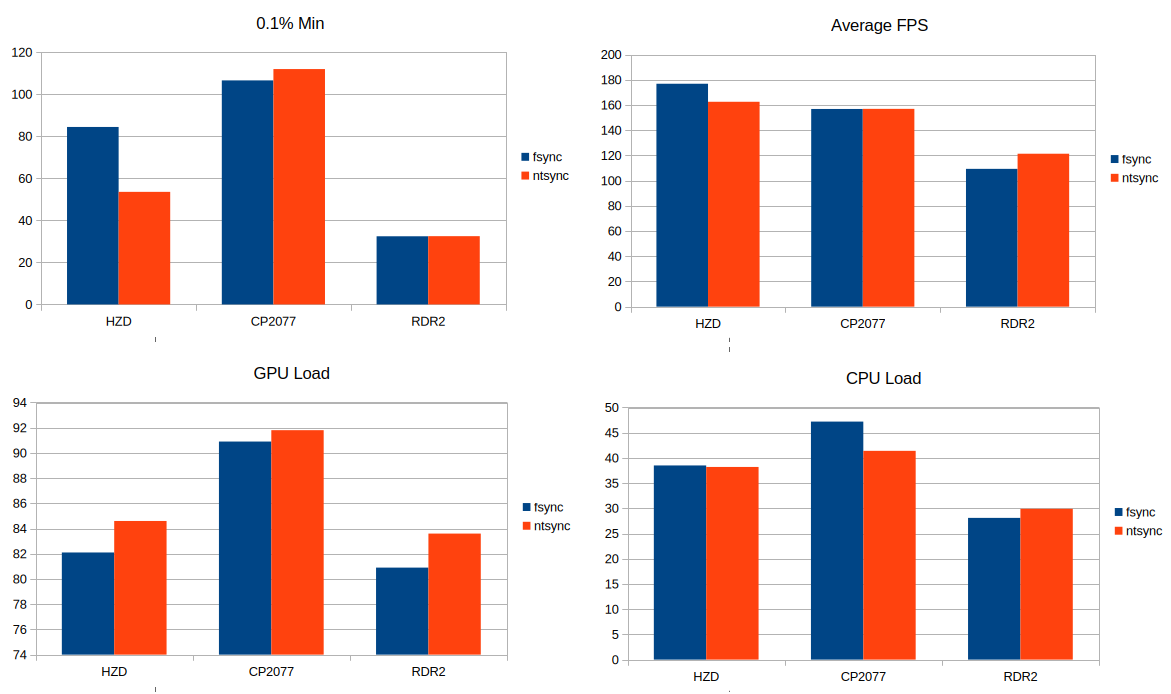
I guess the benefits have yet to materialize. I ran the built-in benchmarks on Horizon Zero Dawn Remastered, Cyberpunk 2077, and Red Dead Redemption 2 with both Fsync (Proton GE 9-26) and NTsync (CachyOS from this thread). Per the results below, NTsync doesn’t add any benefit at the current time, and typically results in higher GPU load.
I actually saw that video earlier in the week, and he was a little mistaken. The numbers the Ntsync developer posted, compares Ntsync to default Winesync and not Fsync.
Now in general, everyone is claiming Ntsync isn’t working right, and or fps is lower than Fsync. To the second point first there should be a bit of a difference in fps but it varies with game. In my instance of the games I play, the fps alone is only a 5% difference. Now the first point of it not working right is true, but the results of Ntsync currently at least personally are quite nice. In my case, I almost get the same FPS between Ntsync and Fsync, but its the smoothness of the game that is different. Ntsync feels exactly like Fsync except for the fact its less choppy, kind of like the input delay decreased by 20ms using Ntsync. But again this is my personal experience and I highly recommend people test it out for themselves and understand Ntsync is still not working right, and it will be dependent on the games you play.
Also pro tip to the people testing Ntsync, the only build with Ntsync right now is the one released Jan2,2025. Everything after that date DOES NOT have the support. If you want to try Proton with Ntsync, use the Jan2 version or you can compile it using TKG-Proton with the Ntsync7 option enabled in the config file. If you have the ability to use Lutris, here is a github that compiles TKG’s version of Wine with Ntsync support, check the releases section with Ntsync in the name. You just need to copy the contents of the .tar.xz file to Lutris runner’s wine folder. Don’t worry the site says its for Final Fantasy but its fine to use on other games.
Also if your planning to test Ntsync, run Lutris through the terminal and look for the line “wine: using fast synchronization.” when you run your game to confirm Ntsync is being used. It’s a bit easier if you use Mangohud and in the config file place winesync which will tell you what kind of sync your using instead of using the terminal.
Yeah, I’ve been looking for benchmarks that compare frame-pacing but everyone is focused on FPS. I’d rather have a few less frames if it means a smoother display.
So what i was expecting, some very slight improvements in FPS, but also frame pacing. I may try running some benchmarks when Cachy has NTSync in their build of Proton, although my graphics card is a tad old - no way it can run CyberPunk 20777…
Hi everyone, I believe NTSYNC has a lot of potential, but it hasn’t been properly cooked yet. It’ll take some time for Valve to tackle its proper implementation in Proton, and only then will we see real results. Even if the FPS ends up being comparable to FSYNC, but with much lower latency, that alone would be a massive win
First download and install in compatibilitytools.d this proton version: Releases · rankynbass/proton-xiv · GitHub (choose ntsync version for download)
Than: sudo modprobe ntsync
Put: PROTON_USE_NTSYNC=1 %command% in launch options
Succes.
(Do not forget to restart steam in order to find the new proton version in the compatibility options)
I got it working and confirmed it with Mangohud. One thing I have noticed right off the bat, is the in game load times are much faster. In The Last of Us, before it took maybe 15 to 20 seconds to load in but now it is less than 5 seconds. I will have to keep testing and see how much FPS, latency, and frame times difference there is.