is it a generally or game specific? if you run unigine-heaven and check with nvidia-smi dmon at the same time
for clocks gpu/mem/watts, do you see max values for gpu?
so it seems i can’t actually install heaven bc of a checksum failure. it’s currently reported on the top comment of the AUR Package.
paru -S unigine-heaven --mflags "--skipchecksums"
//formatting corrected
weird, still no luck. i installed glmark2 and ran that with nvidia-smi dmon though, here are the results.
unigine-heaven install
❯ paru -S unigine-heaven --mflags “–skipchecksums”
:: Resolving dependencies…
:: Calculating conflicts…
:: Calculating inner conflicts…
:: marked out of date: unigine-heaven

Aur (1)             Old Version  New Version    Make Only
aur/unigine-heaven               4.0-2          No

:: Proceed to review? [Y/n]:

:: Downloading PKGBUILDs…
PKGBUILDs up to date
nothing new to review
fetching devel info…
==> Making package: unigine-heaven 4.0-2 (Wed 01 Apr 2026 03:24:09 PM EDT)
==> Retrieving sources…
 → Found Unigine_Heaven-4.0.run
==> Validating source files with sha512sums…
Unigine_Heaven-4.0.run … FAILED
==> ERROR: One or more files did not pass the validity check!
error: failed to download sources for ‘unigine-heaven-4.0-2’:
error: packages failed to build: unigine-heaven-4.0-2
nvidia-smi dmon
❯ nvidia-smi dmon
# gpu pwr gtemp mtemp sm mem enc dec jpg ofa mclk pclk
# Idx W C C % % % % % % MHz MHz
0 77 49 - 40 5 0 0 0 0 10501 2745
0 76 49 - 40 5 0 0 0 0 10501 2745
0 76 49 - 41 5 0 0 0 0 10501 2745
0 78 49 - 41 6 0 0 0 0 10501 2745
0 77 49 - 42 7 0 0 0 0 10501 2745
0 78 49 - 42 5 0 0 0 0 10501 2745
0 78 49 - 40 5 0 0 0 0 10501 2745
0 78 50 - 41 6 0 0 0 0 10501 2745
0 78 50 - 41 6 0 0 0 0 10501 2745
0 77 50 - 41 5 0 0 0 0 10501 2745
0 78 50 - 42 6 0 0 0 0 10501 2745
0 77 50 - 41 5 0 0 0 0 10501 2745
0 78 50 - 45 6 0 0 0 0 10501 2745
0 79 50 - 43 6 0 0 0 0 10501 2745
0 79 50 - 44 6 0 0 0 0 10501 2745
0 79 50 - 44 7 0 0 0 0 10501 2745
0 78 50 - 41 5 0 0 0 0 10501 2745
0 78 50 - 41 5 0 0 0 0 10501 2745
0 78 50 - 41 5 0 0 0 0 10501 2745
0 78 50 - 41 5 0 0 0 0 10501 2745
0 78 51 - 41 5 0 0 0 0 10501 2745
0 78 51 - 40 5 0 0 0 0 10501 2745
0 79 51 - 42 6 0 0 0 0 10501 2745
0 79 51 - 42 6 0 0 0 0 10501 2745
0 81 51 - 47 7 0 0 0 0 10501 2745
0 83 51 - 47 7 0 0 0 0 10501 2745
0 82 51 - 45 7 0 0 0 0 10501 2745
0 82 51 - 46 7 0 0 0 0 10501 2745
0 82 51 - 46 7 0 0 0 0 10501 2745
0 82 52 - 47 7 0 0 0 0 10501 2745
0 82 52 - 47 6 0 0 0 0 10501 2745
0 83 52 - 47 6 0 0 0 0 10501 2745
0 83 52 - 47 6 0 0 0 0 10501 2745
0 84 52 - 48 7 0 0 0 0 10501 2745
0 84 52 - 47 7 0 0 0 0 10501 2745
0 84 52 - 47 7 0 0 0 0 10501 2745
0 84 52 - 46 7 0 0 0 0 10501 2745
0 83 52 - 46 7 0 0 0 0 10501 2745
0 83 52 - 47 7 0 0 0 0 10501 2745
0 83 52 - 46 6 0 0 0 0 10501 2745
0 84 53 - 47 6 0 0 0 0 10501 2745
0 84 53 - 46 7 0 0 0 0 10501 2745
0 85 53 - 47 7 0 0 0 0 10501 2745
0 86 53 - 47 7 0 0 0 0 10501 2745
# gpu pwr gtemp mtemp sm mem enc dec jpg ofa mclk pclk
# Idx W C C % % % % % % MHz MHz
0 86 53 - 48 7 0 0 0 0 10501 2745
0 87 53 - 46 7 0 0 0 0 10501 2745
0 86 53 - 46 7 0 0 0 0 10501 2745
0 85 53 - 47 7 0 0 0 0 10501 2745
0 86 53 - 47 7 0 0 0 0 10501 2745
0 86 54 - 48 7 0 0 0 0 10501 2745
0 86 54 - 47 6 0 0 0 0 10501 2745
0 87 54 - 47 6 0 0 0 0 10501 2745
0 88 54 - 48 6 0 0 0 0 10501 2745
0 89 54 - 49 6 0 0 0 0 10501 2745
0 88 54 - 48 7 0 0 0 0 10501 2745
0 88 54 - 47 7 0 0 0 0 10501 2745
0 87 54 - 46 7 0 0 0 0 10501 2745
0 86 54 - 47 7 0 0 0 0 10501 2745
0 86 54 - 47 6 0 0 0 0 10501 2745
0 87 54 - 47 7 0 0 0 0 10501 2745
0 88 55 - 47 7 0 0 0 0 10501 2745
0 88 55 - 47 7 0 0 0 0 10501 2745
0 88 55 - 48 7 0 0 0 0 10501 2745
0 90 55 - 49 7 0 0 0 0 10501 2745
0 92 55 - 53 7 0 0 0 0 10501 2745
0 94 55 - 51 7 0 0 0 0 10501 2745
0 94 56 - 50 7 0 0 0 0 10501 2745
0 96 56 - 50 7 0 0 0 0 10501 2745
0 98 56 - 51 7 0 0 0 0 10501 2745
0 99 56 - 50 7 0 0 0 0 10501 2745
0 97 56 - 51 7 0 0 0 0 10501 2745
0 95 56 - 52 7 0 0 0 0 10501 2745
0 95 56 - 53 7 0 0 0 0 10501 2745
0 95 56 - 37 5 0 0 0 0 10501 2745
0 80 55 - 41 7 0 0 0 0 10501 2745
0 80 55 - 40 7 0 0 0 0 10501 2745
0 80 55 - 41 7 0 0 0 0 10501 2745
0 80 55 - 41 7 0 0 0 0 10501 2745
0 80 55 - 41 7 0 0 0 0 10501 2745
0 80 55 - 41 7 0 0 0 0 10501 2745
0 80 55 - 40 7 0 0 0 0 10501 2745
0 80 55 - 40 7 0 0 0 0 10501 2745
0 80 55 - 40 7 0 0 0 0 10501 2745
0 80 55 - 39 7 0 0 0 0 10501 2745
0 81 56 - 41 7 0 0 0 0 10501 2745
0 81 56 - 41 7 0 0 0 0 10501 2745
0 81 56 - 41 7 0 0 0 0 10501 2745
0 81 56 - 40 7 0 0 0 0 10501 2745
# gpu pwr gtemp mtemp sm mem enc dec jpg ofa mclk pclk
# Idx W C C % % % % % % MHz MHz
0 82 56 - 40 7 0 0 0 0 10501 2745
0 82 56 - 40 7 0 0 0 0 10501 2745
0 81 56 - 41 7 0 0 0 0 10501 2745
0 81 56 - 41 7 0 0 0 0 10501 2745
0 81 56 - 41 7 0 0 0 0 10501 2745
0 82 56 - 41 7 0 0 0 0 10501 2745
0 86 57 - 45 1 0 0 0 0 10501 2745
0 87 57 - 45 1 0 0 0 0 10501 2745
0 87 57 - 45 1 0 0 0 0 10501 2745
0 87 57 - 46 1 0 0 0 0 10501 2745
0 87 57 - 45 1 0 0 0 0 10501 2745
0 87 57 - 45 1 0 0 0 0 10501 2745
0 87 57 - 46 1 0 0 0 0 10501 2745
0 87 57 - 45 1 0 0 0 0 10501 2745
0 88 57 - 46 1 0 0 0 0 10501 2745
0 88 57 - 45 1 0 0 0 0 10501 2745
0 102 59 - 50 1 0 0 0 0 10501 2730
0 105 59 - 50 1 0 0 0 0 10501 2730
0 105 59 - 50 1 0 0 0 0 10501 2730
0 104 59 - 49 1 0 0 0 0 10501 2730
0 104 59 - 50 1 0 0 0 0 10501 2730
0 104 59 - 50 1 0 0 0 0 10501 2730
0 104 58 - 50 1 0 0 0 0 10501 2730
0 104 58 - 51 1 0 0 0 0 10501 2730
0 104 58 - 50 1 0 0 0 0 10501 2730
0 104 58 - 50 1 0 0 0 0 10501 2730
0 83 55 - 44 5 0 0 0 0 10501 2730
0 80 55 - 47 2 0 0 0 0 10501 2730
0 81 55 - 50 2 0 0 0 0 10501 2730
0 81 54 - 45 3 0 0 0 0 10501 2730
0 81 54 - 40 6 0 0 0 0 10501 2730
0 78 54 - 42 7 0 0 0 0 10501 2745
0 79 53 - 44 5 0 0 0 0 10501 2745
0 80 53 - 39 3 0 0 0 0 10501 2745
0 81 53 - 44 2 0 0 0 0 10501 2745
0 79 53 - 44 2 0 0 0 0 10501 2745
0 82 53 - 54 1 0 0 0 0 10501 2745
0 84 53 - 54 1 0 0 0 0 10501 2745
0 84 53 - 54 1 0 0 0 0 10501 2745
0 84 53 - 54 1 0 0 0 0 10501 2745
0 84 53 - 54 1 0 0 0 0 10501 2745
0 84 52 - 53 1 0 0 0 0 10501 2745
0 83 52 - 56 2 0 0 0 0 10501 2745
0 83 52 - 54 1 0 0 0 0 10501 2745
# gpu pwr gtemp mtemp sm mem enc dec jpg ofa mclk pclk
# Idx W C C % % % % % % MHz MHz
0 83 52 - 55 1 0 0 0 0 10501 2745
0 83 52 - 54 1 0 0 0 0 10501 2745
0 76 50 - 31 1 0 0 0 0 10501 2745
0 74 50 - 31 1 0 0 0 0 810 2355
0 45 48 - 37 16 0 0 0 0 810 2280
0 47 48 - 35 1 0 0 0 0 10501 2475
0 57 48 - 35 1 0 0 0 0 10501 2475
0 49 47 - 36 3 0 0 0 0 5001 2190
0 42 47 - 45 28 0 0 0 0 810 2265
0 60 48 - 32 1 0 0 0 0 10501 2715
0 72 48 - 33 1 0 0 0 0 10501 2715
0 59 47 - 39 2 0 0 0 0 10501 2430
0 63 48 - 54 2 0 0 0 0 10501 2745
0 69 48 - 55 2 0 0 0 0 10501 2745
0 70 48 - 50 2 0 0 0 0 10501 2745
0 69 48 - 50 2 0 0 0 0 10501 2745
0 68 47 - 50 2 0 0 0 0 10501 2745
0 69 47 - 51 2 0 0 0 0 10501 2745
0 69 47 - 50 2 0 0 0 0 10501 2745
0 69 47 - 50 2 0 0 0 0 10501 2745
0 68 47 - 50 2 0 0 0 0 10501 2745
0 68 47 - 40 2 0 0 0 0 10501 2745
0 67 47 - 40 2 0 0 0 0 10501 2745
0 66 46 - 40 2 0 0 0 0 10501 2730
0 65 46 - 40 2 0 0 0 0 10501 2715
0 64 46 - 40 2 0 0 0 0 10501 2715
0 65 46 - 39 2 0 0 0 0 10501 2730
0 65 46 - 40 2 0 0 0 0 10501 2730
0 65 46 - 40 2 0 0 0 0 10501 2715
0 64 46 - 40 2 0 0 0 0 10501 2715
0 64 45 - 39 2 0 0 0 0 10501 2715
0 67 46 - 60 2 0 0 0 0 10501 2745
0 70 46 - 61 2 0 0 0 0 10501 2745
0 70 46 - 61 2 0 0 0 0 10501 2745
0 70 46 - 61 2 0 0 0 0 10501 2745
0 70 46 - 61 2 0 0 0 0 10501 2745
0 70 46 - 60 2 0 0 0 0 10501 2745
0 70 45 - 60 2 0 0 0 0 10501 2745
0 70 45 - 60 2 0 0 0 0 10501 2745
0 70 45 - 60 2 0 0 0 0 10501 2745
0 70 45 - 61 2 0 0 0 0 10501 2745
0 69 45 - 27 2 0 0 0 0 10501 2745
0 70 45 - 27 3 0 0 0 0 10501 2745
0 55 43 - 32 3 0 0 0 0 5001 1950
# gpu pwr gtemp mtemp sm mem enc dec jpg ofa mclk pclk
# Idx W C C % % % % % % MHz MHz
0 41 43 - 39 16 0 0 0 0 810 1830
0 38 43 - 37 21 0 0 0 0 810 1815
0 38 42 - 36 34 0 0 0 0 810 1740
0 37 42 - 35 37 0 0 0 0 810 1665
0 37 42 - 37 25 0 0 0 0 810 1605
0 37 42 - 39 17 0 0 0 0 810 1560
0 37 42 - 42 16 0 0 0 0 810 1800
0 40 42 - 55 17 0 0 0 0 810 1875
0 84 45 - 43 1 0 0 0 0 10501 2760
0 93 46 - 45 1 0 0 0 0 10501 2760
0 95 46 - 45 1 0 0 0 0 10501 2760
0 93 46 - 43 1 0 0 0 0 10501 2760
0 92 46 - 43 1 0 0 0 0 10501 2760
0 91 46 - 44 2 0 0 0 0 10501 2760
0 90 46 - 46 2 0 0 0 0 10501 2760
0 89 46 - 45 1 0 0 0 0 10501 2760
0 91 46 - 44 1 0 0 0 0 10501 2760
0 93 47 - 96 3 0 0 0 0 10501 2760
0 120 49 - 96 3 0 0 0 0 10501 2745
0 120 49 - 96 3 0 0 0 0 10501 2745
0 121 49 - 96 3 0 0 0 0 10501 2745
0 121 49 - 96 3 0 0 0 0 10501 2745
0 120 49 - 96 3 0 0 0 0 10501 2745
0 120 49 - 96 3 0 0 0 0 10501 2745
0 120 49 - 96 3 0 0 0 0 10501 2745
0 120 49 - 96 3 0 0 0 0 10501 2745
0 120 49 - 96 3 0 0 0 0 10501 2745
0 112 47 - 40 4 0 0 0 0 10501 2745
0 77 45 - 40 4 0 0 0 0 10501 2745
0 77 45 - 40 4 0 0 0 0 10501 2745
0 77 45 - 41 4 0 0 0 0 10501 2745
0 77 45 - 40 4 0 0 0 0 10501 2745
0 77 45 - 40 4 0 0 0 0 10501 2745
0 77 45 - 39 4 0 0 0 0 10501 2745
0 76 45 - 40 4 0 0 0 0 10501 2745
0 77 45 - 40 4 0 0 0 0 10501 2745
0 77 45 - 40 4 0 0 0 0 10501 2745
0 77 44 - 49 2 0 0 0 0 10501 2745
0 121 49 - 88 4 0 0 0 0 10501 2745
0 123 49 - 88 4 0 0 0 0 10501 2745
0 120 49 - 88 4 0 0 0 0 10501 2745
0 121 49 - 89 4 0 0 0 0 10501 2745
0 123 49 - 89 4 0 0 0 0 10501 2745
0 123 49 - 89 4 0 0 0 0 10501 2745
# gpu pwr gtemp mtemp sm mem enc dec jpg ofa mclk pclk
# Idx W C C % % % % % % MHz MHz
0 122 49 - 89 4 0 0 0 0 10501 2745
0 120 49 - 89 4 0 0 0 0 10501 2745
0 121 49 - 90 4 0 0 0 0 10501 2745
0 121 49 - 61 4 0 0 0 0 10501 2745
0 77 46 - 45 4 0 0 0 0 10501 2745
0 75 45 - 46 4 0 0 0 0 10501 2745
0 75 45 - 45 4 0 0 0 0 10501 2745
0 75 45 - 45 4 0 0 0 0 10501 2745
0 75 45 - 45 4 0 0 0 0 10501 2745
0 74 45 - 45 4 0 0 0 0 10501 2745
0 74 45 - 45 4 0 0 0 0 10501 2745
0 74 45 - 45 4 0 0 0 0 10501 2745
0 74 45 - 45 4 0 0 0 0 10501 2745
0 74 45 - 39 3 0 0 0 0 10501 2745
0 76 45 - 45 4 0 0 0 0 10501 2745
0 76 45 - 45 4 0 0 0 0 10501 2745
0 77 45 - 45 4 0 0 0 0 10501 2745
0 77 45 - 46 4 0 0 0 0 10501 2745
0 77 45 - 44 4 0 0 0 0 10501 2745
0 77 45 - 45 4 0 0 0 0 10501 2745
0 77 45 - 45 4 0 0 0 0 10501 2745
0 76 45 - 44 4 0 0 0 0 10501 2745
0 76 45 - 45 4 0 0 0 0 10501 2745
0 75 44 - 46 4 0 0 0 0 10501 2745
0 74 44 - 45 4 0 0 0 0 10501 2745
0 74 44 - 45 4 0 0 0 0 10501 2745
0 74 44 - 46 4 0 0 0 0 10501 2745
0 74 44 - 46 4 0 0 0 0 10501 2745
0 74 44 - 46 3 0 0 0 0 10501 2745
0 74 44 - 46 4 0 0 0 0 10501 2745
0 74 44 - 46 4 0 0 0 0 10501 2745
0 74 44 - 45 4 0 0 0 0 10501 2745
0 74 44 - 46 4 0 0 0 0 10501 2745
0 75 44 - 44 4 0 0 0 0 10501 2745
0 75 44 - 45 4 0 0 0 0 10501 2745
0 75 44 - 45 4 0 0 0 0 10501 2745
0 75 44 - 45 4 0 0 0 0 10501 2745
0 75 44 - 45 4 0 0 0 0 10501 2745
0 75 44 - 45 4 0 0 0 0 10501 2745
0 75 44 - 46 4 0 0 0 0 10501 2745
0 75 44 - 45 4 0 0 0 0 10501 2745
0 75 44 - 46 4 0 0 0 0 10501 2745
0 75 44 - 45 4 0 0 0 0 10501 2745
0 76 44 - 45 4 0 0 0 0 10501 2745
# gpu pwr gtemp mtemp sm mem enc dec jpg ofa mclk pclk
# Idx W C C % % % % % % MHz MHz
0 77 44 - 45 4 0 0 0 0 10501 2745
0 77 44 - 45 4 0 0 0 0 10501 2745
0 77 44 - 44 4 0 0 0 0 10501 2745
0 77 44 - 45 4 0 0 0 0 10501 2745
0 77 44 - 45 4 0 0 0 0 10501 2745
0 77 44 - 46 4 0 0 0 0 10501 2745
0 77 44 - 45 4 0 0 0 0 10501 2745
0 77 44 - 46 4 0 0 0 0 10501 2745
0 77 44 - 45 4 0 0 0 0 10501 2745
0 76 44 - 44 4 0 0 0 0 10501 2745
0 75 44 - 46 4 0 0 0 0 10501 2745
0 75 44 - 45 4 0 0 0 0 10501 2745
0 75 44 - 46 4 0 0 0 0 10501 2745
0 75 44 - 46 4 0 0 0 0 10501 2745
0 75 44 - 45 3 0 0 0 0 10501 2745
0 75 44 - 46 4 0 0 0 0 10501 2745
0 75 44 - 45 4 0 0 0 0 10501 2745
0 75 44 - 45 4 0 0 0 0 10501 2745
0 75 44 - 45 4 0 0 0 0 10501 2745
0 75 44 - 45 4 0 0 0 0 10501 2745
0 75 43 - 45 4 0 0 0 0 10501 2745
0 75 43 - 45 4 0 0 0 0 10501 2745
0 75 43 - 45 4 0 0 0 0 10501 2745
0 75 43 - 45 4 0 0 0 0 10501 2745
0 75 43 - 45 3 0 0 0 0 10501 2760
0 75 43 - 44 4 0 0 0 0 10501 2760
0 75 43 - 45 4 0 0 0 0 10501 2760
0 75 43 - 46 4 0 0 0 0 10501 2760
0 75 43 - 45 4 0 0 0 0 10501 2760
0 75 43 - 45 4 0 0 0 0 10501 2760
0 76 43 - 45 4 0 0 0 0 10501 2760
0 76 43 - 45 4 0 0 0 0 10501 2760
0 76 43 - 45 4 0 0 0 0 10501 2760
0 76 43 - 46 4 0 0 0 0 10501 2760
0 76 43 - 45 4 0 0 0 0 10501 2760
0 76 43 - 45 4 0 0 0 0 10501 2760
0 76 43 - 44 4 0 0 0 0 10501 2760
0 76 43 - 45 4 0 0 0 0 10501 2760
0 76 43 - 46 4 0 0 0 0 10501 2760
0 69 42 - 0 0 0 0 0 0 10501 2760
0 55 41 - 0 0 0 0 0 0 10501 2760
0 38 39 - 0 4 0 0 0 0 810 525
0 25 39 - 0 5 0 0 0 0 810 330
0 23 39 - 0 10 0 0 0 0 405 210
# gpu pwr gtemp mtemp sm mem enc dec jpg ofa mclk pclk
# Idx W C C % % % % % % MHz MHz
0 15 38 - 0 9 0 0 0 0 405 210
0 15 38 - 0 10 0 0 0 0 405 210
0 15 38 - 0 10 0 0 0 0 405 210
0 15 38 - 0 10 0 0 0 0 405 210
0 17 38 - 24 37 0 0 0 0 405 315
0 18 38 - 0 16 0 0 0 0 405 315
gmark2
❯ glmark2
=======================================================
    glmark2 2023.01
=======================================================
    OpenGL Information
    GL_VENDOR:      NVIDIA Corporation
    GL_RENDERER:    NVIDIA GeForce RTX 4070 Ti SUPER/PCIe/SSE2
    GL_VERSION:     4.6.0 NVIDIA 595.58.03
    Surface Config: buf=32 r=8 g=8 b=8 a=8 depth=24 stencil=0 samples=0
    Surface Size:   800x600 windowed
=======================================================
[build] use-vbo=false: FPS: 6594 FrameTime: 0.152 ms
[build] use-vbo=true: FPS: 19300 FrameTime: 0.052 ms
[texture] texture-filter=nearest: FPS: 18916 FrameTime: 0.053 ms
[texture] texture-filter=linear: FPS: 18878 FrameTime: 0.053 ms
[texture] texture-filter=mipmap: FPS: 19213 FrameTime: 0.052 ms
[shading] shading=gouraud: FPS: 19275 FrameTime: 0.052 ms
[shading] shading=blinn-phong-inf: FPS: 19342 FrameTime: 0.052 ms
[shading] shading=phong: FPS: 19359 FrameTime: 0.052 ms
[shading] shading=cel: FPS: 19384 FrameTime: 0.052 ms
[bump] bump-render=high-poly: FPS: 19142 FrameTime: 0.052 ms
[bump] bump-render=normals: FPS: 19288 FrameTime: 0.052 ms
[bump] bump-render=height: FPS: 19330 FrameTime: 0.052 ms
[effect2d] kernel=0,1,0;1,-4,1;0,1,0;: FPS: 19734 FrameTime: 0.051 ms
[effect2d] kernel=1,1,1,1,1;1,1,1,1,1;1,1,1,1,1;: FPS: 19701 FrameTime: 0.051 ms
[pulsar] light=false:quads=5:texture=false: FPS: 18400 FrameTime: 0.054 ms
[desktop] blur-radius=5:effect=blur:passes=1:separable=true:windows=4: FPS: 7675 FrameTime: 0.130 ms
[desktop] effect=shadow:windows=4: FPS: 8315 FrameTime: 0.120 ms
[buffer] columns=200:interleave=false:update-dispersion=0.9:update-fraction=0.5:update-method=map: FPS: 1670 FrameTime: 0.599 ms
[buffer] columns=200:interleave=false:update-dispersion=0.9:update-fraction=0.5:update-method=subdata: FPS: 2980 FrameTime: 0.336 ms
[buffer] columns=200:interleave=true:update-dispersion=0.9:update-fraction=0.5:update-method=map: FPS: 2063 FrameTime: 0.485 ms
[ideas] speed=duration: FPS: 10308 FrameTime: 0.097 ms
[jellyfish] <default>: FPS: 15090 FrameTime: 0.066 ms
[terrain] <default>: FPS: 3694 FrameTime: 0.271 ms
[shadow] <default>: FPS: 12154 FrameTime: 0.082 ms
[refract] <default>: FPS: 8332 FrameTime: 0.120 ms
[conditionals] fragment-steps=0:vertex-steps=0: FPS: 19688 FrameTime: 0.051 ms
[conditionals] fragment-steps=5:vertex-steps=0: FPS: 19640 FrameTime: 0.051 ms
[conditionals] fragment-steps=0:vertex-steps=5: FPS: 19678 FrameTime: 0.051 ms
[function] fragment-complexity=low:fragment-steps=5: FPS: 19693 FrameTime: 0.051 ms
[function] fragment-complexity=medium:fragment-steps=5: FPS: 19677 FrameTime: 0.051 ms
[loop] fragment-loop=false:fragment-steps=5:vertex-steps=5: FPS: 19704 FrameTime: 0.051 ms
[loop] fragment-steps=5:fragment-uniform=false:vertex-steps=5: FPS: 19665 FrameTime: 0.051 ms
[loop] fragment-steps=5:fragment-uniform=true:vertex-steps=5: FPS: 19636 FrameTime: 0.051 ms
=======================================================
                                  glmark2 Score: 15317
=======================================================
it is bc of formatting. correct now.
I’m actually out of ideas ) post us screenshot from nvidia-settings with powermizer tab..
try set explicit with command like here How to Permanently Set NVIDIA PowerMizer Settings in Ubuntu | rastating.github.io
that’s alright, i went ahead and installed it as well. meanwhile, here’s the powermizer screenshot. seems like there’s something wrong when i ran the command.
❯ nvidia-settings -q all | grep -C 10 -i powermizer

ERROR: Error while querying valid values for attribute 'PCIEMaxLinkSpeed' on [gpu:0] (Operation not supported).


ERROR: Error while querying valid values for attribute 'PCIECurrentLinkSpeed' on [gpu:0] (Operation not supported).


ERROR: Error while querying valid values for attribute 'GPUCurrentPerfLevel' on [gpu:0] (Operation not supported).


ERROR: Error while querying valid values for attribute 'GPUAdaptiveClockState' on [gpu:0] (Operation not supported).


ERROR: Error while querying attribute 'ECCStatus' on [gpu:0] (Operation not supported).


ERROR: Error while querying attribute 'ECCConfiguration' on [gpu:0] (Operation not supported).


ERROR: Error while querying valid values for attribute 'ECCDefaultConfiguration' on [gpu:0] (Operation not supported).

  Attribute 'PCIEGen' ([gpu:0]): 3.
    'PCIEGen' is an integer attribute.
    'PCIEGen' is a read-only attribute.
    'PCIEGen' can use the following target types: GPU.

  Attribute 'GPUPowerSource' ([gpu:0]): 0.
    'GPUPowerSource' is an integer attribute.
    'GPUPowerSource' is a read-only attribute.
    'GPUPowerSource' can use the following target types: GPU.

  Attribute 'GPUPowerMizerMode' ([gpu:0]): 0.
    Valid values for 'GPUPowerMizerMode' are: 0, 1 and 2.
    'GPUPowerMizerMode' can use the following target types: GPU.

  Attribute 'GPUPowerMizerDefaultMode' ([gpu:0]): 0.
    Valid values for 'GPUPowerMizerDefaultMode' are: 0, 1 and 2.
    'GPUPowerMizerDefaultMode' is a read-only attribute.
    'GPUPowerMizerDefaultMode' can use the following target types: GPU.

  Attribute 'ECCSupported' ([gpu:0]): 0.
    'ECCSupported' is a boolean attribute; valid values are: 1 (on/true) and 0 (off/false).

ERROR: Error while querying attribute 'ECCSingleBitErrors' on [gpu:0] (Operation not supported).


ERROR: Error while querying attribute 'ECCDoubleBitErrors' on [gpu:0] (Operation not supported).


ERROR: Error while querying attribute 'ECCAggregateSingleBitErrors' on [gpu:0] (Operation not supported).


ERROR: Error while querying attribute 'ECCAggregateDoubleBitErrors' on [gpu:0] (Operation not supported).

    'ECCSupported' is a read-only attribute.
    'ECCSupported' can use the following target types: GPU.

  Attribute 'ECCConfigurationSupported' ([gpu:0]): 0.
    'ECCConfigurationSupported' is a boolean attribute; valid values are: 1 (on/true) and 0 (off/false).
    'ECCConfigurationSupported' is a read-only attribute.
    'ECCConfigurationSupported' can use the following target types: GPU.
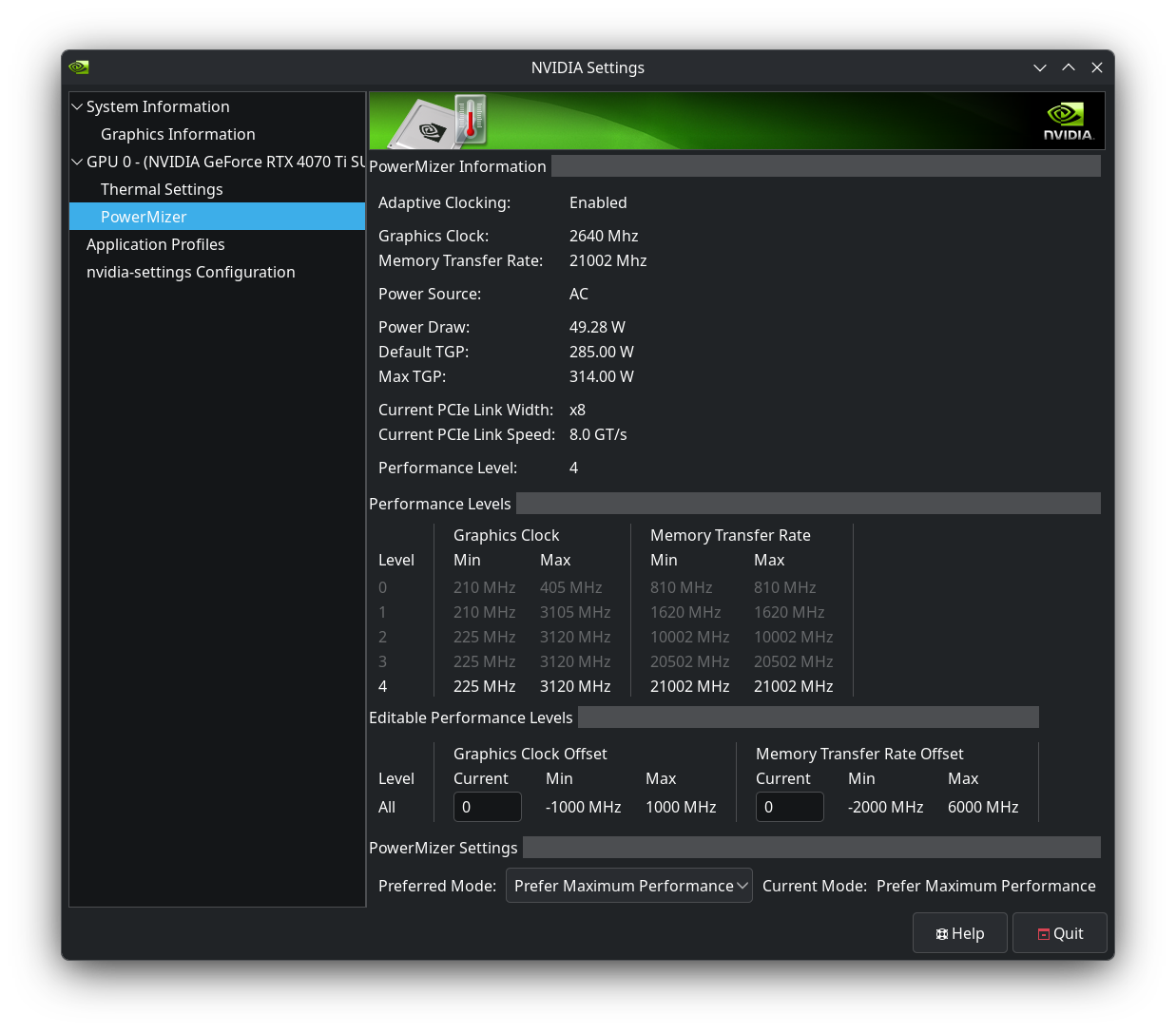
here’s nvidia-smi dmon as well with Heaven running, it is definitely pulling plenty of power with this. so it is specific to Crimson Desert, or DX12 games, it seems.
❯ nvidia-smi dmon
# gpu    pwr  gtemp  mtemp     sm    mem    enc    dec    jpg    ofa   mclk   pclk
# Idx      W      C      C      %      %      %      %      %      %    MHz    MHz
    0    255     67      -    100     37      0      0      0      0  10501   2730
    0    254     67      -    100     36      0      0      0      0  10501   2730
    0    255     67      -    100     37      0      0      0      0  10501   2730
    0    253     67      -    100     37      0      0      0      0  10501   2730
    0    252     67      -    100     36      0      0      0      0  10501   2730
    0    251     67      -    100     35      0      0      0      0  10501   2730
    0    254     67      -    100     36      0      0      0      0  10501   2730
    0    254     68      -    100     35      0      0      0      0  10501   2730
    0    248     67      -    100     34      0      0      0      0  10501   2730
    0    243     66      -    100     33      0      0      0      0  10501   2730
    0    244     66      -    100     32      0      0      0      0  10501   2730
    0    230     66      -     99     33      0      0      0      0  10501   2730
    0    246     66      -    100     33      0      0      0      0  10501   2730
    0    237     65      -    100     33      0      0      0      0  10501   2730
    0    244     66      -    100     34      0      0      0      0  10501   2730
    0    243     66      -    100     34      0      0      0      0  10501   2730
    0    241     66      -     67     23      0      0      0      0  10501   2730
    0    239     66      -    100     36      0      0      0      0  10501   2730
    0    258     67      -    100     37      0      0      0      0  10501   2730
    0    259     67      -    100     36      0      0      0      0  10501   2730
    0    257     66      -    100     36      0      0      0      0  10501   2730
    0    253     67      -    100     36      0      0      0      0  10501   2730
    0    254     66      -    100     36      0      0      0      0  10501   2730
    0    255     66      -    100     36      0      0      0      0  10501   2730
    0    255     66      -    100     36      0      0      0      0  10501   2730
    0    254     66      -    100     37      0      0      0      0  10501   2730
    0    252     66      -    100     36      0      0      0      0  10501   2730
    0    255     66      -    100     37      0      0      0      0  10501   2730
    0    255     66      -    100     36      0      0      0      0  10501   2730
    0    256     66      -    100     35      0      0      0      0  10501   2730
    0    256     66      -    100     35      0      0      0      0  10501   2730
    0    254     66      -    100     35      0      0      0      0  10501   2730
    0    253     66      -    100     35      0      0      0      0  10501   2730
    0    251     66      -    100     34      0      0      0      0  10501   2730
    0    248     66      -    100     34      0      0      0      0  10501   2730
    0    248     66      -    100     34      0      0      0      0  10501   2730
    0    249     66      -    100     34      0      0      0      0  10501   2730
    0    250     66      -    100     34      0      0      0      0  10501   2730
    0    250     66      -    100     35      0      0      0      0  10501   2730
    0    229     63      -     89     32      0      0      0      0  10501   2730
    0    218     63      -     87     32      0      0      0      0  10501   2730
    0    217     63      -     84     31      0      0      0      0  10501   2730
    0    212     62      -     83     30      0      0      0      0  10501   2730
    0    214     62      -     89     32      0      0      0      0  10501   2730
# gpu    pwr  gtemp  mtemp     sm    mem    enc    dec    jpg    ofa   mclk   pclk
# Idx      W      C      C      %      %      %      %      %      %    MHz    MHz
    0    209     62      -     89     32      0      0      0      0  10501   2730
    0    246     65      -    100     35      0      0      0      0  10501   2730
    0    252     65      -    100     36      0      0      0      0  10501   2730
    0    249     65      -    100     35      0      0      0      0  10501   2730
    0    248     65      -    100     35      0      0      0      0  10501   2730
    0    247     65      -    100     36      0      0      0      0  10501   2730
    0    246     64      -    100     37      0      0      0      0  10501   2730
    0    245     64      -    100     35      0      0      0      0  10501   2730
    0    245     65      -    100     35      0      0      0      0  10501   2730
    0    246     65      -     99     34      0      0      0      0  10501   2730
    0    245     65      -    100     33      0      0      0      0  10501   2730
    0    246     65      -    100     33      0      0      0      0  10501   2730
    0    249     65      -    100     34      0      0      0      0  10501   2730
looks curious. do you see deference on powermizer tab by Current Pcie Link Speed
if gpu is idle and if heaven is running?
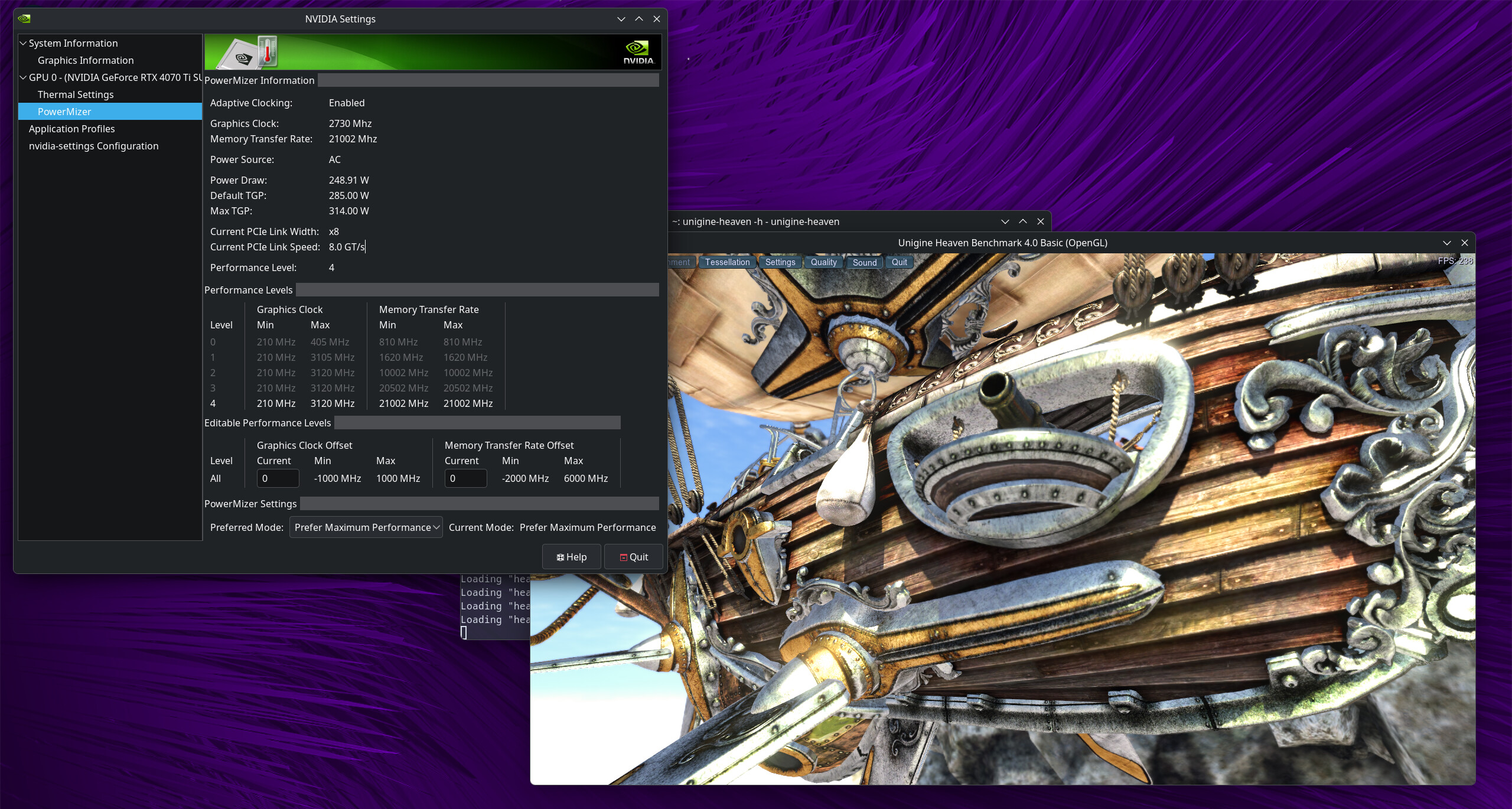
that’s problem. maybe check bios settings for pciex bandwidth.
PS. Is linux-firmware-nvidia installed?
right, i set the PCIex mode to GEN 3 but it still shows 8 GT/s. setting the bandwidth only gave me a RAID option.
and yes, linux-firmware-nvidia is installed, with version 20260309
I happen to also have a 4070 TiS, but with a 9700X. Running older drivers: 580.105.08.
Just grabbed the game to have a look and compare. I’m seeing higher power draw, but still well below your Windows numbers:
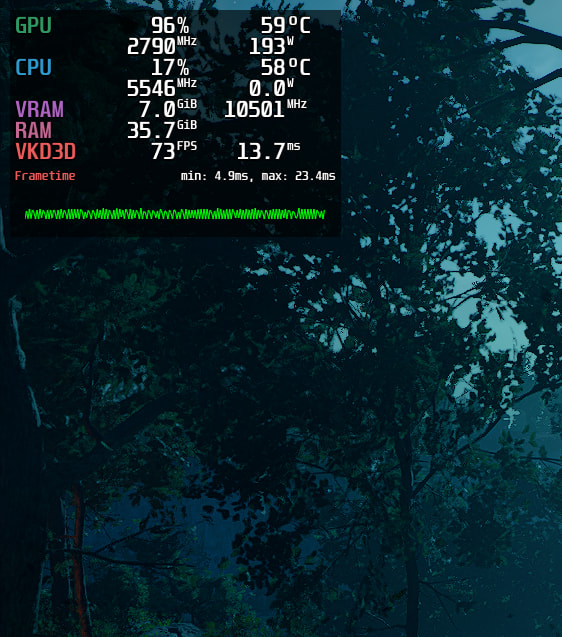
VSync off, 1080p, no upscale, no framegen, graphics quality defaulted to Ultra, no changes.
Not liking the buzzsaw frame timing, but it does flatline completely to 60 fps with VSync on.
Start options used (just cobbled together from protondb, haven’t tuned / compared at all yet):
MANGOHUD=1 PROTON_VKD3D_HEAP=1 PROTON_ENABLE_WAYLAND=1 PROTON_NO_WM_DECORATION=1 game-performance %command%
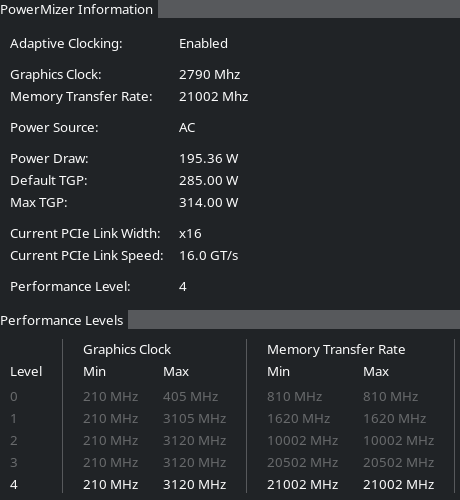
Something definitely looks off in your nvidia-settings.
It should be PCIe x16, and range from 2.5 GT/s to 16 GT/s, depending on level.
btop also shows power under-utilized, but GPU at near 100%:
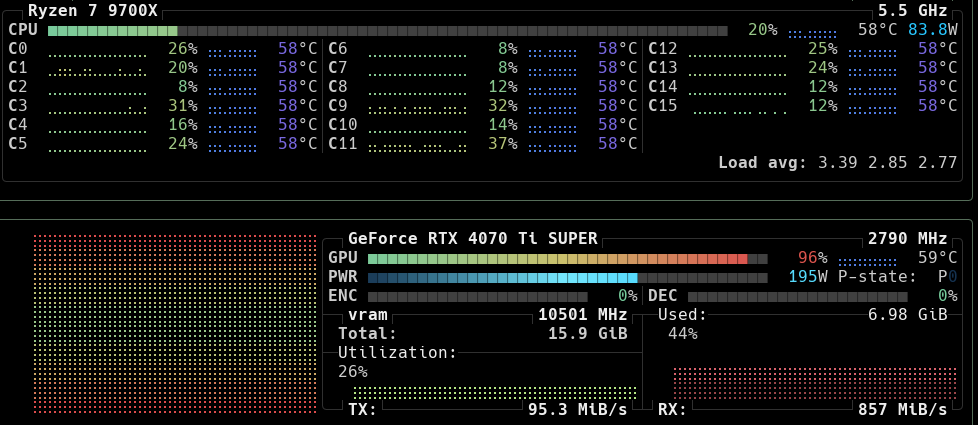
I suspect it would do better under X11, but can’t try right now.
Not sure if this helps, but maybe it gives you something to compare to / set expectations against.
I’ll tinker a bit to see if I can squeeze some more out of it. Let me know if you want me to try or share something specific.
your resolution is most likely the big factor to the FPS difference. i run on 1440p with Ultra/Cinematic settings, same settings on Windows.
tho, the NVIDIA settings do seem off. maybe it’s not properly reading it. i can check on Windows and see if it says it’s using x16 speeds.
post
nvidia-smi -q |grep -A 14 "GPU Link Info"
can you recheck on windows with gpu-z that gpu is scaling by load? specially for bandwidth.
// I’m away til tomorrow
sure, here’s nvidia-smi:
❯ nvidia-smi -q |grep -A 14 "GPU Link Info"
        GPU Link Info
            PCIe Generation
                Max                                    : 3
                Current                                : 3
                Device Current                         : 3
                Device Max                             : 4
                Host Max                               : 3
            Link Width
                Max                                    : 16x
                Current                                : 8x
        Bridge Chip
            Type                                       : N/A
            Firmware                                   : N/A
        Replays Since Reset                            : 0
        Replay Number Rollovers                        : 0
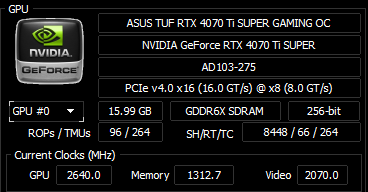
and on Windows, i used HwInfo bc i already have that installed. seems it is also 8x on Windows so definitely something wtih my BIOS config it seems. the speed on the left is the supported, the 8x is the active speed.
So, you can do this:
PROTON_DLSS_UPGRADE=1 NVPRESENT_ENABLE_SMOOTH_MOTION=1 ... %command%
To achieve this:

It is technically framegen, of course, so that’s cheating. But it does smooth the frame timings impressively. At least appears to. Still only 195W.
OR, you can do this:
PROTON_DLSS_UPGRADE=1 ... %command%
And then enable DLSS + DLAA + Ray Reconstruction, to achieve this:
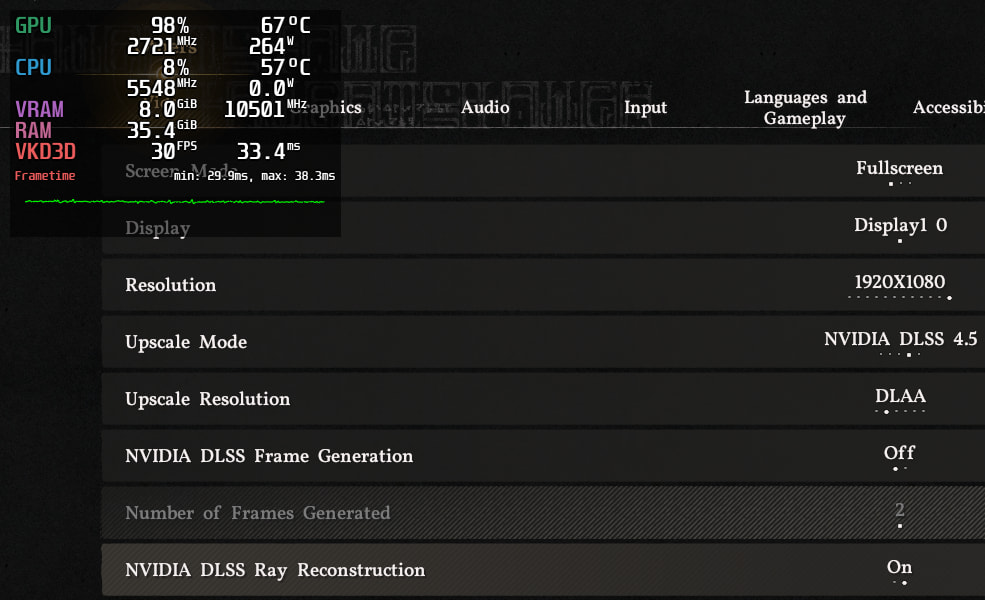
264W! Actually pulling power now, and smooth frame timing, no VSync… but ouch, my frame rate.
Are you sure the power difference between Windows and Cachy isn’t due to a similar difference in settings like this?
PS: Consult your MB manual about the PCIe speed. It often matters which slot(s) are in use. Is your GPU the only thing using a PCIe slot?
PPS: DLSS+DLAA but no Ray Recon seems like a decent compromise. Loses a few fps, but image quality/clarity is noticeably better, and draws ~215 W.
i re-seated my GPU and checked again, but still 8x. could it be because of the NIC that i installed a few weeks ago? i can’t imagine it would take up some of the PCI lane speed. there is also the possibility of my PC having three SSDs and two M.2s, that may be taking up some of that lane speed. honestly, i just need to buy a large M.2 NVMe.
the GPU is in the up-most PCIe x16 slot, so it should be taking priority though.
also, yeah i am sure it’s not a difference in settings. the power draw on other games seems to be fine, and other games perform pretty well. like with the Heaven benchmark, my GPU drew about 260W at some points.
Yeah, sometimes M2 slots do leech some of the PCIe speed… depends on how it’s wired. Manual often has diagrams / tables to explain it.
It doesn’t seem like it’s capping you out here though. Your performance metrics all seem in line with mine. So it’s more of a cosmetic / perfectionism issue.
Some games do just take a performance hit on Linux, especially new ones. Might improve over time with proton / driver versions. I am also still curious how it would do on X11, sometimes that makes a big difference. Can’t be bothered to try right now, I don’t have it installed on this machine, but maybe later.
most likely honesty, the problem is that CD probably just isn’t quite up-to-spec with what the Windows side is for support, driver and whatnot-wise. i think i will just need to cope with it for now and play on Windows for the time being. i did try to use X11 myself but for some reason when i logged in with it enabled, the whole screen would just hang on black and never load anything.
When logging in? Sounds like plasmashell is crashing, you could switch to a TTY while on the black screen and have a look at its logs: journalctl --user -u plasma-plasmashell. But that’s probably getting off topic in this thread 