Ive updated the Guide:
FSR4 is now fully implemented for RDNA4 and does not need a workaround anymore. RDNA3 still needs it.
The FSR4 DLL gets now automatically downloaded and applied for FSR 3.1 games with the PROTON_FSR4_UPGRADE variable.
Ive updated the Guide:
FSR4 is now fully implemented for RDNA4 and does not need a workaround anymore. RDNA3 still needs it.
The FSR4 DLL gets now automatically downloaded and applied for FSR 3.1 games with the PROTON_FSR4_UPGRADE variable.
Hi,
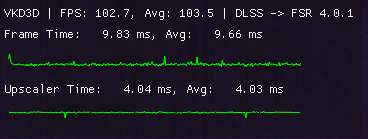
There seems to be an issue with the new implementation; using the command line arguments:PROTON_FSR4_UPGRADE=1 %command%, FSR4 does work, however slowy so, using 4ms per frame. With the previous implementation with FSR4_UPGRADE=1 DXIL_SPIRV_CONFIG=wmma_fp8_hack %command% FSR4 was only using ~0.9ms frame time budget. My (naive) guess is that the new implementation is not using FP8 hardware acceleration, instead using FP8 emulation through FP16.
One thing to note, I’m using arch with cachyOS repos and on a 9070XT, I don’t know if that is causing an issue.
Here is optiscaler output for the game Control. It was showing 0.9ms upscaler time before I updated my system and used the new command line arguments. Trying to add DXIL_SPIRV_CONFIG=wmma_fp8_hack crashes the game.
i am using the fsr to rdna3 hack however none of the games shows fsr 4 option , maybe with dont with the hack ? i have proton cachyos and mesa git in lib32-mesa-git from cachyos repo as well
I noticed that too. At least it felt like it. I was playing Star Wars Outlaws before. Ubi launcher installed with Lutris and added as a non-Steam game. FSR4 worked. Pretty high settings with RT on low-medium. In that Snowy city I got 80-90 fps before (if I remember correctly). After the update and all that I get like 60-70fps. As soon as I started the game and continued where I left off, I felt something was different. But I can’t really give you exact numbers. The only thing I can do is install the game on Windows with the same settings and compare it to Linux.
As I‘m writing this I remembered I can compare Marvel Rivals. A few weeks ago I did some benchmarks with the different upscalers the game provides. I think I wrote the results down somewhere. See if I can find them. Then I will compare them with my current settings and configuration. If I find them I will poste an update here.
I have been recommended to request some patches to mesa-git, if you’re so inclined. I don’t know where to put that right now.
Please add MRs 34918 (wayland support improvements), 35784, 35854, 35876 (fsr4 support improvements) to a current copy of mesa-git (July 2, commit ec05d4b1) for improvements in FSR4 Upscaler frametimes.
Ok guys. Here are my results with Rivals. I immediately noticed a huge drop in performance as soon as I got into the practice range in the game. Before I had around 220-200 fps (200 in really heavy scenes with a lot going on). Now I step out of the door in the range and I have 130-140 fps with nothing going on at all. GPU utilization is up to 99%. This never happend before in that area of the map. So there is something wrong with the FSR4 implementation for sure.
Is this on RDNA3?
I’m on a 9070XT. These test have all been made with FSR3 and 4. A few weeks ago I just wanted to compare the different upscalers in Rivals. With the older „hacked“ version of FSR4 on Cachy I had way more FPS across the board. In the part of the map where I did the test I had around 180fps with fsr4 and 3 because it was taxing on the gpu. This was the only spot where I got almost 100% GPU utilization all the time. So I ran around there to do my test ( Btw, now I have the 100% utilization basically everywhere in the practice range. This was not the case before)
Now I get 95 fps in the same spot with the current fsr4 implementation. If I turn that command (FSR4_UPGRADE=1) off and switch to fsr3 it gets a little better. I get around 150fps. Prior to that I had 180fps in that spot. I seems to me that both fsr4 and 3 take a huge performance hit for some reason. While it’s way more with fsr4. I’m also on the latest CachyOS Proton (tried GE Proton 10.8 as well. Same results) The graphic setting in game are still the same across all tests. I didn’t change them.
Edit: did some more testing. It seems that all upscalers and the overall performance takes a huge hit in Rivals. I tried Epic TSR as well. Even this upscaler is performing worse. If I run around in that graphically taxing spot I get 150fps with it. A few weeks ago I had 216fps in that spot according to the notes I took.
Made the jump to Cachy last night as a long time kubuntu user.
Was able to get everything working, however I did notice that it seems I still had to download and place amdxcffx64.dll manually to get FSR4 working in Oblivion remastered. Haven’t tested on other games yet.
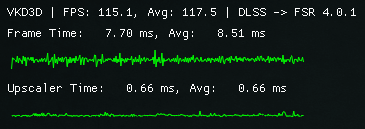
I can’t reproduce this on Control or CP2077, always seem to get around 0.6 - 0.7ms upscaler time with 9070 XT on cachyos-v3/mesa-git 25.2.0_devel.208043.6f38d58db35-1 and cachyos-v3/proton-cachyos 1:10.0.20250623-3.
One thing of note though is if I use PROTON_FSR4_UPGRADE=1 and don’t place the latest amdxcffx64.dll in the game folder manually only FSR 4.0.0 is available.
Yea I just updated everything (vkd3d-proton latest git, proton-ge 10-7, latest mesa-git) and I’m now getting 0.7ms upscale time. So the problem seems resolved now.
Something fixed the performance problems I had. I can’t say for certain what exactly fixed it, though. I just updated everything I could. I’m on the newest mesa-git, Cachy Proton, Optiscaler, etc…
This seems to fix the performance in Marvel Rivals. I think there was maybe a problem with the outdated Optiscaler (at least in Star Wars Outlaws and Stellar Blade). I uninstalled it from every game and then installed the newest version 0.7.7 pre12. They had quite a few bug fixes as well. Who ever is responsible for fixing the problem: Thank you!
I have tried it but it does not seem to work.
At least not with Robocop, which is an UE game.
In NoMan’sSky I do not see a difference either.
To test I have switched to Intels upscaler and I get no performance difference at all. Nor does it look better.
Is there a way to test if FSR4 is running?
I was using:
PROTON_FSR4_UPGRADE=1 game-performance mangohud %command%
Would “game-quality” set it to quality setting or does that game-performance stand for something else?
Also while I am getting 90 to 115 fps on Manjaro, in Chachy-os I just get 50 to 70 fps at the same place where I am loading the game.
FSR or the Intel upscaler makes no difference in terms of fps, while it makes a big difference on Manjaro. That was just with mangohud and no other command.
There’s no good way as even if you applied it into a game it’s done in a rather invasive/forced manner. I was thinking about it and since PROTON_FSR4_UPGRADE=1 downloads a dll in theory one could check the destination directory for that download as a way to validate it? Again is not exactly clean but maybe it can give you an idea of if the parameter is doing something. I don’t know where said dll (amdxcffx64.dll) is being downloaded but I suspect it should be in the system32 folder of your game.
No, that’s not how that script work. I recommend you to read Gaming with CachyOS Guide | CachyOS so you know more about what game-performance does and how to set up everything properly. Maybe the performance drop comes from there.
I have checked it before I ran it and the .dll was already there, which kinda surprised me. It was in the system32 folder as well as by the .exe of the UE game, where it should be as to a guide I have found.
I’ll look into it but tbh. it is not really motivating to install a supposedly gaming optimized distribution to then have to tinker howto get performance on par with a normal distribution, while performance is good there without tinkering.
That does not sit well with me.
Edit: I did not find anything in there since I am just using Steam atm. it is easy going.
Seems I have to reinstall and try again after I upgraded my cpu.
FSR4_UPGRADE=1 is only for games with FSR4 official support, for the rest you need to also use Optiscaler, same as Windows or any other Linux distro.
No Man’s Sky is a Vulkan game, so no FSR4 support at the moment, even with Optiscaler. FSR4 doesn’t work with native Vulkan games in general, but it’s an AMD issue, there’s nothing we can do here.
You can check which games have official support and how well they work with Optiscaler using this list: https://github.com/optiscaler/OptiScaler/wiki/FSR4-Compatibility-List
Pity, I thought it is easier to get to fsr4 when I found this post, because setting up optiscaler is a hassle.
That it wont work on Vulcan is a valuable info, thank you!
I beg to differ. At least PROTON_FSR4_UPGRADE=1 also makes games that only officially support FSR3.1 use FSR4 behind scenes. This behavior can also be achieved on Windows through AMD Adrenalin if I remember correctly, as there’s only a handful of games with official FSR4 support.
Optiscaler is mostly used to spoof games that only support DLSS into believing your GPU is nvidia so you can enable it in game while in the back is handled with FSR4, for example. I think it works with older versions of FSR too.
From my own experience I can just say it did not. With this one (my first) game try with fsr4 anyways.
After installing optiscaler, which was not as a hassle as I thought it would be (I didnt know that I can just use the .bat even though I am not in Windows) it seems to be running with FSR4 now.
The difference is that with fsr (Robocop is on 3.1 afaik) wet spots got pixelated while moving, which is gone after installing Optiscaler.
The performance though is still as low as before but I will do some more testing with FG, although it was not needed on Manjaro.
I just did a quick search and it looks like it’s not. It’s FSR 3.0, thus not 3.1. That would explain why it didn’t work for you without optiscaler. Optiscaler is capable of wiring DLSS and the rest of FSRs with FSR4 under the hood while PROTON_FSR4_UPGRADE=1 only works with FSR3.1 to FSR4.
I actually started playing Spiderman Remastered (FSR3.1 compatible) and I did notice that after starting the game with PROTON_FSR4_UPGRADE=1 it took a little bit more to start (probably because it was downloading the dll and handling that side of things) and I found said dll in the System32 directory of the game. Sadly my eyes aren’t trained enough to notice a difference (I honestly can’t even notice anything when watching those DLSS vs FSR 3.1 vs FSR 4 comparison videos even  )
)