Sorry for the ping. Have you gotten fsr4 to work properly/consistently in this game?
i always get crash for the past week (i kinda manage to narrow the reason i think), and i think the reason probably the framegen (since i use optiscaler to enable it) and most of time happens when in map (so… in case the amd power manager trigger something)
currently i’m trying to disable optiscaler, instead of native FG, i’m trying to use lossless scaling now
my current setup would be like this in general
boot param / ppfeature mask was options amdgpu ppfeaturemask=0xFFFD7FFF runpm=0 aspm=0
lact, only undervolt with high freq mode (not auto)
proton-cachyos 0521
VKD3D_CONFIG=descriptor_heap MANGOHUD=1 %command% (FSR4 upgrade command was on my global env)
ultra preset, env texture set to low, the rest is unchanged
fsr4 aa
mangohud limit to 120fps, vsync off, uncapped fps
3440x1440
will check it later i guess, because it’s still working days, and i finished the summer playlist since last week i guess, probably do more testing on weekend
edit :
radv: enable radv_force_64_byte_sampled_image for Forza Horizon 6
let see the new mesa fix FH6 for good or not 
just want to let you know, today check
playing ~ 1h without issue (finished some playlist event) with the new mesa, UNTIL i open the map, and alt-tab-ing 
let me further check without alt tab (me want to find where the baseball stadium via google maps earlier LMAO)
2nd attempt, playing for 1.5hour without issue, as long i don’t alt tab
so i think the current state is quite stable, i’m playing with convoy for most of this test
Fsr4 is working for you though?
Stability wise it’s been pretty good for me as long as I don’t use optiscaler (which causes it to crash eventually/randomly)
I put in a GitHub issue with cachy-proton. I can’t get it to stay with proton_fsr4_updgrade but proton_fsr4_rdna3_upgrade works
yes i’m using FSR4 without issue (not optiscaler)
i have this on my global environment
PROTON_FSR3_UPGRADE=1
PROTON_FSR4_UPGRADE=1
PROTON_MLFG_UPGRADE=1
also since the url is no longer working for fsr4.1, i put the DLL extracted from latest amd driver (windows) in .cache/protonfixes/upscalers/
amdxcffx64_v4.1.0_69A0952A304a000.dll
Using latest cachy proton SLR?
I’ve added the DLL manually as well to the cache folder and still no go but not using a global envar (is that what you are doing?), using it specifically on the game properties.
if I use the rnda3 fsr4 the performance is garbage (makes sense cause fp8) so I’ve been using xess 2.0.2 since that looks better than fsr3 imo

Maybe I’ll do it globally like you (envars) and see what happens.
again thanks for the tips and feedback!
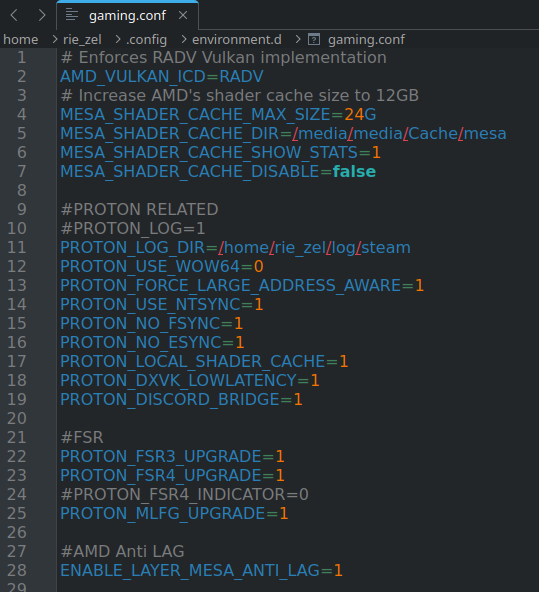
here is mine, in case you want to copy paste “exact”
# Enforces RADV Vulkan implementation
AMD_VULKAN_ICD=RADV
# Increase AMD's shader cache size to 12GB
MESA_SHADER_CACHE_MAX_SIZE=24G
MESA_SHADER_CACHE_DIR=/media/media/Cache/mesa
MESA_SHADER_CACHE_SHOW_STATS=1
MESA_SHADER_CACHE_DISABLE=false

#PROTON RELATED
#PROTON_LOG=1
PROTON_LOG_DIR=/home/rie_zel/log/steam
PROTON_USE_WOW64=0
PROTON_FORCE_LARGE_ADDRESS_AWARE=1
PROTON_USE_NTSYNC=1
PROTON_NO_FSYNC=1
PROTON_NO_ESYNC=1
PROTON_LOCAL_SHADER_CACHE=1
PROTON_DXVK_LOWLATENCY=1
PROTON_DISCORD_BRIDGE=1

#FSR
PROTON_FSR3_UPGRADE=1
PROTON_FSR4_UPGRADE=1
#PROTON_FSR4_INDICATOR=0
PROTON_MLFG_UPGRADE=1

#AMD Anti LAG
ENABLE_LAYER_MESA_ANTI_LAG=1

#DXVK Related
DXVK_FILTER_DEVICE_NAME="9070 XT"
DXVK_STATE_CACHE=1
DXVK_STATE_CACHE_PATH=/media/media/Cache/dxvk
DXVK_ALL_CORES=1
DXVK_LOG_LEVEL=info
DXVK_NVAPI_LOG_LEVEL=info

#vkd3d debug logging
VKD3D_DEBUG=warn

#vkd3d-shader debug logging
VKD3D_SHADER_DEBUG=fixme

#wine-mono debug logging (Wine's .NET replacement)
WINE_MONO_TRACE=E:System.NotImplementedException
#"MONO_LOG_LEVEL": "info",

#Enable DXVK's HUD
#"DXVK_HUD": "api,version",
DXVK_HUD=0

# Wine related
PATH="/opt/wine-cachyos/bin/:$PATH"
WINEDLLPATH="/opt/wine-cachyos/lib/wine:/opt/wine-cachyos/lib32/wine:$WINEDLLPATH"
LD_LIBRARY_PATH="/opt/wine-cachyos/lib/:/opt/wine-cachyos/lib32/:$LD_LIBRARY_PATH"
Have you tested RT yet? Apparently it works
RT seems to be working yes. Since most recent Mesa update Ive had no issues with RT. Running Ultra+RT and getting about 100 FPS on average
just tested it. using the DF optimized setttings with RT i get between 90-100fps at 4k using fsr4 balanced, 85-90 using quality. pretty happy with it. The RT makes a nice difference imo when it comes to shadows inside the car (I have a wheel and use inside view only).
RT disabled in hitting 120fps steady with fsr4 balanced, 110ish at quality.
not yet, i have electricity problem on my room today, sad ._.
what’s DF optimized settings again ?
Pain
Digital foundry
someone on Reddit made a table
Honestly damn happy with performance I’m getting considering I’m gaming at 4K. Just need to fix the clutch pedal bug and it’ll be perfect. Game isn’t has fun as it should be with my wheel setup.
610* is the latest driver
You replied to a post from a month ago.