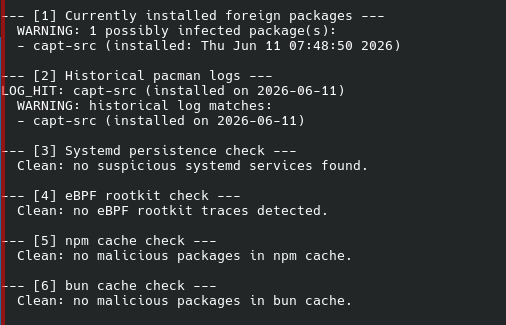
WARNING: 1 possibly infected package(s) found:
- capt-src
Should i revome it?
I installed it on 11th Jun
WARNING: 1 possibly infected package(s) found:
Should i revome it?
I installed it on 11th Jun
Thanks for clarifying what’s going on 
This script partially clears you.
I’d suggest installing Traur to assist flagging up any potential issues as you update any AUR packages too.
Here’s another one you can try:
git clone https://github.com/lenucksi/aur-malware-check.git
cd aur-malware-check
chmod +x aur_check.sh
./aur_check.sh --full
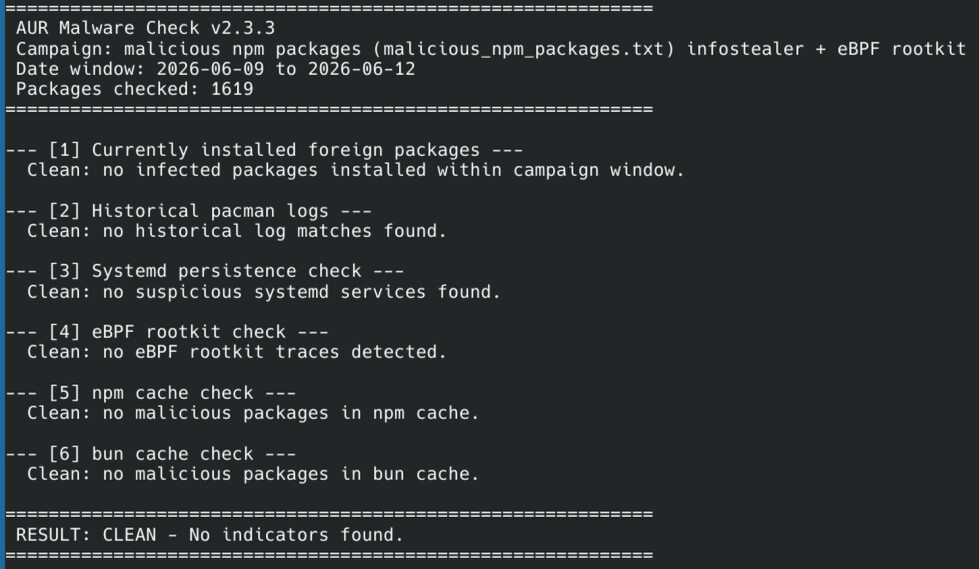
This includes an npm scan… output looks like this:
============================================================
 AUR Malware Check v2.3.3
 Campaign: malicious npm packages (malicious_npm_packages.txt) infostealer + eBPF rootkit
 Date window: 2026-06-09 to 2026-06-12
 Packages checked: 1619
============================================================

--- [1] Currently installed foreign packages ---
  Clean: no infected packages installed within campaign window.

--- [2] Historical pacman logs ---
  Clean: no historical log matches found.

--- [3] Systemd persistence check ---
  Clean: no suspicious systemd services found.

--- [4] eBPF rootkit check ---
  Clean: no eBPF rootkit traces detected.

--- [5] npm cache check ---
  Clean: no malicious packages in npm cache.

--- [6] bun cache check ---
  Clean: no malicious packages in bun cache.

============================================================
 RESULT: CLEAN - No indicators found.
============================================================
The most critical risk is that you have an eBPF rootkit, and can survive if you remove that package.
For now, I’d suggest your credentials are at high risk - any SSH keys, website passwords, API tokens…
Personally I would get my USB out and do a clean install now, restore my backups and waste half a day getting it back up to scratch.
After that, monitor your accounts for suspicious activities?
oh wow now i need to run a .sh that i don’t trust to see if i’m infected, ok i guess.
It’s all there… public. Read the issues and comments.
The maintainer of the cachy paste updated it to pull from both the Arch list and this repo, as well as CSCS list.
i suck at using github, i get it’s legit but i’m such a scaredy-cat
I am not sure that the eBPF check is sufficiently comprehensive. I am new to this too but the checked for files could be deleted after the rootkit runs, no?
And the rootkit could interfere with the resulting search?
If you have a match, your information was possibly stolen whether there is a rootkit installed or not. The advice is to change all you passwords on every account you have.
@ducanh @Potente @Noemy-Amelie and all:
Guys, can we please stop screenshotting our terminals and come back to copy/ pasting the text instead and formatting it with the </> button?
I understand we are all a little in panic-mode at the moment, but please let’s try to stick to at least a little discipline here. Trying to “read” your screenshots on a phone is next to impossible, also it is much easier to copy/paste text from your output than having to type it manually.
Thanks.
.=======================================.
| Because text > image, dontcha know ;) |
.=======================================.
       \   ,__,
        \  (oo)____
           (__)    )\
              ||--|| *
============================================================
 AUR Malware Check v2.3.3
 Campaign: malicious npm packages (malicious_npm_packages.txt) infostealer + eBPF rootkit
 Date window: 2026-06-09 to 2026-06-12
 Packages checked: 1619
============================================================

--- [1] Currently installed foreign packages ---
  Clean: no infected packages installed within campaign window.

--- [2] Historical pacman logs ---
  Clean: no historical log matches found.

============================================================
 RESULT: CLEAN - No indicators found.
============================================================
 You can create a function to do this in fish…
function copyshow
    $argv | tee /dev/tty | wl-copy
end
then…
funcsave copyshow
After that:
./aur_check-v2.sh --full | copyshow
ready to paste…
Otherwise, use Konsole - you can select/copy/paste easily too.
If Garuda has made Chaotic safer I appreciate that. If it’s safe enough remains to be seen considering that new and more sophisticated attacks (possibly AI-created) will happen - or are already happening.
I still think that nobody should use the AUR who is not able to read and understand PKGBUILDs.
Apologies for the potentially dumb question(still working my way through this thread) but despite me never intentionally grabbing any AUR packages it turns out I have some anyways after running pacman -Qm . Not everything in the output is on the list of affected packages but I have at least 3.
That being said, they all list CachyOS as the packager and the versions don’t match what I see on the AUR package list site so just to confirm, is it safe to assume I’m in the clear and that the affected packages were probably installed as part of a system update?
List the packages. If something is dropped from CachyOS repos, then it’ll show up as AUR.
Sure,
I definitely have never knowingly downloaded these, given the packager name listed I just assumed it was part of a system update at some point.
It’s an ‘entirely at your own risk’ scenario - I have no objection to EVERYONE using the AUR. I have major objections to people saying ‘WE SHOULD BE PROTECTED’ - though some safeguards are being implemented…
It isn’t and wasn’t ever supported… and you’re free to do whatever you like… as long as you accept that if you install your own malware suite, it’s your decision to do so.
Also, it’s really not too difficult to learn some basic forum formatting and construct a meaningful post asking others here to look over something before you go ahead and install.
It’s hardly surprising you don’t know where they came from, they’re definitely part of building - likely dependencies from something you did install.
The kernel is freuently compiled with the Clang compiler… during a system update or installing headers.
Clang19 and compiler-rt19 are part of Arch Linux’s extra repository… which adds another layer as to why they’re listed as foreign/AUR for you.
Do you have Chaotic enabled?
Are you sure you dind’t install them from AUR as a dependency for a build in the past?
pacman -Qi clang19 compiler-rt19 lld19
pactree -r clang19
pacman -Si clang19 compiler-rt19 lld19
For a quick cleanup…
sudo pacman -Rns clang19 compiler-rt19 lld19
But don’t remove them if they are shown as required by the linux-cachyos kernel… hence the pactree check.
If they’re part of Chaotic, then reinstall them from official sources to switch the source…
I think the bigger problem for most people is not the installation process, but rather updating. If someone has multiple AUR packages installed (as I do) then updating can be a nightmare. The only safe way to update is to check what needs updating and then vetting each update. The common advice to beginners to “just run yay and everything gets updated” is a big problem and a problem for lazy people like me.